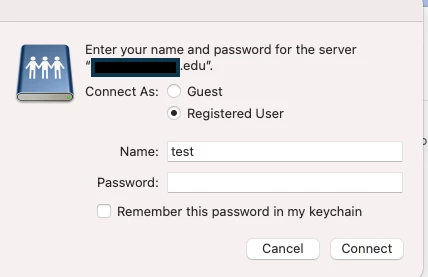
Just a little thing to replace our old mount share script, which had a ton of oscascript tell blocks that would generate PPPC dialog boxes for our users.
This new script has been tested and it works. If it's a Directory User, then the share just mounts. If it's a local user, then they get prompted for their AD credentials, as expected. But no matter whether the mount fails (due to user off campus and not connected to VPN) or succeeds, I always get a "usage" nag from sudo in the logs (see below). I believe I'm using sudo -u correctly. Why is it complaining?
CURRENTUSER="$(stat -f%Su /dev/console)"

SERVER=$4
SHARE=$5
PROTOCOL=smb ###for our purposes smb is the only game in town. This could be modified to be a JAMF variable if necessary.
STRING='"'$PROTOCOL://$SERVER/$SHARE'"'

sudo -u $CURRENTUSER
if /sbin/ping -q -c 1 $SERVER &> /dev/null
then
echo "Share host $SERVER is responding. Mounting share...";
#
#
# Mount share:
/usr/bin/osascript -e "try" -e "mount volume $STRING" -e "end try"
#
exit 0
else
#
##declare variable for JAMF notifications
MA="/Library/Application Support/JAMF/bin/Management Action.app/Contents/MacOS/Management Action"
#
"$MA" -title "JAMF Management Notification" -message  "On campus users - please connect to Secure  wifi (not Guest wifi)  and try connecting again. Off campus users - please connect to VPN and try connecting again."

exit 1
fi
Script result: usage: sudo -h | -K | -k | -V
usage: sudo -v [-AknS] [-g group] [-h host] [-p prompt] [-u user]
usage: sudo -l [-AknS] [-g group] [-h host] [-p prompt] [-U user] [-u user]
[command]
usage: sudo [-AbEHknPS] [-C num] [-D directory] [-g group] [-h host] [-p
prompt] [-R directory] [-T timeout] [-u user] [VAR=value] [-i|-s]
[<command>]
usage: sudo -e [-AknS] [-C num] [-D directory] [-g group] [-h host] [-p prompt]
[-R directory] [-T timeout] [-u user] file ...