Question

Word 2016 grant file access to custom dictionary

  • July 7, 2016
  • 3 replies
  • 20 views

Forum|alt.badge.img+3

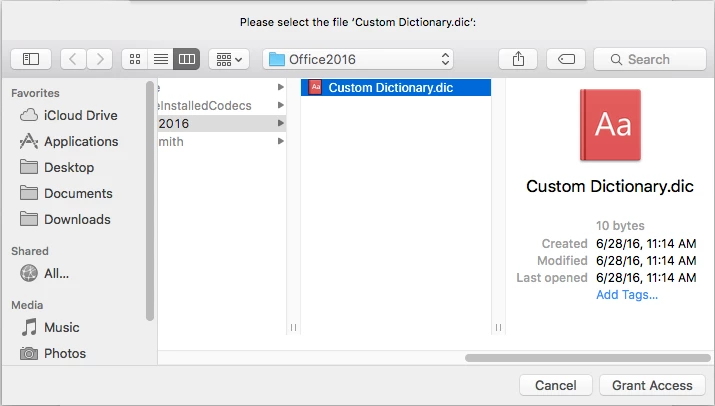
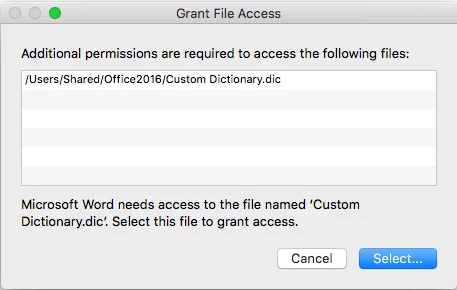
Whenever a new user logs in, they get this pop up for the custom dictionary within Word 2016.

OS X 10.11.5


3 replies

bpavlov
Forum|alt.badge.img+18
  • Esteemed Contributor
  • July 20, 2016

Did you manually place that custom dictionary there? If not, perhaps try to delete it? Otherwise if its required, I'd look at the permissions on it as that may be the issue at hand.


Forum|alt.badge.img+3
  • Author
  • New Contributor
  • July 20, 2016

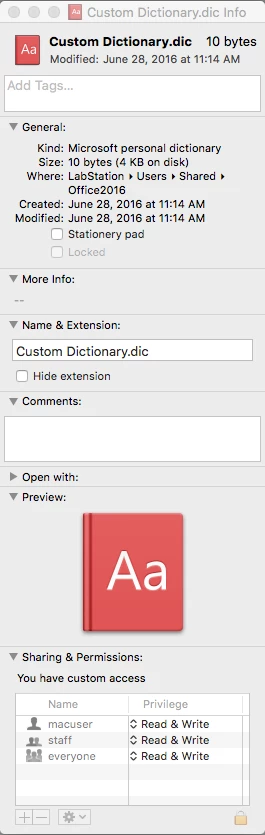
When I first tested this master image with a stock Office 2016 install, this grant file access error was pointing to a file in the local account I used to configure the image with. I copy this local account to the default user profile so every user has the same configuration. I tried moving the custom dictionary to a shared folder location with full read & write access to everyone. Same issue sadly. Is there anymore permissions I could be giving this folderfile that may fix this?


bpavlov
Forum|alt.badge.img+18
  • Esteemed Contributor
  • July 21, 2016

Join Slack at http://macadmins.org and check out the #microsoft-office channel. There are quite a few members from the Office for Mac team there who might be able to help you out.