Question

WPA2 Enterprise, EAP-TLS and 802.1x Computer certificate Big Sur

  • December 4, 2020
  • 31 replies
  • 209 views

Hi,

Big Sur MacOS machines cannot connect to our corporate wifi and 802.1X.
We have computer payload certificate installed on the profile.
Everything work nicely on Catalina.

31 replies

  • December 11, 2020

I did delete my corporate ssid name from system keychain under system password and after that i did succeed to connect our corporate wifi, but MacOS will ask every time administrator username and password to allow access cause it want to use system keychain access :/ I will haven´t figure out why 802.1X dont work ?


Forum|alt.badge.img+7
  • Valued Contributor
  • December 16, 2020

Sorry, I have no answer for your issue, but some questions:
Do you have just one certificate (one profile) for all your Mac devices to connect to your corporate WiFi?

We are using a unique computer certificate for each Mac device. In the past, we created a configuration profile by script (XML file with .mobileconfig extension) and "injected" the computer certificate. After this, the configuration profile was installed with the profiles install command. This worked for more than 8 years!
But now, Apple has deprecated the profiles install command with Big Sur, so Configuration Profiles can only be installed with a MDM. But how can we create such dynamically configuration profiles on our Jamf server? I could create a configuration profile (with the correct certificate) for each Mac device in advance. But as we have several hundreds of managed Macs, this would be a really huge collection of configuration profiles and not really the way we want to solve this.

It seems, the Jamf AD CS connector would fix this problem. But we also have Jamf Pro installed on Mac computers and it seems, AD CS connector is only available on Windows 2016 server.


  • December 17, 2020

We have one certificate (one profile) for our Mac devices for corporate wifi and 802.1X. We also created configuration profile by xml file with .mobileconfig extension. We can install certificate manually to mac device but via terminal using bash script including profile command we cannot cause of Apple deprecated profile command like you said. I cannot figure out why 802.1x dont work :/


Forum|alt.badge.img+9
  • Contributor
  • January 14, 2021

We're seeing the same thing. Profile that worked for Catalina no longer working for Big Sur. Prompting to select cert and auth before it will connect.

Still troubleshooting to see if something needs to be added into the profile


MLBZ521
Forum|alt.badge.img+12
  • Valued Contributor
  • January 14, 2021

We use the AD CS Connector and it's been working great for macOS and iOS (for those using it so far).......

That said, I'll be honest, I haven't been on site to test Big Sur with 802.1x.

@hansjoerg.watzl The AD CS Connector does need to be installed on a Windows Server (ours is running on 2019), however, it doesn't matter what your JPS is running on I'm pretty sure. You don't need (or likely want) the AD CS Connector running on the same box as the JPS.


Forum|alt.badge.img+1

Seeing same issues here, its our authentication servers certificates thats not trusted. Even though their root CA is provided with the same profile as the client cert. The connect to wifi does not complain in the cert, macos just want to install it in the users keychain for some weird reason. Glad to find im not alone though.

@MLBZ521 does your authentication servers have publicly trusted certs, or are they using internal ca certs?


Forum|alt.badge.img+13
  • Honored Contributor
  • January 25, 2021

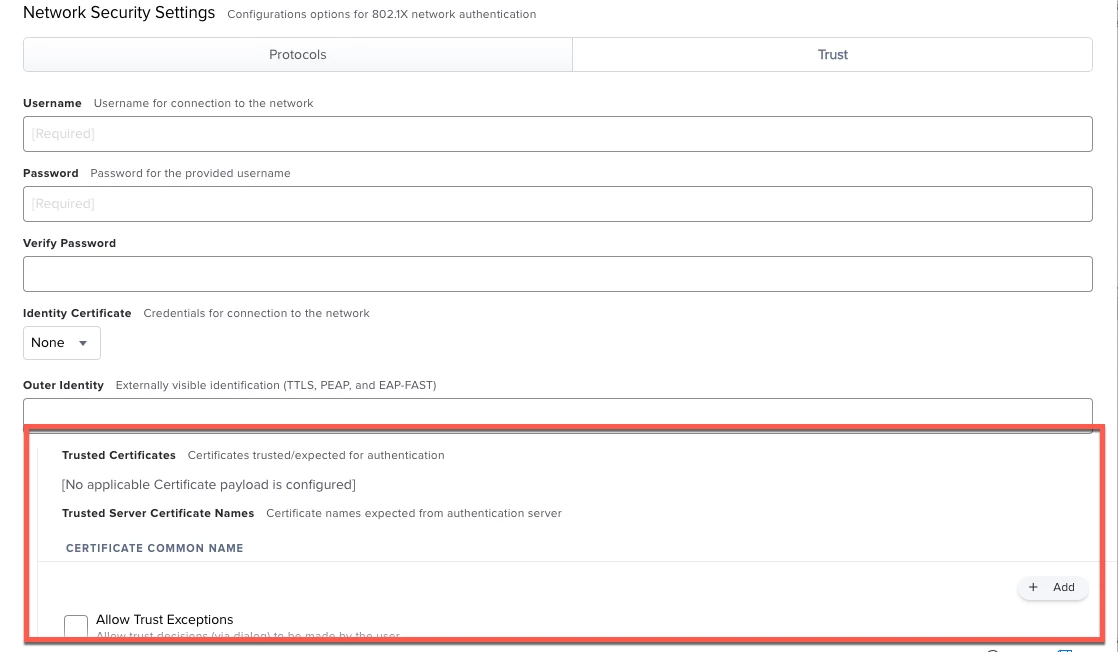
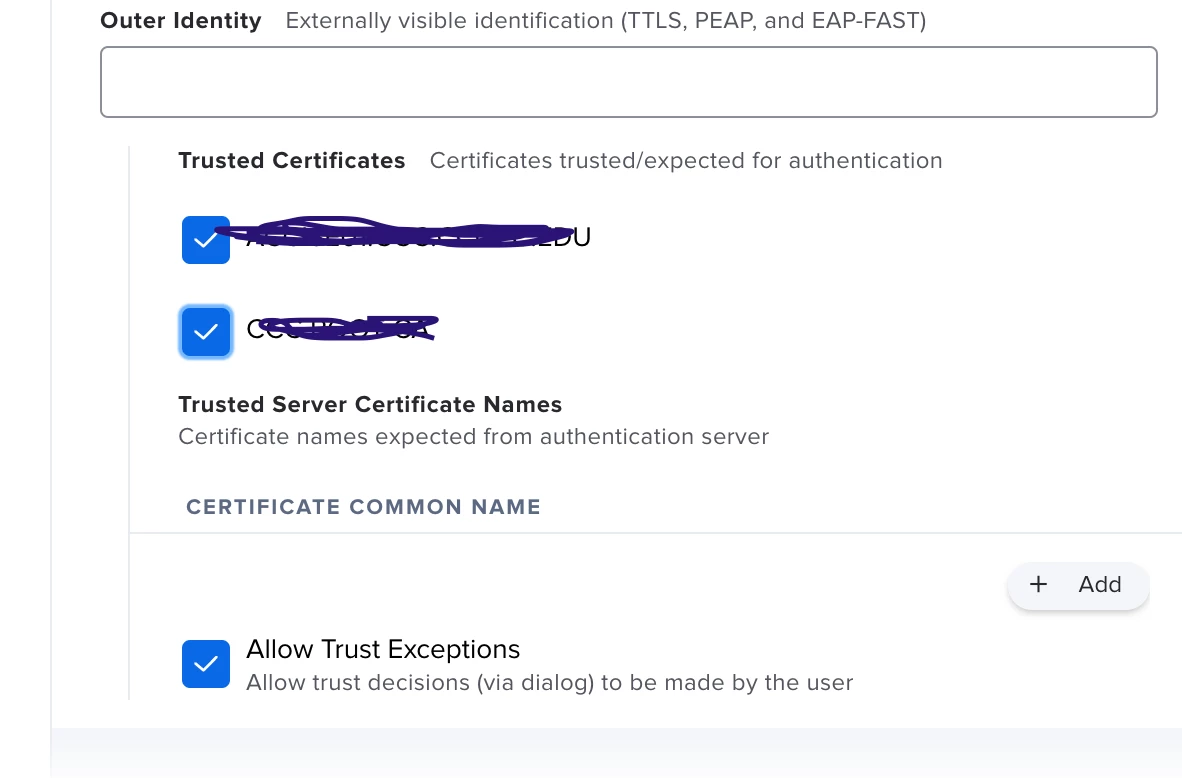
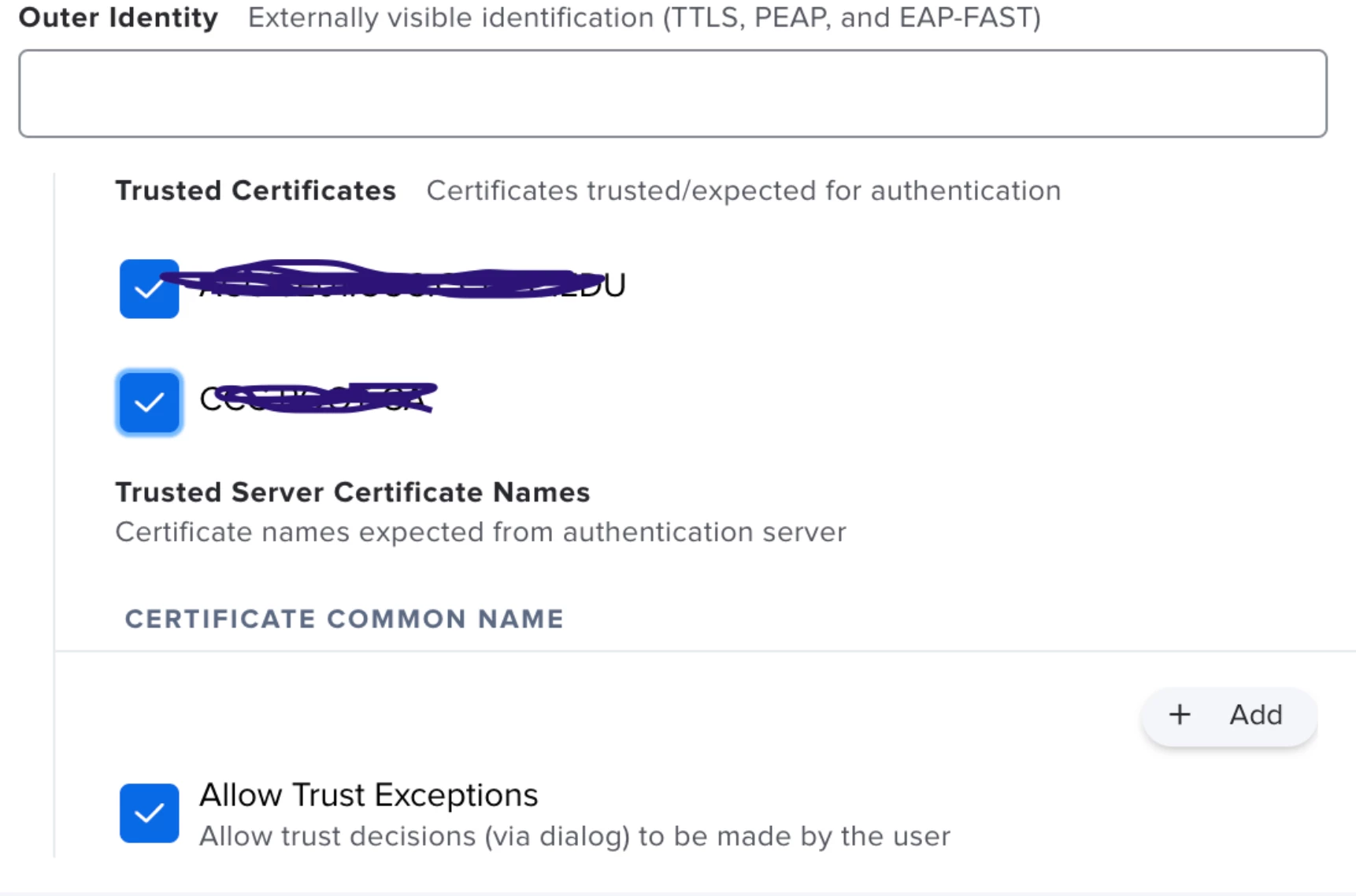
Is the certificate is included in the profile is explicitly marked as trusted in the profile or if not, is its common name (and possibly the intermediate cert) explicitly specified in the profiles Trust section?


MLBZ521
Forum|alt.badge.img+12
  • Valued Contributor
  • January 25, 2021

Our NACs have publicly trusted certs, yes.

Obviously our internal CA is not publicly trusted.

I include the NAC's cert and the intermediate cert for that chain in the WiFi Profile (root is already included in Keychain).


Forum|alt.badge.img+9
  • Valued Contributor
  • January 25, 2021

Do you have the root certificate part of your config profile? Thats what usually prompted users during our initial WiFi profile roll out.

Are any of your other certs expired or need to be updated by chance? Any known issues with the SSID or LDAP account (assuming thats how they are generating their certs and authenticating to the WiFi).


Forum|alt.badge.img+13
  • Honored Contributor
  • January 25, 2021

@MLBZ521 Are the certificates explicitly trusted in the Trust section of the configuration?


MLBZ521
Forum|alt.badge.img+12
  • Valued Contributor
  • January 25, 2021

@andrew.nicholas Yes, they are marked as trusted (check box checked).


Forum|alt.badge.img+3

We're now having this issue with Big Sur UPGRADES. The SCEP cert config profile works without issue on the wired network but when connecting to the corporate WiFi, macOS prompts to choose the protocol (ours is TLS) and certificate. However, the exact same SCEP machine certificate configuration profile doesn't have the issue on new Big Sur machines. The issue only happens with Big Sur upgrades. We can't roll out our upgrade until we figure this out. Even if our users selected TLS and the correct certificate, they don't have administrative rights to make changes to the keychain. If anyone can help, we'd be very appreciative.


Forum|alt.badge.img+1
  • New Contributor
  • February 26, 2021

I'm seeing something similar on my test Big Sur machine; after updating, it prompted for admin credentials to allow macOS to look at the keychain for 802.1x auth. It doesn't keep popping up, but after a reboot it fails to authenticate. I have to open the network settings, click "disconnect" on the 802.1x network, then "connect" again and I immediately get authenticated. I'm using AD CS to distribute device certificates.


Forum|alt.badge.img+17
  • Honored Contributor
  • March 29, 2021

@nwiseman you get big sur working with 802.1x, sounds like we're running into same thing with profile that works on 10.15 but not 11.x


easyedc
Forum|alt.badge.img+16
  • Esteemed Contributor
  • March 30, 2021

In the same boat as the rest of you. I'd noticed this in early Big Sur testing, but hadn't had time to work on it. Profile that works without issue on 10.15 and below has issues with Big Sur. Profile prompts to select the AD issued certificate and user name ("host/"). Feels like it's an apple issue to me so I'm going to open a ticket with support there, too.


Forum|alt.badge.img+17
  • Honored Contributor
  • March 31, 2021

I got mine working - I made mistake on profile the AD cert part make sure Template name matches what server expects. Fixing this mistake alone didn't fix my issue.
- Network tab for username I set it to $COMPUTERNAME
- Network tab under trust, I trusted our cert as @andrew.nicholas pictured above

It then started auto joining and working like the good ole 10.15 days, good luck all.


Forum|alt.badge.img+4

Guys, have you got any fix for this issue? We do see the same issue?


Forum|alt.badge.img+4
  • Contributor
  • May 19, 2021

I am seeing the same behavior on Big Sur, I attempted all the above suggestions with no success, was anyone else able to solve this?
-verified template name
-set username to $COMPUTERNAME
-added cert to trust, tried both $COMPUTERNAME and a specific test computer's name, tried manually trusting the cert in keychain.

Sees the network just fine but cannot authenticate it just tries over and over again.


Forum|alt.badge.img+18
  • Employee
  • May 21, 2021

@msergi Please check out some new documentation we just posted: Big Sur Troubleshooting If that still does not solve it, please follow this guide to gather logging and submit it to Jamf Support: Wireless Debug Logging


Forum|alt.badge.img+4
  • Contributor
  • May 23, 2021

Thank you for the reply @dan.kubley I will check the troubleshooting outlined there


Forum|alt.badge.img+4
  • Contributor
  • May 27, 2021

Thanks again @dan.kubley I was able to resolve using your suggestion, in case anyone else is facing this, I was able to resolve by adding our intermediate and root certificates to the same config profile as the WiFi config and client ADCS certificate. I also marked them as Trusted under the Trust section.


Forum|alt.badge.img+12
  • Contributor
  • June 1, 2021

I am having PEAP issues. Our previous Configuration profile does not work while the computer is logged out of a user. Previously, it stayed connected to our secure wifi so we can log into AD accounts (students/faculty). Now, it shows not connect or flashes periodically. Certificates are loaded in the profile and have not changed. Service account used is still valid and has not changed. These Macs were upgraded from Catalina.


Forum|alt.badge.img+12
  • Contributor
  • June 1, 2021

I just discovered something new in the configuration profile that I had not seen before. There are check boxes for trusted certificates that were unchecked. Unclear whether this is a new JAMF Pro thing (10.29) or ?? If they were unchecked previously, why did they work in Catalina and not Big Sur. I am checking the boxes and redeploying to see iff it makes a difference. I will have to log into every Mac though as it will not get the new profile if not connected while logged out.


easyedc
Forum|alt.badge.img+16
  • Esteemed Contributor
  • June 3, 2021

@mhegge Did your wifi payload have connection settings for more than one SSID? I had seen this happen where 2 SSID settings were pushed in a single payload, but the second didn't have it and I don't recall it having been an option before. In testing, I was able to seamlessly set the trust to checked without interrupting the users while connected Wifi when still on Catalina. Once they upgraded to Big Sur, they were good to go. I didn't open a case with Apple on it, but I assumed it was an additional security feature added into BS which didn't affect Catalina so I could check/uncheck those boxes all day long for Catalina folks. But test before taking my word for it.


Forum|alt.badge.img+4
  • Contributor
  • June 4, 2021

As per suggestions by Apple, here are the things that need to validate for macOS Big Sur. Computers with macOS 11 or later require greater security for 802.1X implementations to function properly. 802.1X connections will fail if the following conditions are not met:

The identity certificate for Mac computers must trust where the certificate originated (e.g., the root CA, intermediate CA, or the subordinate CA). It is recommended that you use Jamf Pro to deploy the root, intermediate, and subordinate certificates in the same configuration profile that contains the network payload and the identity certificate.

For TLS workflows, the identity certificate must be selected from the the Identity Certificate pop-up menu in the Network payload of the configuration profile.

Even though we have used Jamf to deploy all these in a single profile, the issue wasn't fixed.
Jamf is the one who is causing issues with the trust settings. The payload wasn't properly designed amd the Trust isn't happening t the certs( Root CA, Issueing). Payload is not that helpful Jamf you need to fix this ASAP.