Question

Trying to get Jamf to recognize iPad name

  • August 12, 2021
  • 3 replies
  • 25 views

Forum|alt.badge.img+2

We set up about 120 iPads earlier this summer and named each of them the asset tag but in jamf the name for the iPad shows up as just blank. What do I need to do in order for jamf to recognize the name of the iPads?

3 replies

Forum|alt.badge.img+16
  • Contributor
  • August 12, 2021

Was it named by touching the device or in the device record? If you named it on the device and you have a naming policy then that will take precedence over the manually typed name. If the device record already has the asset tag in it why not just have a policy to use it as the name versus touching the glass?


Forum|alt.badge.img+2
  • Author
  • New Contributor
  • August 12, 2021

Was it named by touching the device or in the device record? If you named it on the device and you have a naming policy then that will take precedence over the manually typed name. If the device record already has the asset tag in it why not just have a policy to use it as the name versus touching the glass?


They were named by touching the device to name them. Where would I find naming polices that might be taking precedence?


Forum|alt.badge.img+16
  • Contributor
  • August 13, 2021

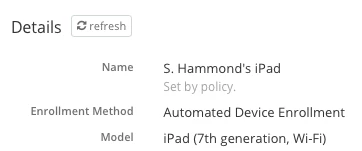
Either under Automated Device Enrollment or it came from a placeholder. In most cases if one exists it will be tied to an ADE profile. To verify one exists goto a device record and look under the name to see if a policy is in effect like in the example below:


If that's the case start with your ADE profile.