We’re a year into Apple shipping Apple Intelligence (though technically still in Beta) but Apple hasn’t shipped a clear matrix of which features are on-device vs. require Private Cloud Compute (PCC).
If you haven’t read part 1, then click here and go back and read it. And then follow up and read part 2, by clicking here.
But what if… all that information was hiding on your very Mac in a system diagnostics, your Mac quietly generates a Model Catalog inside sysdiagnose that lists feature availability, languages, and — critically — which resources are server-side! For those that do not know, you can run a system diagnostics and explore the zip file created to potentially find some interesting tidbits about your Mac.
Open Terminal.app and type
sudo sysdiagnose -f ~/
*** Disclaimer, system diagnostics bundles can potentially contain sensitive
information ***
Follow the prompt and this will create a system diagnostics zip bundle eventually in your home directory. Double click the zip file created.
What is in this folder…the sysdiagnose runs a whole lot of commands and outputs them to files and folders. But what we’re interested in today is in Logs — > ModelCatalog — >model_catalog_dump.txt
This file is actually created by the command
/usr/bin/modelcatalogdump
Temporarily disabling SIP reduces system protections.
Only do this on test devices.
To re-enable:
boot to Recovery → Utilities > Terminal → `csrutil enable` → restart.
However, you must disable System Integrity Protection (SIP) to run it. Sysdiagnose will collect this information without disabling SIP.
Now what is in this file….the answer is…a lot
You’ll see dozens of “Availability for …” tables
(e.g., summarization.generativePlayground, summarization.summarizeMailMessageThread, textComposition.FriendlyTone).
Some of these are easy to attach to the product or feature name and some are not.
Here’s a few of the tables.
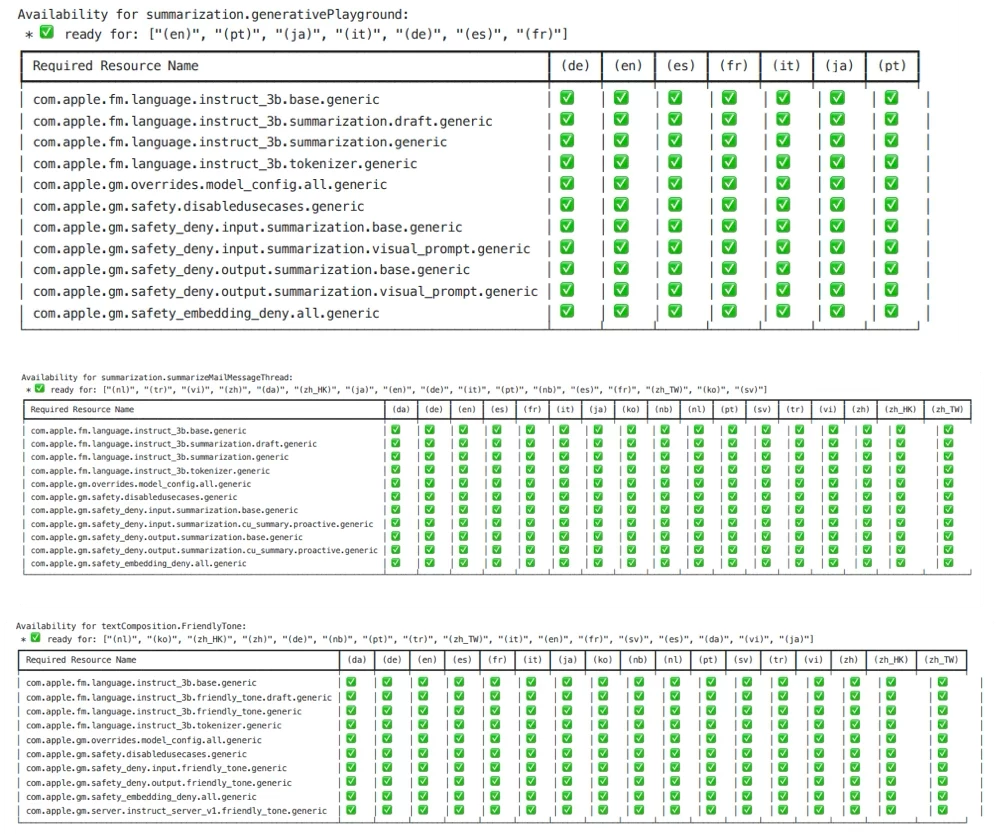
Each table lists required resources per language and you can see the models that are used… but most importantly you can see which features are on device or off device and shipped to Private Cloud Compute (PCC). Entries beginning with com.apple.gm.server indicate server-side involvement.
This doesn’t tell much more than was already stated in the previous blog posts. It appears almost everything is a mix off on device and off device. The only feature that truly seems on device is the image manipulation with Genmoji and Image Playground, and notification related features. One surprise to me was that Smart Replies can potentially route to PCC. So that contradicts what I saw when I wrote the 2nd part of the Apple Intelligence blogs. In my tests I didn’t trigger PCC, but this log shows it can route to PCC under some conditions.
Going lower in the log file is a nice list of Asset Information and the legend there shows you exactly what is using PCC in an easier to read manner.
===============================================================================
Asset Information
===============================================================================
✅ available
✳️ available (sideloaded)
🔒 coherence: the latest version of the asset is successfully locked and will be coherently vended
⚠️ coherence: there is a mismatch between what is currently vended by coherence, and what is the latest asset that can be fetched
🔄 downloading
❌ network related download error
🚫 non-network related download error
⏹️ not downloading
⚪️ not subscribed
💾 out of space
⛔️ server returned no asset
🟢 server side asset
⏸️ stalled
🔵 subscription is managed externally
SERVER SIDE ASSET
Right there! Clear as day. These are the things that use PCC.
grep -i '\x{1f7e2}' model_catalog_dump.txt
You end up with output like this

This still involves attaching these assets to features. Nothing new is discovered; it’s simply piecing together more clues in the puzzle.
So how much can you disable of Apple Intelligence to restrict off device?
The keys in the domain com.apple.applicationaccess are
• allowMailSmartReplies
• allowSafariSummary
• allowWritingTools
• allowNotesTranscriptionSummary
and of course to disable integration with ChatGPT
• allowExternalIntelligenceIntegrations
• allowExternalIntelligenceIntegrationsSignIn (just for good measures)
Then also if you use XCode or have people that use it, in the domain com.apple.dt.Xcode
• CodingAssistantAllowExternalIntegrations
The coding assistant does NOT use Apple Intelligence and relies on third party systems such as ChatGPT.
Other than the XCode coding assistant control, there were ZERO keys added in macOS 26.0 to control Apple Intelligence, which is somewhat of a bummer. Because just using these keys, does not restrict all the features that appear to go off device, but I think it’s close.
We still need keys to restrict Memory Movies in Photos for example on the Mac..but also as Apple integrates Apple Intelligence more and more into the system it becomes harder to give feedback for a specific feature enterprises need control over. Even though Apple has strongly said NO to an MDM control to restrict on or off device, to me this shows they could and know exactly what features would be affected. This is potentially important for Cyber Insurance coverage. This is important for data sovereignty laws and compliance requirements not just in the US but other countries require it as well. Mostly, it’s important for organizations to feel they have control over their data. And I understand from all the documents on Private Cloud Compute that it is generally NOT storing user data. This quote from the PCC documentation may make some feel otherwise.
For certain use cases, the user’s device may in the future permit PCC to cache user data for a limited amount of time for use in subsequent PCC requests. In that case, PCC’s statelessness will be preserved through cryptographic key control; PCC will cache data encrypted with a key provided by the user’s device, and will wipe its own copy of that key after the request. PCC will therefore only be able to decrypt the cached data if the user’s device sends another request that includes the cache decryption key.
I understand it’s encrypted by a key provided by the user’s device, but something is being stored thus a lot of organizations may feel as though data sovereignty laws and so forth MUST be adhered to when using Apple Intelligence and PCC.
There are some other goodies in this log file may be some features that are coming in Apple Intelligence.
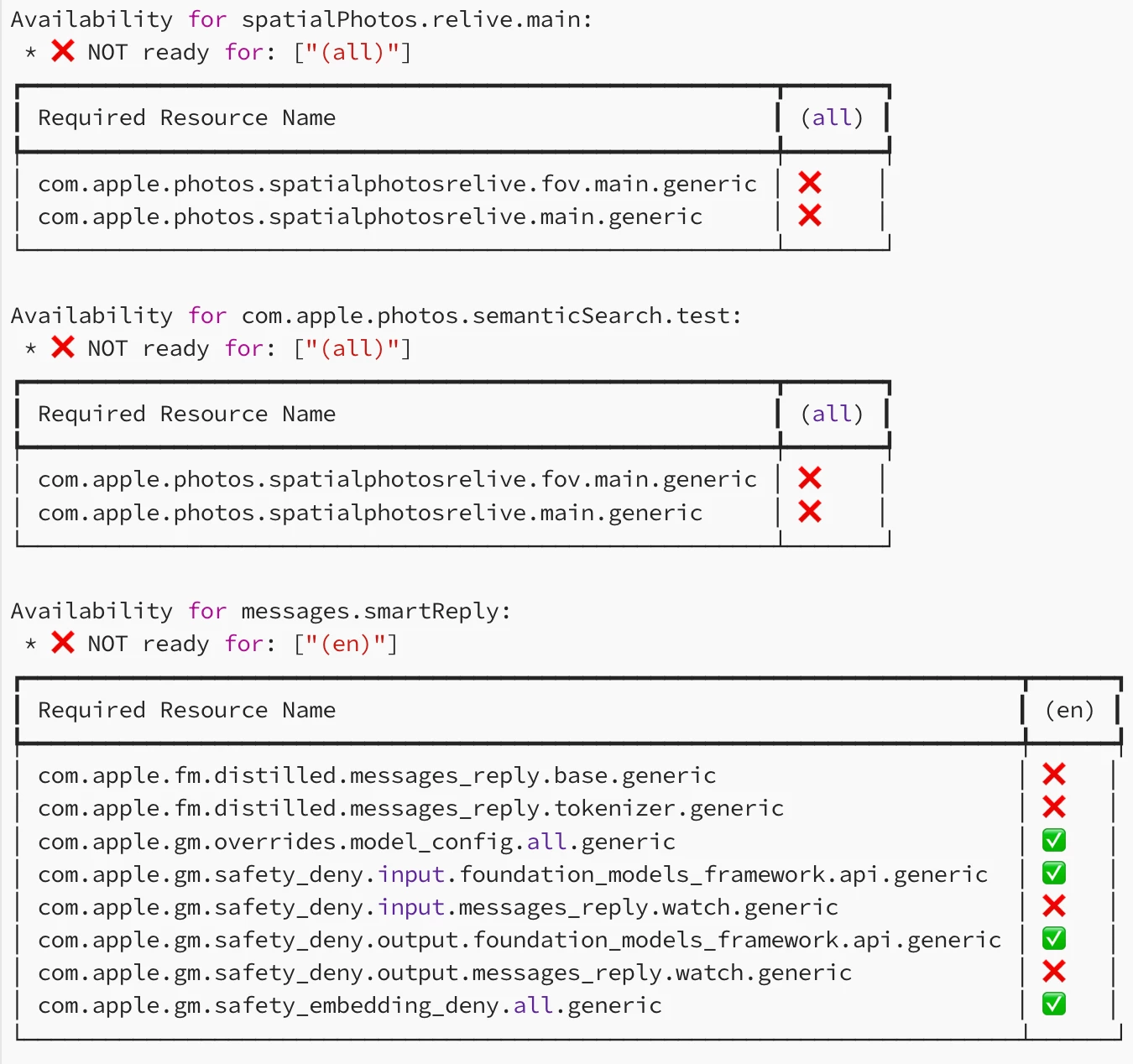
The messages.SmartReply looks like it may be coming to an Apple Watch near you. Then you have things like

This sounds like one of the Siri features mentioned at WWDC 2024.
Anyway, it’s an interesting log file that may get more interesting over time.
These 3 blog posts were hopefully helpful in determining if your organization could use Apple Intelligence on their Apple devices. Apple could have made this easy by adding an MDM control to allow organizations to adopt Apple Intelligence at their own speed but making people “figure it out” just creates ambiguity and slows adoption. Any new feature (especially ones that go off device and rely on a cloud service) NEED a way to manage it. Organizations cannot just trust, verify, and manage devices to their requirements, not ones posed by the vendor.