Question

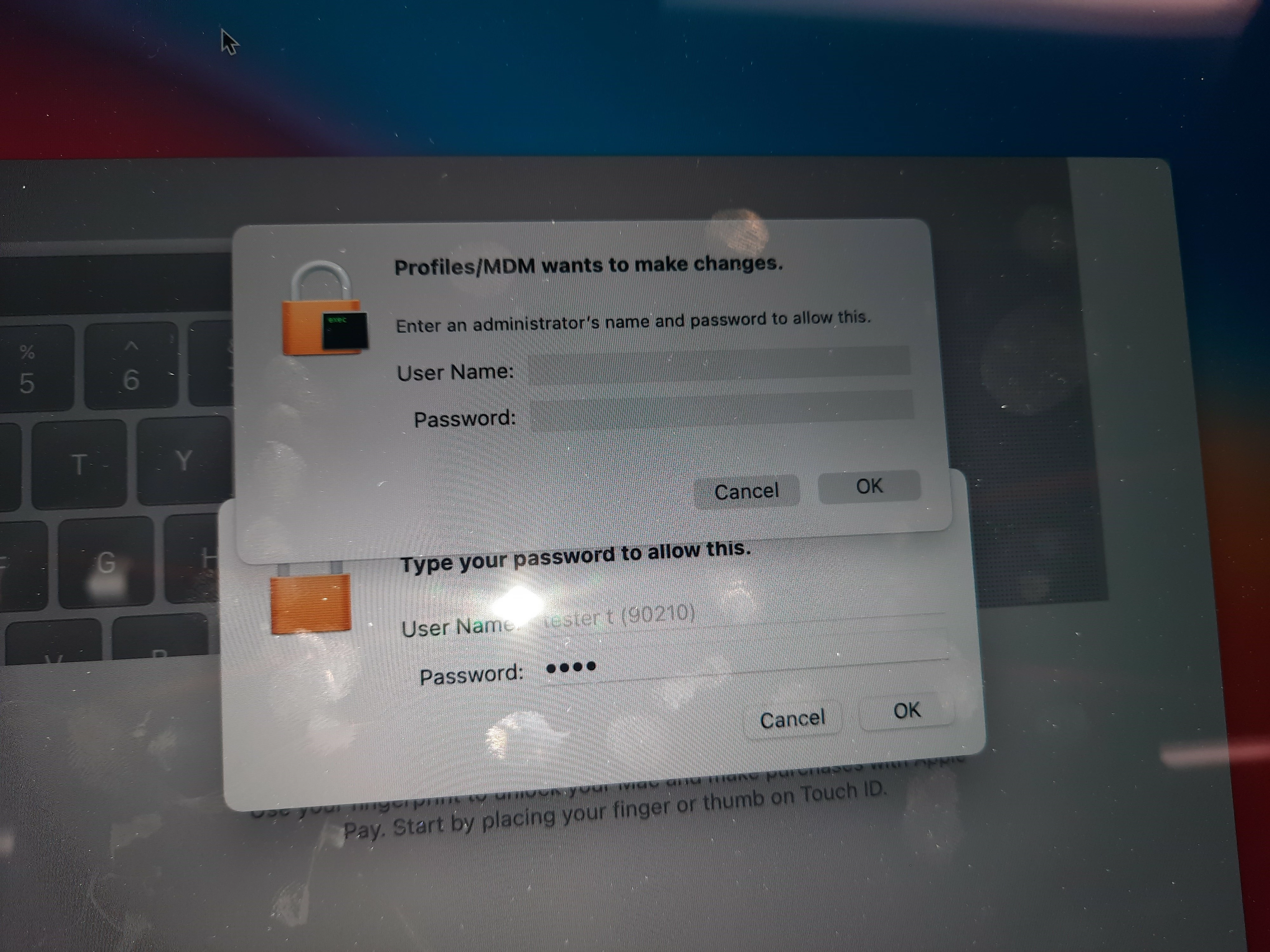
"macOS wants to make changes" when applying a Restrictions profile.

  • August 18, 2020
  • 9 replies
  • 57 views

catesr
Forum|alt.badge.img+6

Obviously a no go considering these are student machines. If I click cancel the message goes away. just wondering what would cause this and will there be trouble in the future. The profiles are being installed at the User level. All of our computers are running Catalina. Thanks.

9 replies

sdagley
Forum|alt.badge.img+25
  • Jamf Heroes
  • August 18, 2020

@catesr How are you installing the profile?


catesr
Forum|alt.badge.img+6
  • Author
  • Contributor
  • August 18, 2020

I'm simply creating the profile and scoping to our students? Does that answer your question?


sdagley
Forum|alt.badge.img+25
  • Jamf Heroes
  • August 18, 2020

@catesr Are you creating and deploying the profile as a Configuration Profile in Jamf Pro? Or are you trying to deploy the Configuration Profile via a Policy?


catesr
Forum|alt.badge.img+6
  • Author
  • Contributor
  • August 18, 2020

Sorry I'm a bit dense. I'm creating the profile and replying as a Configuration Profile.


sdagley
Forum|alt.badge.img+25
  • Jamf Heroes
  • August 18, 2020

So much for that theory then. I've not seen this behavior before with Configuration Profiles, not that's it's appropriate for EDU use, but I typically install User level profiles via Self Service so they'll install immediately as opposed to some other random time/user login one typically gets with User level profiles. Have you tried installing at Computer level? And out of curiosity, how were these Macs enrolled in your Jamf Pro instance? (Not that a Restrictions payload requires UAMDM)


catesr
Forum|alt.badge.img+6
  • Author
  • Contributor
  • August 18, 2020

They're enrolled via DEP. I might test the Self Service thing just to take a variable out of the equation. I will also try the Computer Level as well. Appreciate the fast responses.


Forum|alt.badge.img+3
  • New Contributor
  • August 25, 2020

What's the Config Profile that you are installing? We had this issue when the profile had "Require Authentication" on for the Internal Disks in a Restrictions profile.


Forum|alt.badge.img+7
  • Valued Contributor
  • March 2, 2021

Hey did you ever figure this out? I think this is why my mac wireless certificate profile keeps disconnecting. Basically i have wireless before login, then this prompt comes up during login, i click cancel, and i lose wireless. This is on a new signin of a limited user.


Forum|alt.badge.img+2
  • New Contributor
  • March 19, 2021

Im having the same issue as well. I manually add the profile onto the end users machine, since we need to remove it, to re authenticate onto the network servers.