Question

Monterey 12.4 upgrade "Setup Assistant" has iCloud Drive for Desktop/Documents default checked

  • May 17, 2022
  • 3 replies
  • 28 views

Forum|alt.badge.img+7

"All your files in iCloud" is checked by default in Setup Assistant (after upgrading, not reinstalling) to 12.4. 

GDPR nightmare TBH.

Configuration profile to disable that? Any other way? 

3 replies

RaxiaDK
Forum|alt.badge.img+10
  • Valued Contributor
  • May 17, 2022

Forum|alt.badge.img+7
  • Author
  • Contributor
  • May 17, 2022


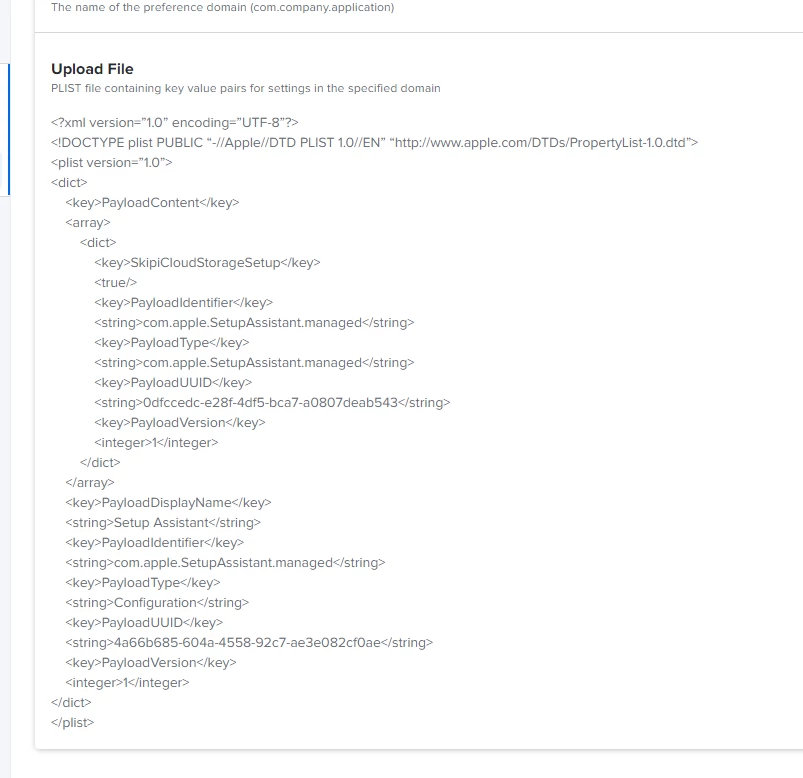
As you noticed on Slack, I figured it out. It's a bit simpler than that :) Jamf custom profiles don't need all the metadata from Profile Editor. 


This will do: 

<?xml version="1.0" encoding="UTF-8"?> <!DOCTYPE plist PUBLIC "-//Apple//DTD PLIST 1.0//EN" "http://www.apple.com/DTDs/PropertyList-1.0.dtd"> <plist version="1.0"> <dict> <key>SkipiCloudStorageSetup</key> <true/> </dict> </plist>


RaxiaDK
Forum|alt.badge.img+10
  • Valued Contributor
  • May 17, 2022


As you noticed on Slack, I figured it out. It's a bit simpler than that :) Jamf custom profiles don't need all the metadata from Profile Editor. 


This will do: 

<?xml version="1.0" encoding="UTF-8"?> <!DOCTYPE plist PUBLIC "-//Apple//DTD PLIST 1.0//EN" "http://www.apple.com/DTDs/PropertyList-1.0.dtd"> <plist version="1.0"> <dict> <key>SkipiCloudStorageSetup</key> <true/> </dict> </plist>


Hehe hey :D

Yes. Jamf pro wrap it in a MCX payload.

I am not that lucky with other MDM