
Question

Self Service+ Issues (Keychain and Onboarding)

  • July 7, 2025
  • 18 replies
  • 1978 views

stutz
Forum|alt.badge.img+5

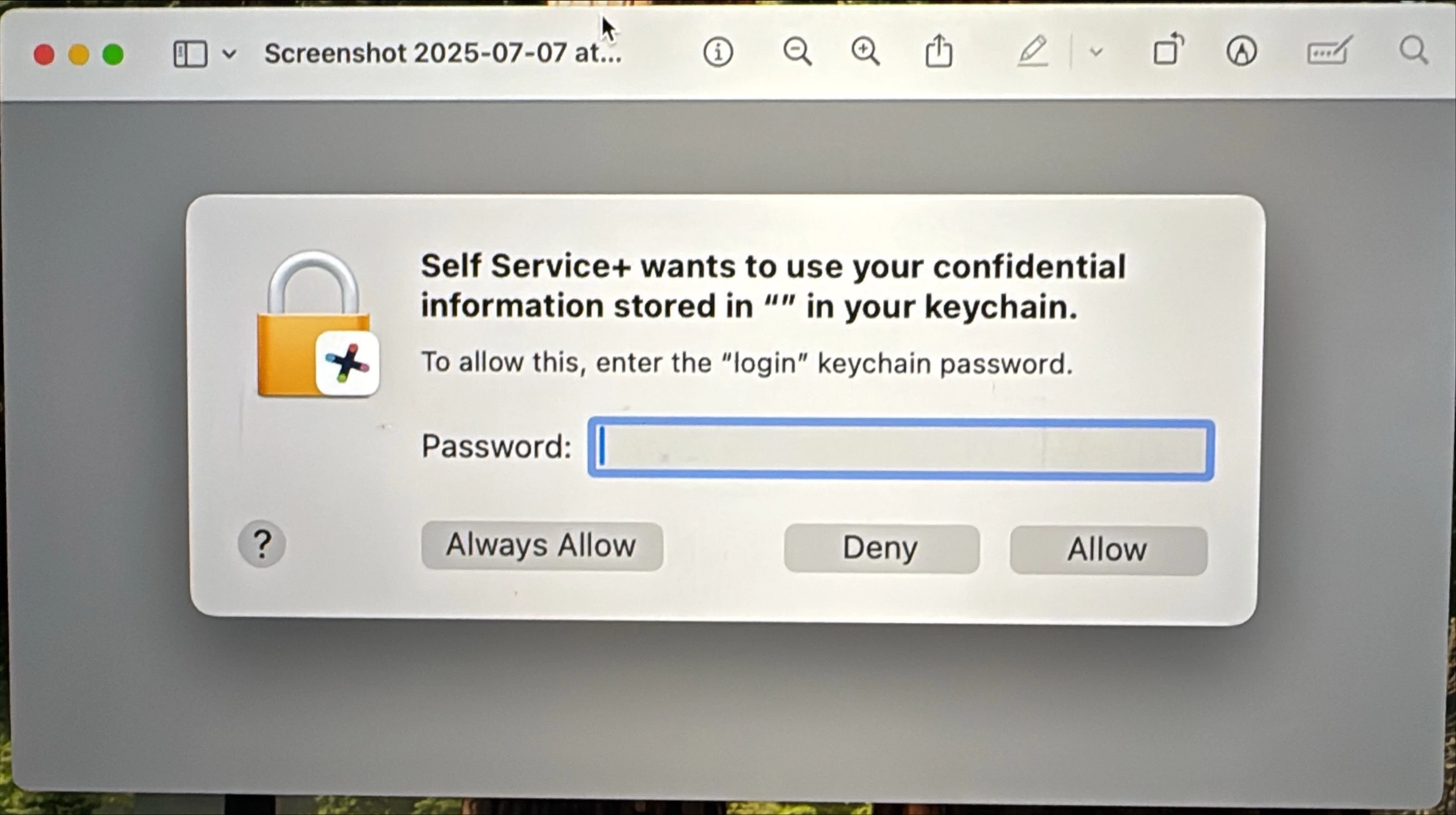
Anyone having a keychain issue and the onboarding window not opening automatically upon first login (newly imaged machine that hasn’t been logged into before)?  Tried 3 times and get the same result.

Self Service+ Version: 2.4.0
Jamf Connect Version: 3.4.1
Jamf Connect Preference Domain Version: 3.2.0
macOS Version: 15.5 (24F74)


18 replies

NewmanAJ
Forum|alt.badge.img+2
  • New Contributor
  • July 8, 2025

I saw this while testing earlier. Still investigating, but figured I would list the steps that preceded getting the prompt. Note that I was testing migration to JC3 and SS+ on a working endpoint with JC 2.45.1. All testing was done on a known working local account that was successfully synced via JC. Config profiles were deployed, one for com.jamf.connect.login and one for com.jamf.connect)

1. Updated from JC 2.45.1 to JC 3.1.0. All good so far.

2 Pushed out SS+ (2.4.0) for a test drive. The JC integration was active in Self Service+ along with the Menubar still showing with company branded icon.

3. Uninstalled JC using the uninstaller and then reinstalled JC 3.1.0. Wanted to see the results if installing JC from scratch. The JC Login Window worked but no JC Menubar nor integration within SS+.

4. I then ran the SS+(2.4.0) installer once again. Boom! Keychain popup triggered. Once I authenticated with the local account password and selected “always allow” I once again had a working JC MenuBar and JC integration with SS+.

I'm wondering if the attempted creation of a new user state plist (com.jamf.connect.state.plist) is what is triggering the prompt? 


stutz
Forum|alt.badge.img+5
  • Author
  • Contributor
  • July 8, 2025

I’ll add that Self Service+ is setup as the default app to install (Self Service classic is no longer getting deployed on newly imaged machines). There is no required login to the Self Service+ app.

The keychain prompt appears 15-20 seconds after first login and to get the Onboarding window to show up you have to open the Self Service+ app manually.

Jamf Pro Cloud Version: 11.18.0-t1750091520803


javed_apple
Forum|alt.badge.img+3
  • New Contributor
  • September 15, 2025

I’ve enabled Self Service+ and macOS Onboarding to launch and install software immediately after user login, but unfortunately, macOS Onboarding doesn’t launch.


If anyone knows a solution, please help me out.


Forum|alt.badge.img+1
  • New Contributor
  • January 6, 2026

Does anyone have any new information on this? I uninstalled Self Service and then manually installed the SelfService+ and continuing to get key chain pop ups on reboot 


Forum|alt.badge.img
  • Employee
  • January 20, 2026

The keychain prompts we are seeing are due to Self Service Plus being installed after Jamf Connect Login. This is considered expected because in order for Jamf Connect Login to add an app to the Access Control List - said app must be installed when it tries to do so.

WORKAROUND

  • Deploy Self Service+ as a package in PreStage
  • or make sure that Self Service+ app is installed BEFORE Jamf Connect Login package. 

This should help! :) 


Forum|alt.badge.img
  • New Contributor
  • January 20, 2026

We ran into the same problem when we implemented Self Service+ and what I found to be the issue(as far as I understand) is that Self Service+ was trying to take control of the password piece of the Jamf Connect Keychain so it could make the necessary changes but was unable to as it was from an older Jamf Connect version. This was only happening for us on devices on macOS 26, I specifically saw it more on 26.2 than any other version.

The Fix: Update Jamf Connect to 3.5.0 or higher.

Immediately after doing this and issuing a restart, our problem disappeared.


tdenton
Forum|alt.badge.img+12
  • Valued Contributor
  • January 20, 2026

@stutz As other have already said you need jamf connect login and Self Service + in your pre stage. Even then I have still seen the error appear only in MacOS 26. Its actual part of this PI146622.

Have been back and forth with jamf support on this last week discribtion of whats happening below.
 

we’ve confirmed that this behaviour is expected and aligns with a known issue tracked under PI146622. The prompts you are encountering occur because Self Service Plus was installed after Jamf Connect Login.


Jamf Connect Login relies on macOS Access Control Lists (ACLs) to grant certain applications the permissions they need. For Jamf Connect Login to successfully add an application to the ACL, that application must already be installed at the time Jamf Connect Login performs this configuration. Since Self Service Plus was installed afterward, it was not included in the ACL, which results in the prompts you are now seeing.


This situation is partly the result of changes introduced in macOS, which have made ACL handling more strict and timing-dependent. As long as Jamf Connect Login continues to use ACLs, this behavior is expected when applications are installed post-deployment.


The product team is actively working on addressing this limitation, including longer-term plans to move away from reliance on Access Control Lists altogether. Until those changes are delivered in a future release, the recommended and supported approach is to continue following the current workaround steps, which you are already doing, until the upcoming release becomes available.

Hopefully thats helpful and helps others.

Thanks
Tom


Mowmow003
Forum|alt.badge.img+2
  • Jamf Heroes
  • January 28, 2026

@stutz As other have already said you need jamf connect login and Self Service + in your pre stage. Even then I have still seen the error appear only in MacOS 26. Its actual part of this PI146622.

Have been back and forth with jamf support on this last week discribtion of whats happening below.
 

we’ve confirmed that this behaviour is expected and aligns with a known issue tracked under PI146622. The prompts you are encountering occur because Self Service Plus was installed after Jamf Connect Login.


Jamf Connect Login relies on macOS Access Control Lists (ACLs) to grant certain applications the permissions they need. For Jamf Connect Login to successfully add an application to the ACL, that application must already be installed at the time Jamf Connect Login performs this configuration. Since Self Service Plus was installed afterward, it was not included in the ACL, which results in the prompts you are now seeing.


This situation is partly the result of changes introduced in macOS, which have made ACL handling more strict and timing-dependent. As long as Jamf Connect Login continues to use ACLs, this behavior is expected when applications are installed post-deployment.


The product team is actively working on addressing this limitation, including longer-term plans to move away from reliance on Access Control Lists altogether. Until those changes are delivered in a future release, the recommended and supported approach is to continue following the current workaround steps, which you are already doing, until the upcoming release becomes available.

Hopefully thats helpful and helps others.

Thanks
Tom

Hi Team, Is there any update regarding this as we are getting more users upgrading to MacOS 26.2. Thanks. 


tdenton
Forum|alt.badge.img+12
  • Valued Contributor
  • January 28, 2026

There isnt anything else you can do apart from make sure self service+ and jamf connect login are in your pre stage. Jamf connect uses relies on macOS Access Control Lists (ACLs) to grant certain applications the permissions they need. For Jamf Connect Login to successfully add an application to the ACL, that application must already be installed at the time Jamf Connect Login performs this configuration. Since Self Service Plus was installed afterward, it was not included in the ACL, which results in the prompts you are now seeing.

I dont think there is a fix until Jamf move away from reliance on Access Control Lists. If its keychain error you refering to. They will need to just enter there password and accept the keychain prompt.

i imaging many other jamf admins are facing similiar issues.


Forum|alt.badge.img
  • New Contributor
  • January 30, 2026

@stutz As other have already said you need jamf connect login and Self Service + in your pre stage. Even then I have still seen the error appear only in MacOS 26. Its actual part of this PI146622.

Have been back and forth with jamf support on this last week discribtion of whats happening below.
 

we’ve confirmed that this behaviour is expected and aligns with a known issue tracked under PI146622. The prompts you are encountering occur because Self Service Plus was installed after Jamf Connect Login.


Jamf Connect Login relies on macOS Access Control Lists (ACLs) to grant certain applications the permissions they need. For Jamf Connect Login to successfully add an application to the ACL, that application must already be installed at the time Jamf Connect Login performs this configuration. Since Self Service Plus was installed afterward, it was not included in the ACL, which results in the prompts you are now seeing.


This situation is partly the result of changes introduced in macOS, which have made ACL handling more strict and timing-dependent. As long as Jamf Connect Login continues to use ACLs, this behavior is expected when applications are installed post-deployment.


The product team is actively working on addressing this limitation, including longer-term plans to move away from reliance on Access Control Lists altogether. Until those changes are delivered in a future release, the recommended and supported approach is to continue following the current workaround steps, which you are already doing, until the upcoming release becomes available.

Hopefully thats helpful and helps others.

Thanks
Tom

Hi Team, Is there any update regarding this as we are getting more users upgrading to MacOS 26.2. Thanks. 

I’m seeing the same thing happen on 26.1. I don’t know why but it started very recently, and not when I updated to 26.1.

Very frustrating :)


tdenton
Forum|alt.badge.img+12
  • Valued Contributor
  • January 30, 2026

@Jo0Lz see comments above from 2 days ago thats from open a ticket with Jamf on the issue.


iOllie
Forum|alt.badge.img+3
  • New Contributor
  • February 4, 2026

Jamf Connect Login 3.6.0 (02/02/2026) fully resolves the Keychain issue.

Additionally:

  • Self Service+ (version 2.15.0) is enabled in Jamf Pro settings to allow automatic application updates.

  • It is not necessary to include or install the Self Service+ package when deploying Jamf Connect via a Prestage custom package.

  • The JamfConnectLaunchAgent is no longer required when using Self Service+. In some cases, it may even cause issues with Account Management, including Privilege Elevation.

All features have been tested and are confirmed to be working perfectly.


Mowmow003
Forum|alt.badge.img+2
  • Jamf Heroes
  • February 4, 2026

Thanks ​@iOllie , 

I just want to ask how I can test this on another pre-stage enrollment profile. Self-Service+ isn’t fully enabled yet, so it’s not official and we only want to test it on a few devices.

How can I include this in Pre-Stage, Jamf Connect 3.6.0, and Self-Service+? We already have a config from Jamf Connect 2.45, so is it still necessary to add this?

I just want to test this version on a newly provisioned device and see, during the Jamf Connect login experience, if the issue with the Wifi selection ,where it asks for a password , gets resolved, since it’s supposed to be fixed in Jamf Connect 3.6.0.


iOllie
Forum|alt.badge.img+3
  • New Contributor
  • February 4, 2026

@Mowmow003 The easiest way to test everything in detail is to use the Jamf sandbox instance that customers have in addition to their primary production instance. The main advantage of this approach is that it allows full-scale testing by recreating the original PreStage from production. You can then enable or disable the Self Service+ deployment—even multiple times.

If this approach is too complex, an alternative is to create a separate PreStage and move a single test computer to it. Then, create a new custom deployment package. In this scenario, you must deploy the Self Service+ package first, followed by the Jamf Connect Login package. Note that with this method, you should not enable Self Service+ via Jamf Pro → Settings → Jamf Apps → Self Service+ → Enable, as this would deploy Self Service+ across all company computers and could lead to unintended consequences for employees.


Forum|alt.badge.img
  • New Contributor
  • February 5, 2026

Jamf Connect Login 3.6.0 (02/02/2026) fully resolves the Keychain issue.

Additionally:

  • Self Service+ (version 2.15.0) is enabled in Jamf Pro settings to allow automatic application updates.

  • It is not necessary to include or install the Self Service+ package when deploying Jamf Connect via a Prestage custom package.

  • The JamfConnectLaunchAgent is no longer required when using Self Service+. In some cases, it may even cause issues with Account Management, including Privilege Elevation.

All features have been tested and are confirmed to be working perfectly.

I have just added Jamf Connect 3.6.0 to my PreStage environment and removed Self Service from it.
Tested enrollment twice, and the second time the same issue occured. 

I’ve added the new Self Service to the prestage, as it is either a different issue, or not fully fixed.


iOllie
Forum|alt.badge.img+3
  • New Contributor
  • February 5, 2026

@Jo0Lz 

In your case, was Self Service+ enabled (Jamf Pro → Settings → Jamf Apps → Self Service+) before starting to use the Jamf Connect Login 3.6.0 in PreStage? If so, there should be no issues.

#!/bin/sh
## postinstall

pathToScript=$0
pathToPackage=$1
targetLocation=$2
targetVolume=$3

/usr/sbin/installer -pkg /tmp/JamfConnectLogin.pkg -target /


exit 0 ## Success
exit 1 ## Failure


If Self Service+ is disabled as an automatic deployment option, the Self Service+ package must be added to the PreStage custom packages and installed before the Jamf Connect Login package. The post-install script is provided below.


#!/bin/sh
## postinstall

pathToScript=$0
pathToPackage=$1
targetLocation=$2
targetVolume=$3

/usr/sbin/installer -pkg /tmp/SelfService+2.15.0.pkg -target /
/usr/sbin/installer -pkg /tmp/JamfConnectLogin.pkg -target /


exit 0 ## Success
exit 1 ## Failure


Forum|alt.badge.img
  • New Contributor
  • February 5, 2026

@Jo0Lz 

In your case, was Self Service+ enabled (Jamf Pro → Settings → Jamf Apps → Self Service+) before starting to use the Jamf Connect Login 3.6.0 in PreStage? If so, there should be no issues.

#!/bin/sh
## postinstall

pathToScript=$0
pathToPackage=$1
targetLocation=$2
targetVolume=$3

/usr/sbin/installer -pkg /tmp/JamfConnectLogin.pkg -target /


exit 0 ## Success
exit 1 ## Failure

If Self Service+ is disabled as an automatic deployment option, the Self Service+ package must be added to the PreStage custom packages and installed before the Jamf Connect Login package. The post-install script is provided below.


#!/bin/sh
## postinstall

pathToScript=$0
pathToPackage=$1
targetLocation=$2
targetVolume=$3

/usr/sbin/installer -pkg /tmp/SelfService+2.15.0.pkg -target /
/usr/sbin/installer -pkg /tmp/JamfConnectLogin.pkg -target /


exit 0 ## Success
exit 1 ## Failure


@iOllie, yes Self Service+ is enabled as automatic deployment. 
I’ve tried it twice now, and the popup for keychain access appears. I’ve deleted the package for Jamf Connect and added the 3.6.0 one again; added it to prestage. But it still happens. 

I’ve added Self Service+ to the Prestage again, this has cost me way too much time to resolve :D


iOllie
Forum|alt.badge.img+3
  • New Contributor
  • February 5, 2026

@Jo0Lz 

Without knowing all the details of your specific workflow and the installation sequence that follows the Jamf Connect Login deployment, it’s quite difficult to make a concrete recommendation.

While time is certainly important, providing the best possible experience for the company’s users requires investing time in testing different scenarios.