Solved

Casper Imaging frozen on "The imaging process is finishing installing software"

  • March 11, 2015
  • 12 replies
  • 52 views

Is OS X prompting me for something behind that black screen? How can I check the logs since the Mac's in question are in a reboot loop?

Has JAMF thought about adding a process bar to Casper Imaging's "Installing Software" page?

Best answer by RobertHammen

When you used CCP to build it, did you choose the options to:

Disable all Adobe AIR installers, including Community Help Client
Ignore conflicts and continue installations
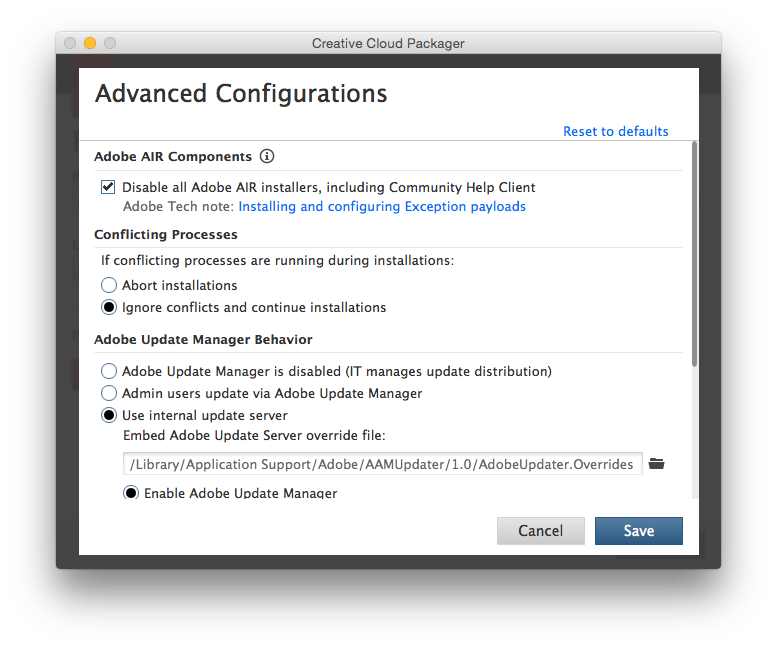
If not, that's your issue (AIR will hang a machine if install is attempted at imaging time).

12 replies

mm2270
Forum|alt.badge.img+24
  • Legendary Contributor
  • March 11, 2015

  • March 11, 2015

@mm2270

"Under Review" and the request was made three years ago :/


Forum|alt.badge.img+10
  • New Contributor
  • March 11, 2015

biggest fail in casper suite by far
this is one of the many reasons I don't use casper imaging


Forum|alt.badge.img+9
  • Contributor
  • March 11, 2015

@Abdiaziz

Can you SSH into the machine and check its local jamf.log to see where it is getting stuck?


  • March 11, 2015

It's a 50/50. I tried to SSH today and some Mac's let me, others didn't. I'll check the local.jamf.log tomorrow! 8 hours of being stuck on that screen, ugh.


RobertHammen
Forum|alt.badge.img+29
  • Esteemed Contributor
  • March 13, 2015

What packages were you installing? It's possible something (i.e. Creative Cloud) is hanging up (DeployStudio 38% error)... reboot in Single User mode and check the /var/log/jamf.log, last thing that was installing should be in there...


  • March 13, 2015

@RobertHammen

It was Adobe CC 2014. Removed it from the image, and it imaged fine. I'll test out running it as a policy when imaging is comepeltly finished. I know the Adobe temp account is the reason. Why does the Adobe temp account hang the imaging process? That's a good question.


Forum|alt.badge.img+12
  • Contributor
  • March 13, 2015

Generally from what I have seen the main reason why that screen hangs is the OS is waiting for some kind of input, user or otherwise that it is not receiving.


RobertHammen
Forum|alt.badge.img+29
  • Esteemed Contributor
  • Answer
  • March 13, 2015

When you used CCP to build it, did you choose the options to:

Disable all Adobe AIR installers, including Community Help Client
Ignore conflicts and continue installations

If not, that's your issue (AIR will hang a machine if install is attempted at imaging time).


  • March 14, 2015

@RobertHammen

The suite was package by our last Mac person. Since that person never used Casper I feel like it was packaged wrong. I'll need to find/request/buy Adobe CC packager and re-do this. Thank you once again @RobertHammen. I'll update this thread once that process is complete.


davidacland
Forum|alt.badge.img+18
  • Valued Contributor
  • March 14, 2015

We see this a lot. We try to make sure ssh is enabled before any other task so we can always get in and either kill the jamfhelper and troubleshoot, or tail the /var/log/jamf.log to where its stuck.

I know lots of people are saying imaging is going away, but its still used a lot, particularly in education where there are labs of shared devices.


Forum|alt.badge.img+4
  • Contributor
  • March 19, 2015

I've had some luck canceling out of the window with Option+Command+Escape. You should then be able to navigate to terminal or console to determine where the issue might be.


