Question

10.13.2 Supplemental Update Workaround

  • January 8, 2018
  • 40 replies
  • 264 views

scafide
Forum|alt.badge.img+21

Hey Jamf Nation!

As some of you have noticed, if you're Collecting Available Software Updates during a recon, your 10.13.2 Macs that have not yet ran the Supplemental update released today may not be submitting inventory.

To resolve the issue either:

Update your 10.13.2 Mac to the supplemental update.

or

Turn off collect available software updates from inventory collection preferences within your Jamf Pro Server (if you are collecting them) until your 10.13.2 Macs have updated to the supplemental updates.

40 replies

Forum|alt.badge.img+8
  • Contributor
  • January 8, 2018

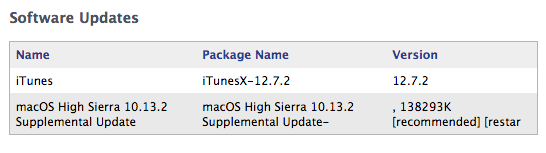
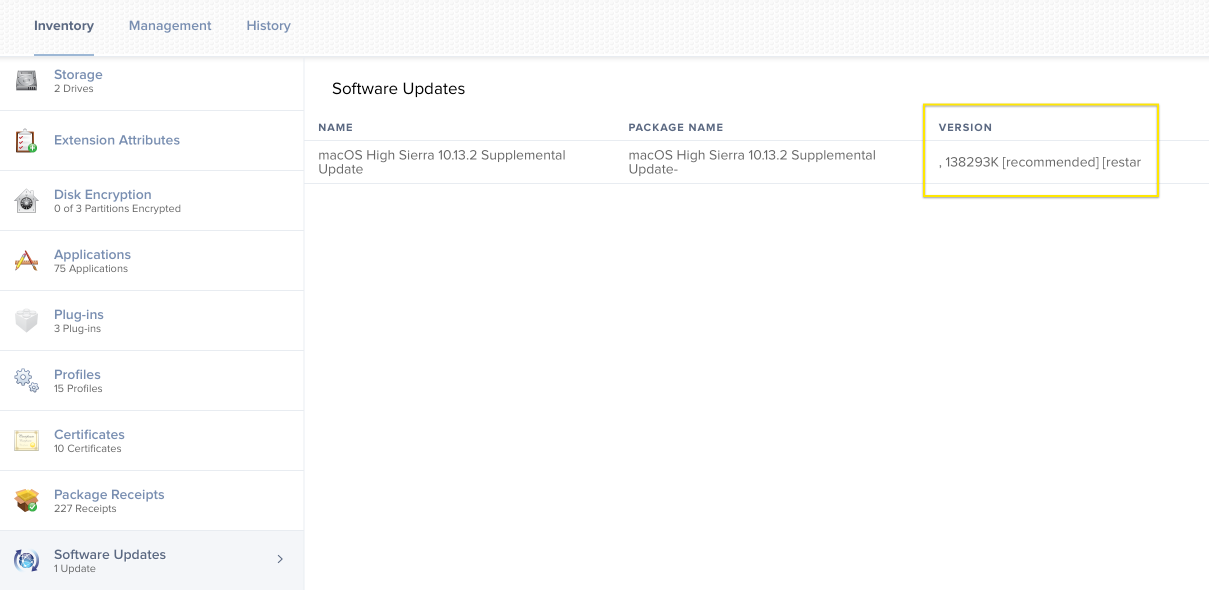
For what it's worth, I'm not seeing the reported problem on our Jamf Cloud instances. The clients are able to successfully recon, but the formatting of the available Software Updates in the computer object view has the version number incorrectly formatted.

Can we get some clarification on affected environments? Discussion in Slack seems to point to this being an environmental issue.


emily
Forum|alt.badge.img+26
  • Hall of Fame
  • January 9, 2018

I'm speculating here but it seems like from what I've seen that mostly on-prem Windows hosted JSS instances. 9 and 10 both appear to have the same issue.


mhasman
Forum|alt.badge.img+22
  • Valued Contributor
  • January 9, 2018

Is there download URL for 10.13.2 Supplemental Update, please? I can not find it on Apple Updates


jmahlman
Forum|alt.badge.img+17
  • Valued Contributor
  • January 9, 2018

@emily This also happened on our RHEL on-prem system.


Forum|alt.badge.img+20
  • Valued Contributor
  • January 9, 2018

@scafide Thank you for brining this issue to light!

@bentoms Thank you for pointing me to this thread from macadmins slack!!!


Forum|alt.badge.img+15
  • Valued Contributor
  • January 9, 2018

I'm also seeing this on my on-prem RHEL system.


mm2270
Forum|alt.badge.img+24
  • Legendary Contributor
  • January 9, 2018

So can I assume if we don't have the "Collect available software updates" option enabled in Inventory Collection Preferences, the problem is avoided? It sounds like that's the case, but I just want to be sure I'm understanding that properly. Because we don't have that option on and haven't for a while. Sounds like we won't see the issue.


Forum|alt.badge.img+4
  • Contributor
  • January 9, 2018

THANK YOU!

This was driving me crazy yesterday. Couldn't figure out why all of a sudden some of my test boxes were failing to recon. "An unknown error occurred"

Totally explains why a couple of them recon without issue now, they're the same ones that I applied the 10.13.2 supplemental update to.

On prem Windows 2012 R2 w/ JSS 9.101.0-t1504998263


emily
Forum|alt.badge.img+26
  • Hall of Fame
  • January 9, 2018

@mm2270 yes, based on my testing, if "Collect available software updates" is not enabled for inventory collection this will not be an issue. I had it off on a Dev box, recon was fine, but once I enabled it recon failed. I haven't tried turning it off again to see if it can revert back okay, but I'm assuming it would start working again after. I'll test that in a bit here.


scafide
Forum|alt.badge.img+21
  • Author
  • Community Manager
  • January 9, 2018

Hey,

Yes, the issue lies in the availability of the update, not the update itself. When the recon runs and collects that available update, that’s the issue causing recon submission failure. Toggling collecting available software updates on and off will not resolve the issue - issue resolution today revolves around turning off the collection until your Macs are patched, or making manual SQL configuration changes, which we would suggest avoiding until we fix in the parsing.


emily
Forum|alt.badge.img+26
  • Hall of Fame
  • January 9, 2018

Note that if you disable the "Check for available software updates" feature, you're also losing a software update check during recon. By default macOS only checks for updates weekly, while you may have been benefitting from more regular checks for software updates due to having recon run at a higher frequency than once every 7 days. Just throwing that out there.


donmontalvo
Forum|alt.badge.img+36
  • Hall of Fame
  • January 9, 2018

Yea, disabling "Check for available software updates" is a bit of a problem, if you're scoping an update to computers that show it as available in softwareupdate -l.

FWIW...

https://www.jamf.com/jamf-nation/discussions/25648/high-sierra-supplemental-update-breaks-recon#responseChild158442


Forum|alt.badge.img+20
  • Contributor
  • January 10, 2018

my 10.13.2 is also having an unknown error when running recon.

via terminal softwareupdate -l (supplemental update listed)
softwareupdate -ai

I am now installing the supplemental update 10.13.2 and let's see if this unknown recon error continues.

jamf version 9.101.0

I'm assuming that computers that directly install high sierra upgrade from the App Store will initially get this supplemental update included in the installation. I have unblocked High Sierra upgrade so users can upgrade on their own time.


Forum|alt.badge.img+3
  • New Contributor
  • January 10, 2018

FYI, I was having the same recon error. I completed the 10.13.2 supplemental update and it corrected the unknown recon error.


Forum|alt.badge.img+20
  • Contributor
  • January 10, 2018

After the 10.13.2 supplemental update installed i ran the 'sudo jamf recon' and it successfully completed !!

softwareupdate - l
softwareupdate - ia


donmontalvo
Forum|alt.badge.img+36
  • Hall of Fame
  • January 10, 2018

Same here, once the item (with its syntax wonkiness) was installed, and no longer on the softwareupdate -l list, recon ran fine on the LAB computers that had the problem.

Apple is looking into why the last couple (few?) Supplemental Updates' names are wonky (tic 100404578230).


Forum|alt.badge.img+2

Happening for us as well. JamfPro 9.100 using RHEL as host.


Forum|alt.badge.img+11
  • New Contributor
  • January 10, 2018

FWIW It's not broken in 9.101 !?

Looking at the output of the CLI softwareupdate it appears the lack of version in the parentheses is the culprit... the dangling hyphen on "...Supplemental Update-" is weird too. Sloppy, Apple.

$ sudo softwareupdate -l
Software Update Tool

Finding available software
Software Update found the following new or updated software:
   * macOS High Sierra 10.13.2 Supplemental Update- 
    macOS High Sierra 10.13.2 Supplemental Update ( ), 138293K [recommended] [restart]

Here's what a 10.13.2 machine without patch inventory looks like in 9.101 as you can see the version column is all messed up...

As a test I went in Recovery mode and replaced /usr/sbin/softwareupdate with a script that output the same data but with "(1.0)" instead of "( )" ... but it seems the jamf binary was not having any of that and inventory now says "No Updates Available" - pfeh! Anyway I think that's it...

Perhaps a quick report to Apple could fix this up too: https://bugreport.apple.com/web/

Expected result: Version number in parentheses Actual result: Nothing Burger ( )

emily
Forum|alt.badge.img+26
  • Hall of Fame
  • January 10, 2018

@brunerd are you sure you have "check for available updates" enabled on your JSS? If you don't, it doesn't check during recon, and recon won't break. Alternately, the character size of the software updates table in your JSS may be long enough to accept the amount of characters of this long-named update.

I won't go into too much detail here, Jamf can do that, but based on the logging I'm seeing it doesn't have to do with parentheses or anything like that, and more has to do with the length of the name of the update and it being more characters than that table allows.

Contact a Jamf support partner/buddy/TAM/whatever they're called these days and they can tell you what to modify to allow more characters on the table to accept the longer name.


scottb
Forum|alt.badge.img+18
  • Valued Contributor
  • January 10, 2018

Well, if it makes anyone feel better, 10.13.3 Beta (17D34a) doesn't fail recon. Today.


Forum|alt.badge.img+8
  • Contributor
  • January 10, 2018

FYI no issues seen on our on-prem 9.101.4 instance on Ubuntu.


ThijsX
Forum|alt.badge.img+20
  • Employee
  • January 10, 2018

Anyone knows if the supplemental update is already available as an package?

Thanks!


ThijsX
Forum|alt.badge.img+20
  • Employee
  • January 10, 2018

My bad, already found it!
https://support.apple.com/kb/DL1951?viewlocale=en_AU&locale=en_AU


mhasman
Forum|alt.badge.img+22
  • Valued Contributor
  • January 10, 2018

@txhaflaire Thank you!


donmontalvo
Forum|alt.badge.img+36
  • Hall of Fame
  • January 11, 2018

@emily Awesome, Jamf indeed confirmed the character limit issue. Tested the schema change in our QA environment as per Jamf fixed the issue for us.

We followed up with Apple so they can update ticket.

I won't go into too much detail here, Jamf can do that, but based on the logging I'm seeing it doesn't have to do with parentheses or anything like that, and more has to do with the length of the name of the update and it being more characters than that table allows.