
Solved

[10.13] Having trouble skipping "Enable Ask Siri" on lab computers

  • December 18, 2017
  • 2 replies
  • 37 views

Forum|alt.badge.img+16

I previously used a configuration profile that disabled the assistant entirely. That no longer works in 10.13. So I tried running the following command on the computers:

/usr/bin/defaults write "${USER_TEMPLATE}"/Library/Preferences/com.apple.SetupAssistant DidSeeSiriSetup -bool TRUE

That didn't skip it. I couldn't find anything in the Configuration Profile settings to skip over it. This isn't an issue on individual users machines, but I do not want this popping up for every single person who signs into our lab computers. That's just not a good thing.

Does anyone know a way to skip over "Enable Ask Siri" that works on 10.13.2?
Best answer by crbeck1

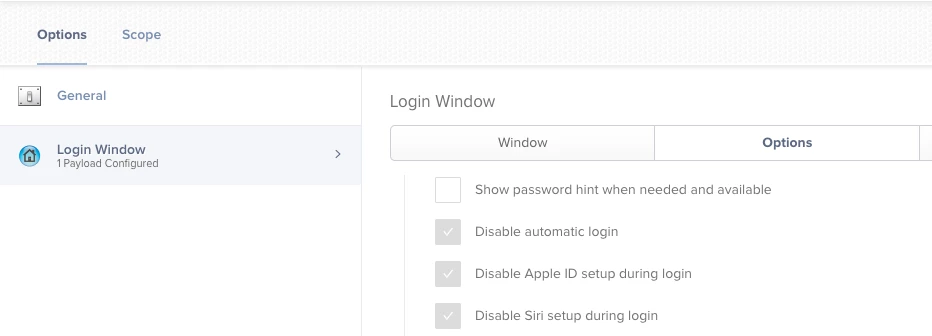
This is what I've been using. I only have a handful of 10.13 machines at this point but I haven't seen either the Siri or Apple ID prompt on any of them yet.

2 replies

Forum|alt.badge.img+8
  • New Contributor
  • Answer
  • December 18, 2017

This is what I've been using. I only have a handful of 10.13 machines at this point but I haven't seen either the Siri or Apple ID prompt on any of them yet.


Forum|alt.badge.img+16
  • Author
  • Honored Contributor
  • December 18, 2017

Of course it would be in a section I assumed would have nothing to do with Restrictions. Figures. Thanks again.