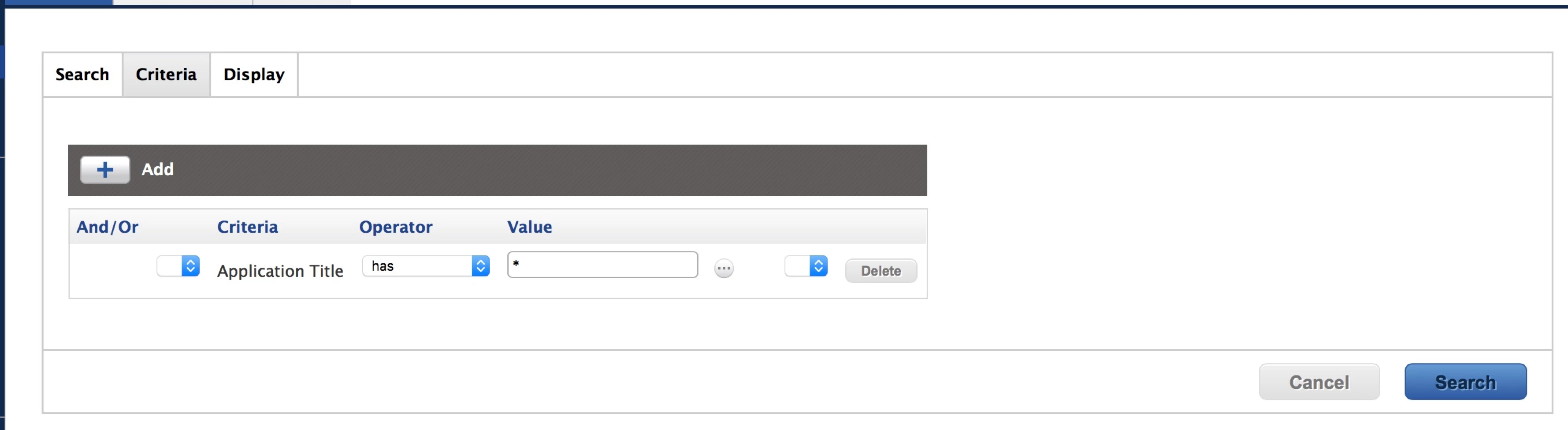
I'm trying to build an Advanced Computer Search so I can save it and delegate some work.
Long story short, I can't get wildcards to work with Advanced Computer Searches at all.
If I use an asterisk for Application Title, I get nothing at all. However if I use a wildcard (asterisk) for simple searches it works. It's the Advanced Computer Searches that aren't working with wildcards.
This returns every app, as expected.
This returns nothing.
Am I out of luck? I even tried to RTFM! ;-)
Best answer by alexjdale
Instead of wildcards, use "like" and "has" queries. Pretty sure Advanced Computer Searches will just see an asterisk as a literal character.
A "like" or "has" query will have implicit wildcards. When I do a similar Advanced Computer Search for Application Title and leave the criteria blank, it returns all computers the way you'd expect a wildcard to.
These are two very different searches. The first search returns apps, the second search returns computers.
Instead of wildcards, use "like" and "has" queries. Pretty sure Advanced Computer Searches will just see an asterisk as a literal character.
A "like" or "has" query will have implicit wildcards. When I do a similar Advanced Computer Search for Application Title and leave the criteria blank, it returns all computers the way you'd expect a wildcard to.
These are two very different searches. The first search returns apps, the second search returns computers.