Question

AirDrop requiring passcode on iPads

  • April 30, 2026
  • 3 replies
  • 40 views

Forum|alt.badge.img+5

Hello,

Since iOS 26.2, a passcode is required when using AirDrop, which quickly becomes cumbersome in a classroom setting.

Is there a way to disable this requirement via Jamf School? I haven’t been able to find a relevant setting.

Thank you in advance for your help.

3 replies

GregBobbett
Forum|alt.badge.img+12
  • Jamf Heroes
  • April 30, 2026

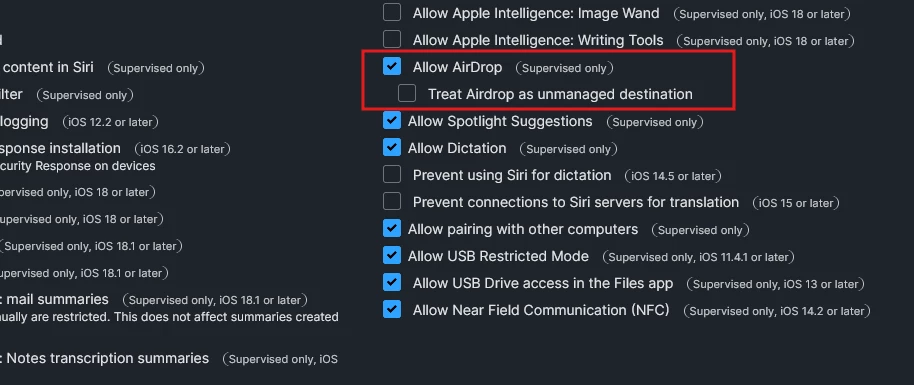
Currently we aren’t experiencing that issue, so I’m making a guess that there might be a restriction that is active in your instance. Under Restrictions > “Your named restriction profile” > Device Functionality section > Allow Airdrop should be selection, but the sub selection ‘Treat Airdrop as unmanaged destination’ should NOT be selected.

If this doesn’t work for you, let us know and I’ll dig more to see if I can help find the culprit.

Greg


Forum|alt.badge.img+5
  • Author
  • New Contributor
  • April 30, 2026

Hello, 

thank you for your reply. ‘Treat Airdrop as unmanaged destination’ is already not selected :


Could this be related to the fact that teachers and students are not in each other’s contacts? When they want to receive files via AirDrop, they have to enable “Everyone for 10 minutes.”


GregBobbett
Forum|alt.badge.img+12
  • Jamf Heroes
  • April 30, 2026

That is very plausible thought. I know that I’ve had that issue personally with my iPhone. Definitely worth a test. I’ll reach out to one of my schools that do a lot of Airdrop and see if that’s a step that they just already do.