
Solved

Auto-Enrollment DEPNotify and Touch ID

  • June 28, 2022
  • 3 replies
  • 43 views

adl-gavinator
Forum|alt.badge.img+4

Hi Everyone,

Bit of a niche question here.  We are currently using DEPNotify to pre install applications and settings to Mac's which are company owned, as well as improve the end user onboarding experience. 

We currently also use Jamf Connect which gets the user to sign in using their AzureAD creds and sync a local password to the Mac.  Directly after that, DEPNotify kicks in and begins installing software, plists and configs.  The user is not prompted, to setup their Touch ID, or their iCloud account. 

Is there a way of getting DEPNotify to invoke this from Setup Assistant?  Or maybe doing a partial Setup Assistant with certain screens like the Touch ID, iCloud Setup, Apple Pay etc?
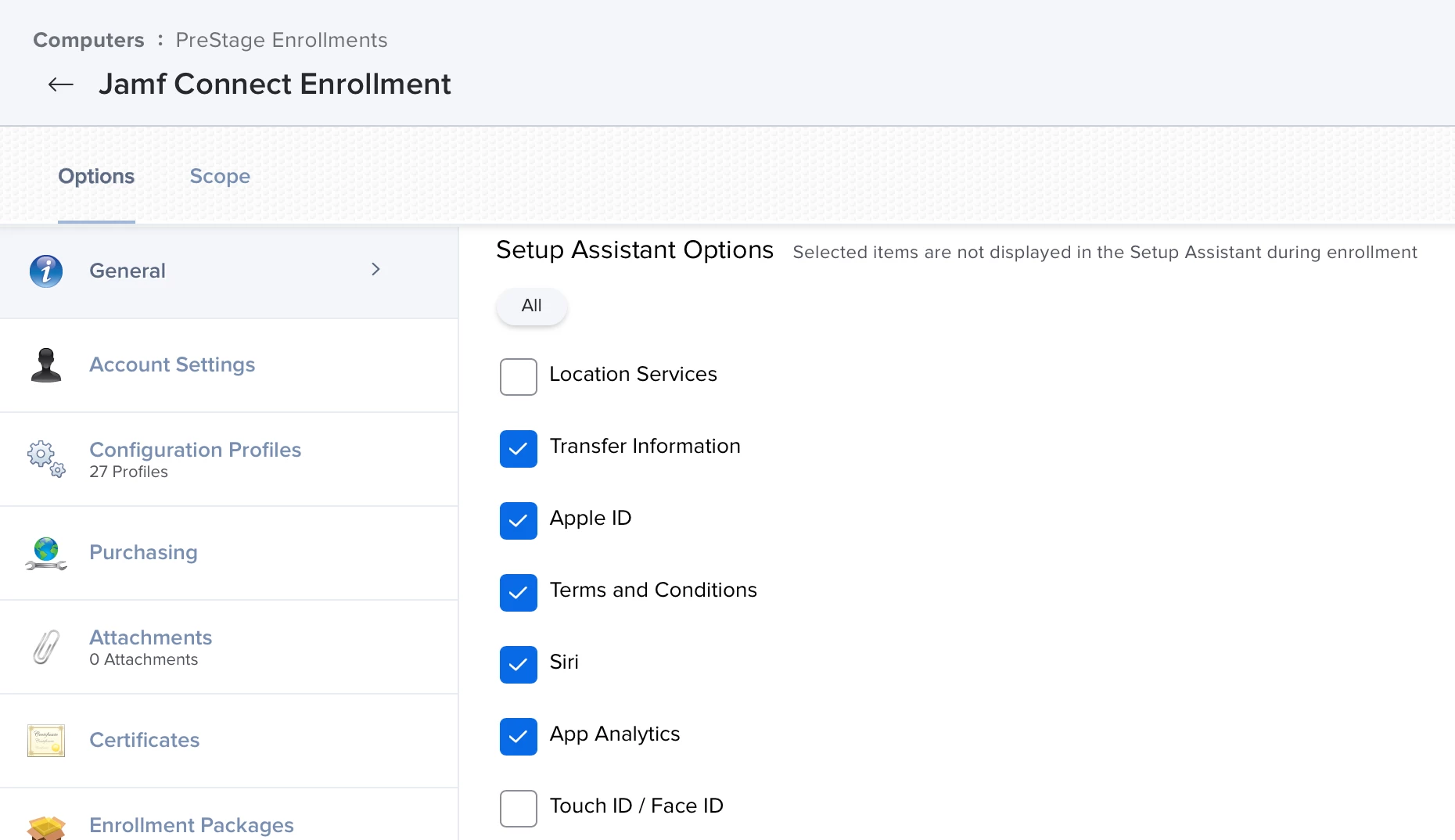



Best answer by Samstar777

@adl-gavinator can you make sure Touch ID / Face ID is uncheck, as shown in screenshot below

3 replies

mm2270
Forum|alt.badge.img+24
  • Legendary Contributor
  • June 28, 2022

I'm pretty sure you'll need to enable those Setup Assistant screens to show up during enrollment, to allow the user to set them up.


Samstar777
Forum|alt.badge.img+11
  • Valued Contributor
  • Answer
  • June 28, 2022

@adl-gavinator can you make sure Touch ID / Face ID is uncheck, as shown in screenshot below


adl-gavinator
Forum|alt.badge.img+4
  • Author
  • Contributor
  • June 29, 2022

Thanks @Samstar777 you were right on the money!  I had forgotten these settings.