Question

Big Sur and Cisco Anyconnect

  • November 19, 2020
  • 55 replies
  • 240 views

Show first post

55 replies

  • March 11, 2021

This is, how I get the installation of Cisco AnyConnect without any user prompt.
We only install the VPN Client. (Cico AnyConnect VPN)


Forum|alt.badge.img+2
  • New Contributor
  • March 24, 2021

Has anyone figured out how to configure the notification payload?
(Can't seem to find the correct App Name & Bundle ID combination...)


AJPinto
Forum|alt.badge.img+26
  • Legendary Contributor
  • March 24, 2021

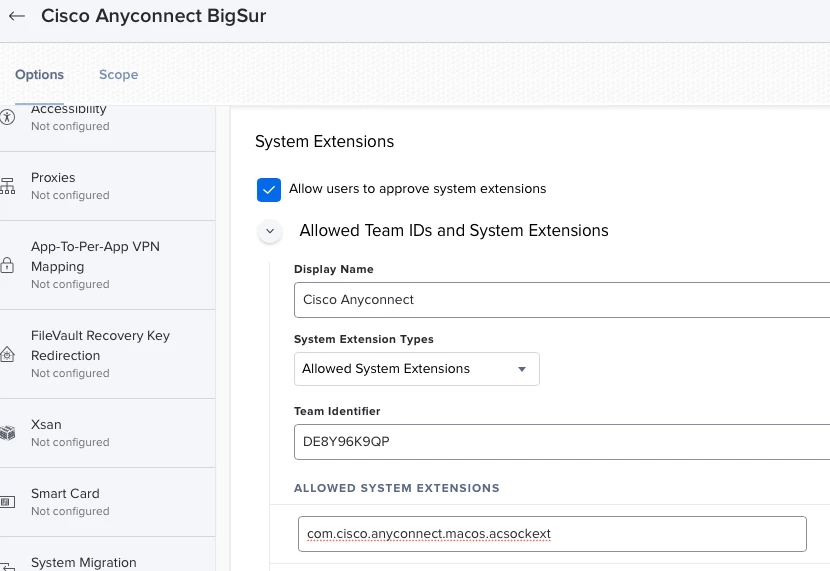
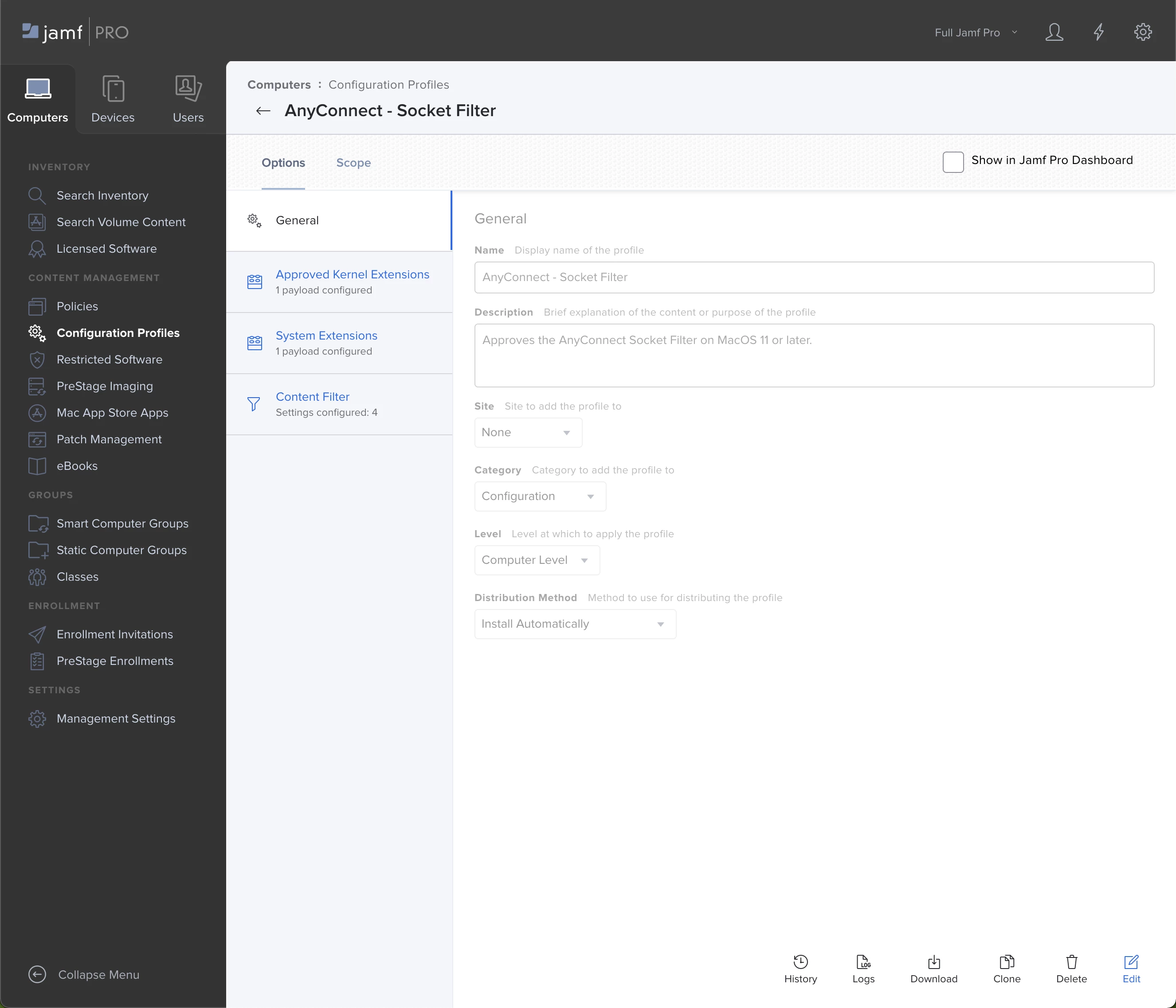
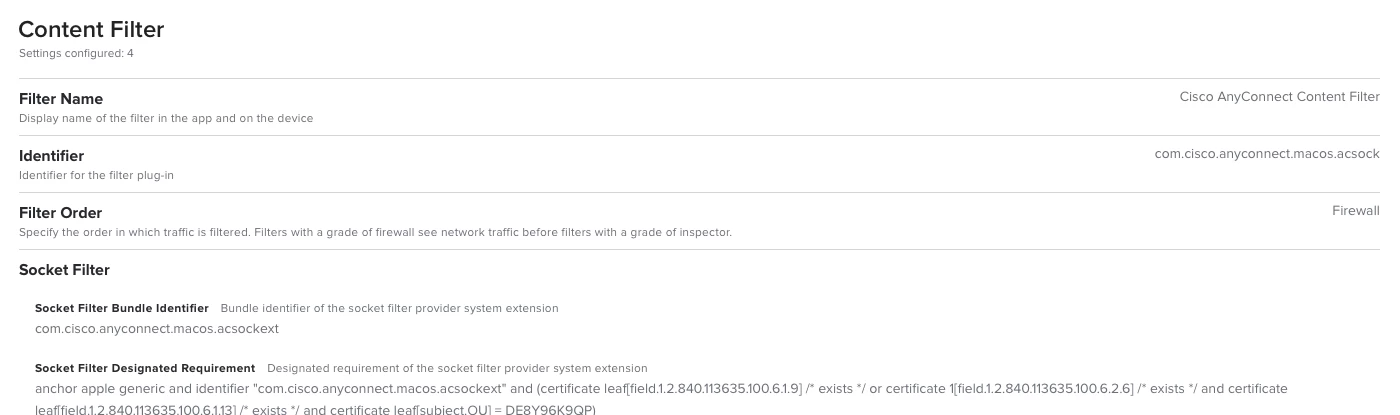
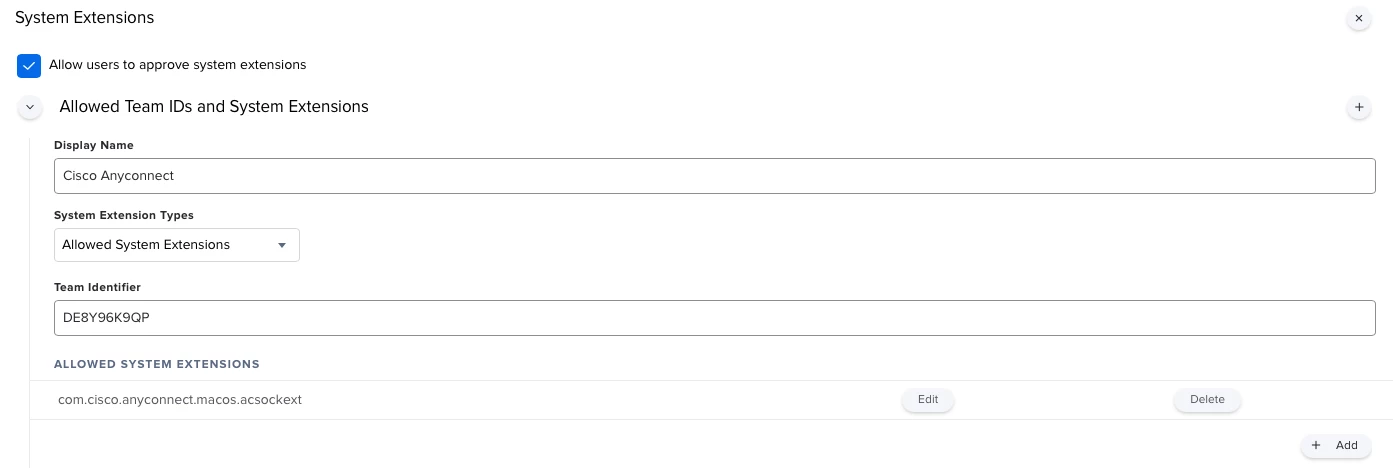
@jon.verret We have it configured this way. One thing I learned is the Configuration Profile has to be installed on the Mac BEFORE AnyConnect drops the system extension. If the system extension is on their first the user must approve. Its just how system extensions work and is kinda dumb, its not a JAMF thing. It is possible to remove a System Extension but you have to disable SIP first, at least for now according to the binaries notification. The screenshot below is the configuration profile that resulted from a JAMF ticket on this matter.


Forum|alt.badge.img+2
  • New Contributor
  • March 24, 2021

@AJPinto Hey thanks for the response. I appreciate the screen caps, those are helpful to validate what I'm already deploying, which is working.

I was curious if anyone had managed to successfully configure the Notifications payload in the same profile for AnyConnect notification settings. Have you played with that at all?


Forum|alt.badge.img+8
  • Valued Contributor
  • April 15, 2021

I've got a related problem in that the Configuration Profile supplied by an Apple Engineer works perfectly in Big Sur on Intel but deploys and doesn't work on Big Sur M1 Macs. I opened a ticket with AppleCare and was told to try AnyConnect 4.9.06037.
I'm looking forward to getting my hands on it to test.
Anyone tried it yet?
- Scott


Forum|alt.badge.img+8
  • Valued Contributor
  • April 21, 2021

4.10 Fixes it.


Forum|alt.badge.img+3
  • New Contributor
  • May 10, 2021

I got everything in place based on this Cisco guide:

AnyConnect Changes Related to macOS 11 (Big Sur)

Installed 4.10.00093 just a minute ago but no joy, it still requires for the extension to be approved manually. :(


Forum|alt.badge.img+2
  • New Contributor
  • May 12, 2021

@NOVELLUS Can you explain, how you managed to install AnyConnect without socket filter? Since you don't use a content filter policy it looks like you really just have the VPN Client installed. Even when we install manually and unselect all options, the socket filter app gets installed along with the security mobility client.

regards
jeremias


  • May 12, 2021

@jexon we are using the "anyconnect-macos-4.9.04043-core-vpn-webdeploy-k9.pkg" This is installing only the vpn client.
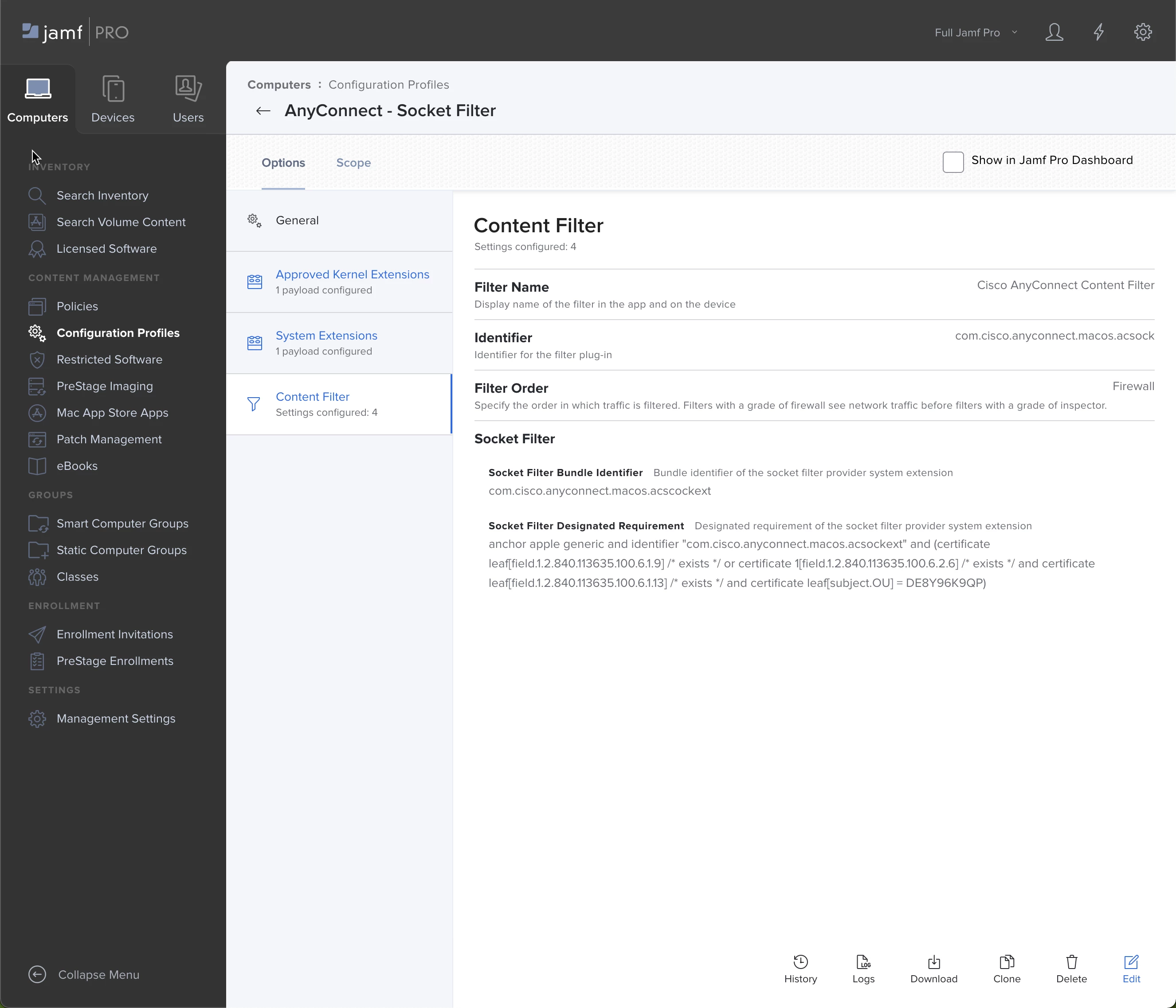
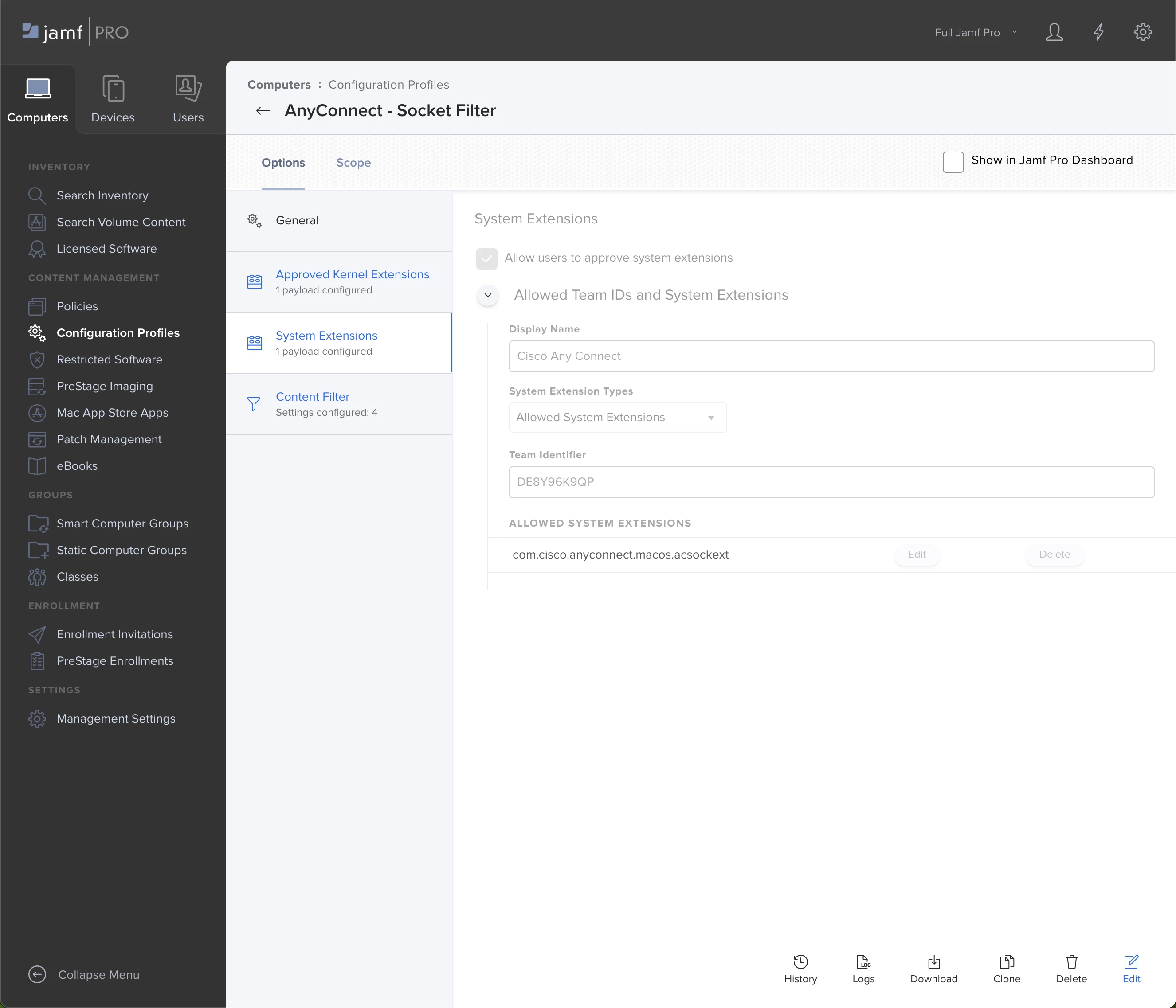
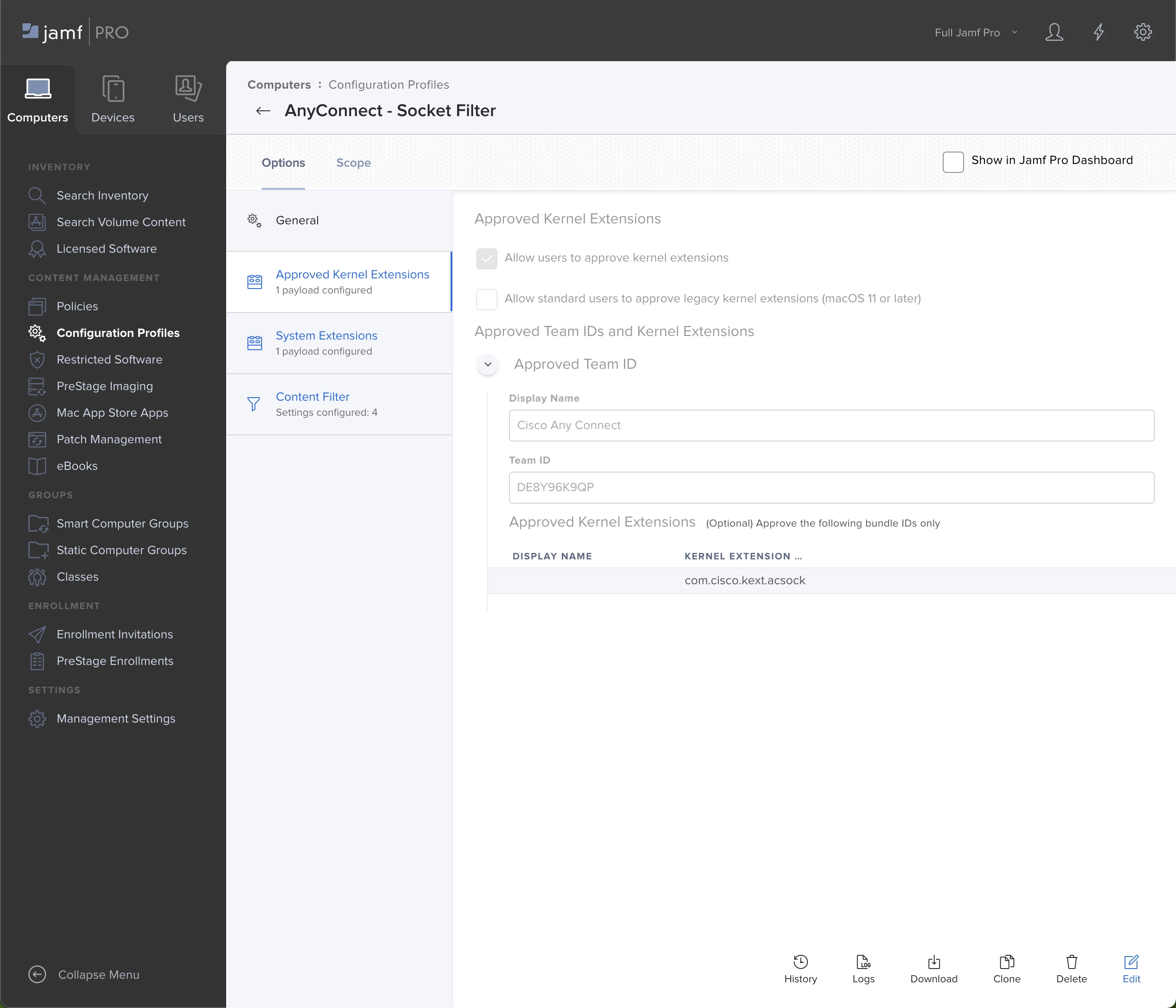
In addition to this , we are deploying a configuration profile with settings for system extensions ans content filtering as seen below. This works for us. The installation is running silent.
If the user will be connected with our VPN , the newest version of anyconnect will be downloaded and installed automaticly.
We do not have any M1 Macs at this time.


BCPeteo
Forum|alt.badge.img+11
  • Contributor
  • May 18, 2021

For M1 macs I had to remove the Kernel extension settings from the config profile and then it installed with out error.
Still have the popup but I think its because AnyConnect was already installed. One odd thing is if I run systemextensionsctl list it does not show up. (sophos one I have does show up) So not really sure this is working correctly. This is anyconnect 4.9.04043


Forum|alt.badge.img+10
  • Contributor
  • May 26, 2021

At the moment there seems to be DNS issues with big sur 11.4 and Cisco anyconnect 4.10.01075 - randomly works on- off and cisco rapport it is a known issue


Forum|alt.badge.img+1

seems like all the anyconnect profiles that worked till now are no longer compatible with 11.4 , throwing errors . running 4.10.00093.

Error Code 10 The operation couldn’t be completed. (SPErrorDomain error 10.)

the good news is they work again in 11.5 according to the devices that we have deployed in the field running beta with the same client version. havent verified if they actually apply, but just not seeing the same errors.


Forum|alt.badge.img+11
  • Contributor
  • June 1, 2021

The Socket Filter is causing the DNS issues.. after removing the Socket Filter payload, the DNS issues stopped for me. And we're able to still manage as we did with Kernel Extensions and macOS 10.x


Forum|alt.badge.img+10
  • Contributor
  • June 1, 2021

-


mickl089
Forum|alt.badge.img+11
  • Valued Contributor
  • June 1, 2021

That can´t be a solution for the Cisco Support, or am I mistaken? I have a different view of support quality...


Forum|alt.badge.img+10
  • Contributor
  • June 1, 2021

Seems disabling Umbrella also do the trick - even it is not a very good workarround. But simply also cannot understand how Cisco are not up-to-date with their software. They have several month to test new versions comming for Mac and it seems they first test their software after the releases have been made. And now they just point to Apple and say they should fix it in a new version


mickl089
Forum|alt.badge.img+11
  • Valued Contributor
  • June 1, 2021

We have the same problems and umbrella is not in use... but apparently this is the trend of developers nowadays. Example: Big Sur was released in the fall of 2020, only in March 2021 was a final compatible version of Sophos Endpoint rolled out, until then Sophos was not running under Big Sur. Sad story if you think about how long the Big Sur beta versions were already available.


Forum|alt.badge.img+10
  • Contributor
  • June 1, 2021

Yes Umbrella removal is also not a workarround. DId some testing where it worked without umbrella - but it is just random as it sometimes can work temporary if you like re-install or restart the client, but later it then fails again.

So really difficult to find an error that is happening random.


Forum|alt.badge.img+10
  • Contributor
  • June 1, 2021

11.5 Beta Big sur also does not solve anything. It worked some hours, but now again I cannot connect to server names


mickl089
Forum|alt.badge.img+11
  • Valued Contributor
  • June 2, 2021

Our company is changing from Cisco to Forti, not only because of these errors...


Forum|alt.badge.img+1
  • New Contributor
  • June 2, 2021

@jameson am experiencing same, after Jamf Pro pushes config profile. We can no longer ping out AD FQ'd domain name. Have submitted a support request to Cisco, have spent much time on this as many other Jamfers out there.


Forum|alt.badge.img+6
  • Contributor
  • June 8, 2021

I've got AnyConnect running on Big Sur thanks to the tips here, but am having issues reinstalling the app if it's been removed. Has anyone had success reinstalling?

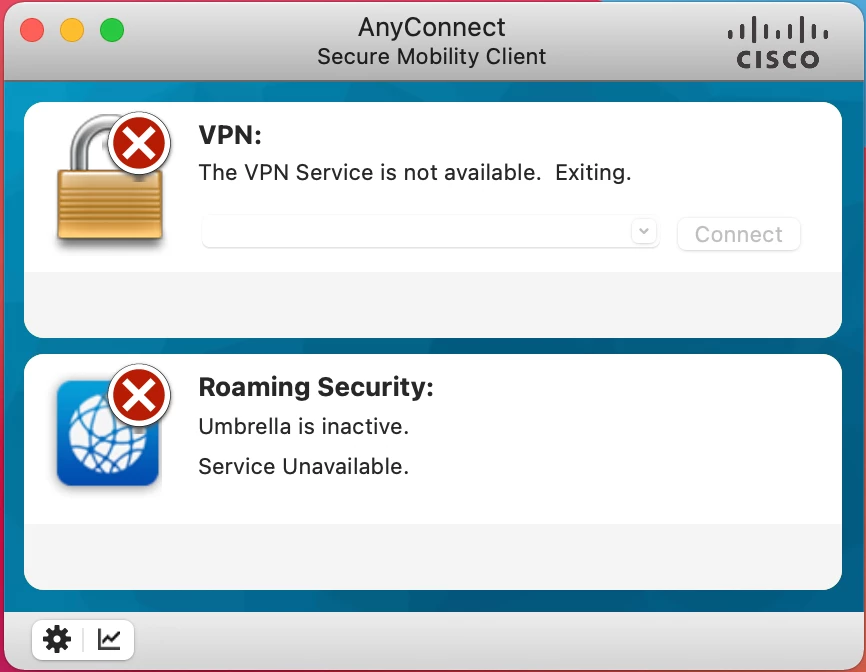
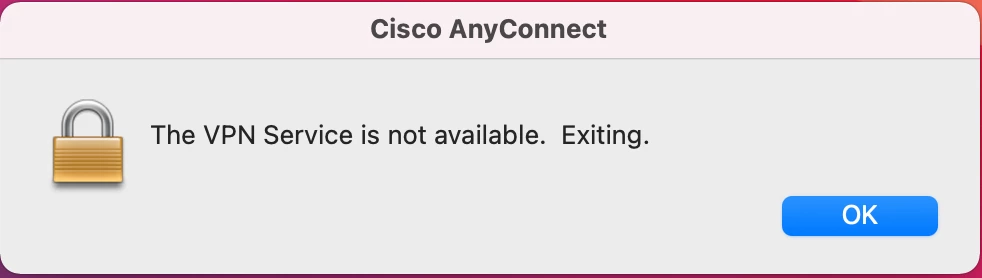
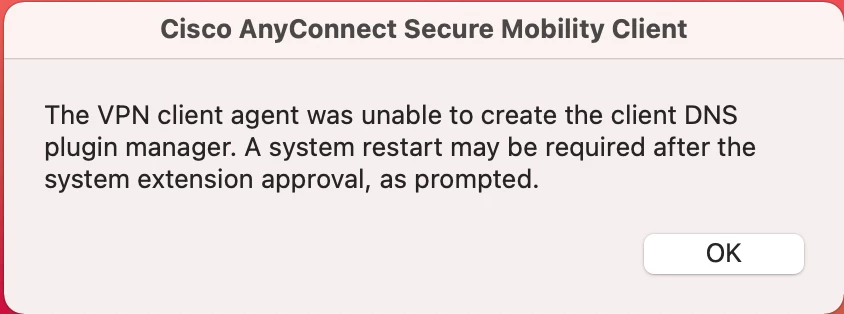
In testing I had a user uninstall AnyConnect and DART using the uninstallers in the Applications folder. We performed the testing needed and then pushed the app back out. Now we are getting the errors in the attached screenshots. There are no system extensions to install, and we did not remove the config profile during the uninstall process, it's all still in place from the initial install. The system extension warning pops-up every 10 seconds or so making the Mac unusable. I can repeat this on other Macs as well.


  • June 14, 2021

@rlindenmuth Hi,, did you restart after installing and removing the Anyconnect client? As far as I know, a reboot is required for Anyconnect to work.

Maybe this link will help you for removing the client: http://kb.mit.edu/confluence/display/mitcontrib/Cisco+Anyconnect+Manual+uninstall+Mac+OS


Forum|alt.badge.img+6
  • Contributor
  • June 28, 2021

We've rebooted and have tried both manual uninstall and uninstall via the app, both with no avail.


daniel_ross
Forum|alt.badge.img+20
  • Jamf Heroes
  • September 24, 2021

The Socket Filter is causing the DNS issues.. after removing the Socket Filter payload, the DNS issues stopped for me. And we're able to still manage as we did with Kernel Extensions and macOS 10.x


Were you able to confirm this?  We are seeing the VPN/DNS error and are wondering if this is our issue as well.  Just want to make sure someone confirmed it for sure before removing this profile.  Were running AnyConnect 4.10.02086