Solved

Block Installing Programs

  • September 11, 2019
  • 4 replies
  • 74 views

Forum|alt.badge.img+8

We just got a request to block users from being able to install programs on some public use Macs. My initial thought was someone set them up with admin rights but the account is a standard user. I though standard users could not install programs?

The example they gave me and I tested was some kids would go to roblox.com and download/install it. This does indeed work as a standard user. What do I need to do to block this behavior?


Best answer by garybidwell

It’s an ongoing issue with certain apps that don’t have a installer (ie they download as a dmg & don’t need to be installed to run (Skype was an example- users just dragged it onto their desktop or even ran straight from the dmg)
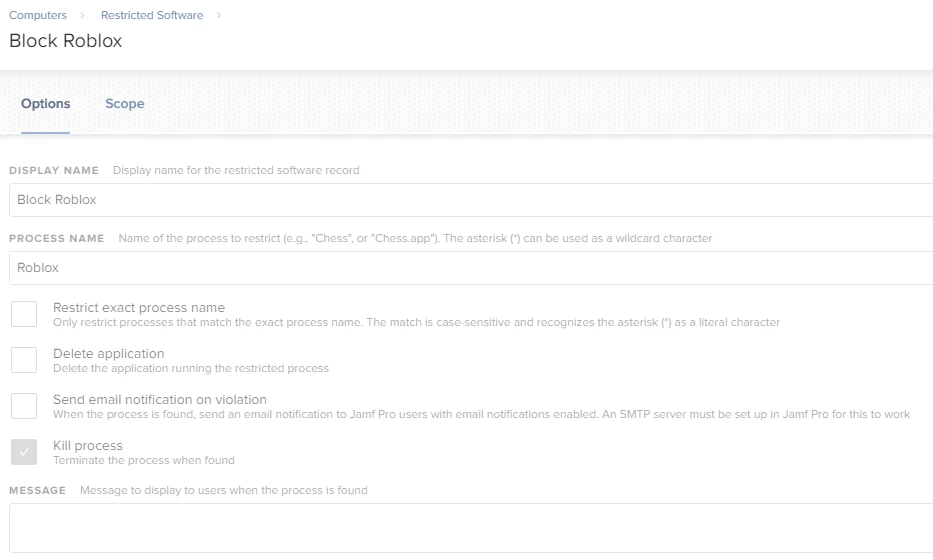
The only way I found was to block the process from launching with restricted software setting
The other way is to use parental controls to say only what can be used

4 replies

Forum|alt.badge.img+8
  • Valued Contributor
  • 70 replies
  • September 11, 2019

Something in parental controls perhaps?

I also just found this:

  • in the users home dir verify the 'Applications' directory exists, if not create it.
  • assign it the user 'root' and group 'admin' "chmod root:admin Applications".
  • assign permissions of 000 to it "chmod 000 Applications"

from https://forums.macrumors.com/threads/how-can-i-prevent-standard-users-from-installing-software.1085631/
(quite an old thread though)


garybidwell
Forum|alt.badge.img+15
  • Jamf Heroes
  • 178 replies
  • Answer
  • September 11, 2019

It’s an ongoing issue with certain apps that don’t have a installer (ie they download as a dmg & don’t need to be installed to run (Skype was an example- users just dragged it onto their desktop or even ran straight from the dmg)
The only way I found was to block the process from launching with restricted software setting
The other way is to use parental controls to say only what can be used


Forum|alt.badge.img+8
  • Author
  • Contributor
  • 50 replies
  • September 12, 2019

Tried using restricted software but even that does now seem to block Roblox. Did I set something incorrectly?


Forum|alt.badge.img+8
  • Author
  • Contributor
  • 50 replies
  • September 12, 2019

After going back to my test machine and finding the account locked out. I was unable to log into it. Switched users and the test account was no longer listed. Yeah I guess naming the test account Roblox may have been an issue. Seems like an odd interaction.

Went ahead and created a new test account and it did indeed stop Roblox from installing.