Solved

Blocking Sonoma Developer Beta

  • June 7, 2023
  • 11 replies
  • 176 views

Forum|alt.badge.img+4

With Apple's changes to who qualifies for the Developer beta (as well as how it is installed), does anyone have advice on how to block users from installing it? In the past we always created a Restricted Software policy that restricted and then killed the process named "Install macOS <this year's name> Beta.app", but it looks like Apple is no longer deploying these in that way anymore. Granted, I could be wrong on that haha.

We've created a similar policy for Sonoma, as well as an additional policy that blocks "macOSDeveloperBetaAccessUtility*" -- since it looks like that is the new deployment method. Have any of you come across a better solution?
Best answer by pkleiber

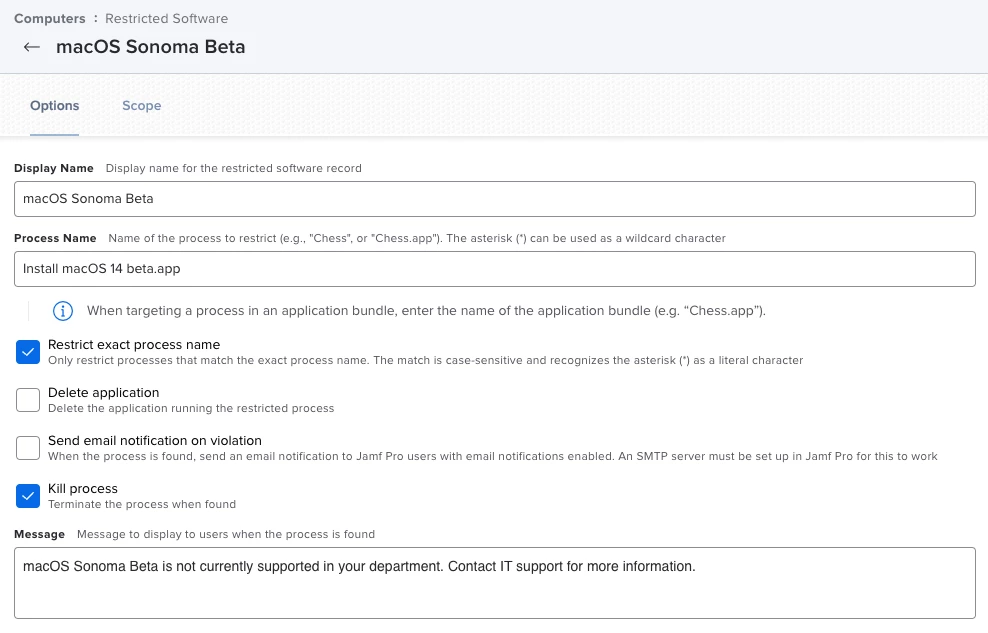
@marlink They changed the filename of the Sonoma Beta to "Install macOS 14 beta.app"

So Restrict Software works with this setting:

11 replies

Forum|alt.badge.img+14
  • Honored Contributor
  • June 8, 2023

Deploy an MDM profile as follows:

Preference domain: com.apple.SoftwareUpdate

<key>AllowPreReleaseInstallation</key> <false/>

Forum|alt.badge.img+19
  • Honored Contributor
  • June 8, 2023

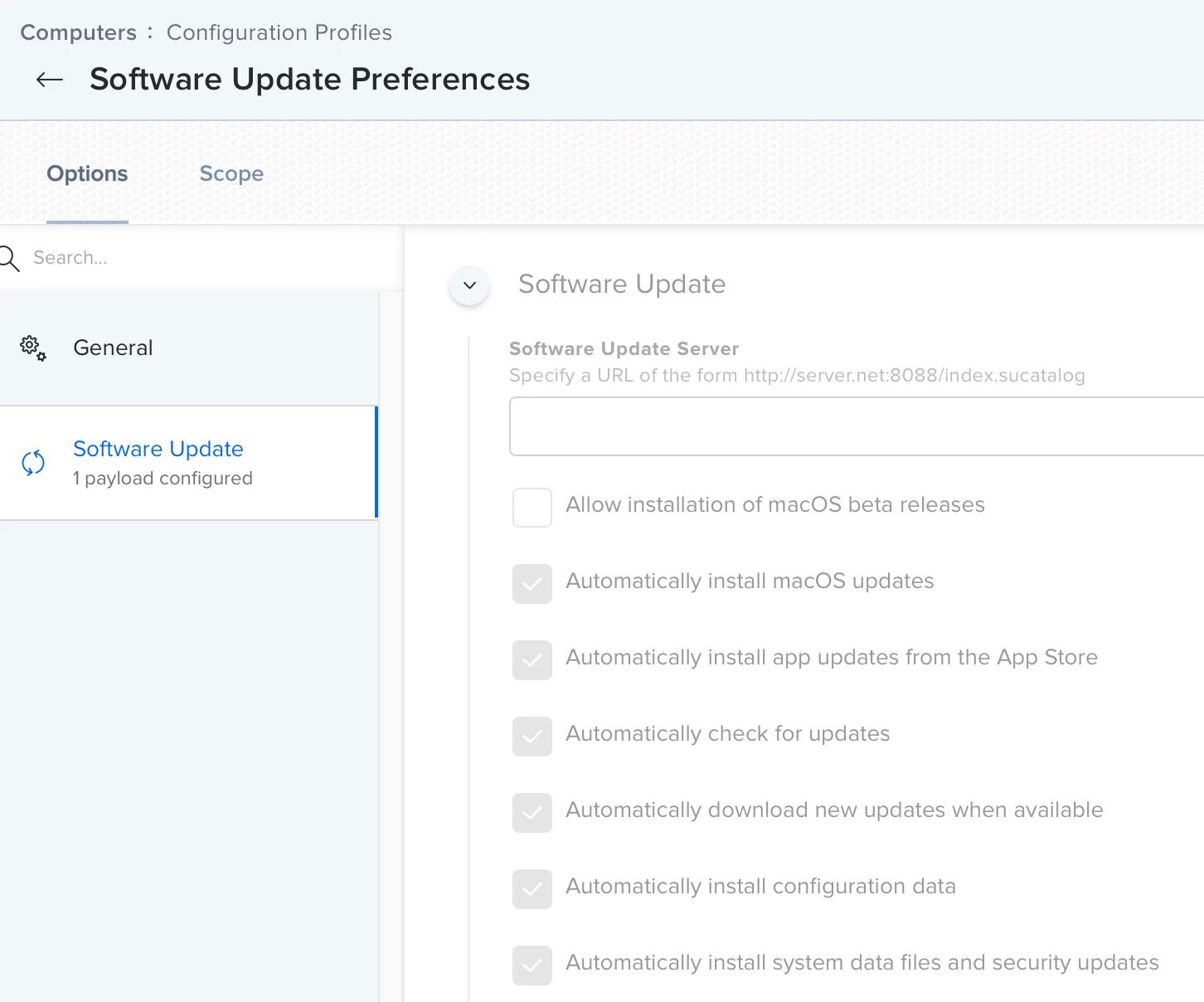
There is also Configuration Profile option in Jamf to block Beta software. It is under the Software Update payload, un-check the “Allow installation of macOS beta releases”

FYI - Software Update is still an “all-or-nothing” payload, so if you set the beta setting, make sure the other settings are set appropriately. If you ONLY want to block betas, use a custom payload and the settings @jtrant posted above. 


Forum|alt.badge.img+3
  • New Contributor
  • June 8, 2023

hmmm tried a custom profile with 

<key>AllowPreReleaseInstallation</key>
	<false/>

and betas are still available from sysprefs


pkleiber
Forum|alt.badge.img+9
  • Contributor
  • Answer
  • June 13, 2023

@marlink They changed the filename of the Sonoma Beta to "Install macOS 14 beta.app"

So Restrict Software works with this setting:


Forum|alt.badge.img+4
  • Author
  • Contributor
  • June 13, 2023

Thank you all for you very helpful advice!


Jason33
Forum|alt.badge.img+13
  • Honored Contributor
  • June 23, 2023

Just to note, Beta 2 has changed the app installer name to Install macOS Sonoma beta.app, so if you're blocking by app name, you'll want to add/update as needed


Forum|alt.badge.img+4
  • Author
  • Contributor
  • June 26, 2023

Just to note, Beta 2 has changed the app installer name to Install macOS Sonoma beta.app, so if you're blocking by app name, you'll want to add/update as needed


Thank you for this! 


pkleiber
Forum|alt.badge.img+9
  • Contributor
  • July 3, 2023

What a mess 😄


mvu
Forum|alt.badge.img+20
  • Jamf Heroes
  • July 17, 2023

There is also Configuration Profile option in Jamf to block Beta software. It is under the Software Update payload, un-check the “Allow installation of macOS beta releases”

FYI - Software Update is still an “all-or-nothing” payload, so if you set the beta setting, make sure the other settings are set appropriately. If you ONLY want to block betas, use a custom payload and the settings @jtrant posted above. 


This is working. Set it up during the CIS build-out. When users attempt to do any beta installs, a prompt says they cannot and to see your admin or something.


Forum|alt.badge.img

Hello there, what would now be the correct way to block the office macOS Sonoma soon to be released?

Meaning what shall be the correct process name to block?

"Install macOS Sonoma.app" or "Install macOS Sonoma 14.app"?

Thank you.


Forum|alt.badge.img+1
  • New Contributor
  • September 12, 2023

Hello there, what would now be the correct way to block the office macOS Sonoma soon to be released?

Meaning what shall be the correct process name to block?

"Install macOS Sonoma.app" or "Install macOS Sonoma 14.app"?

Thank you.


I don't have any additional information but it's likely to follow the same pattern as the previous releases so you should be okay with "Install macOS Sonoma.app"