Solved

Cannot Save PreStage Enrollment Computer Activation

  • May 20, 2019
  • 5 replies
  • 36 views

Forum|alt.badge.img+3

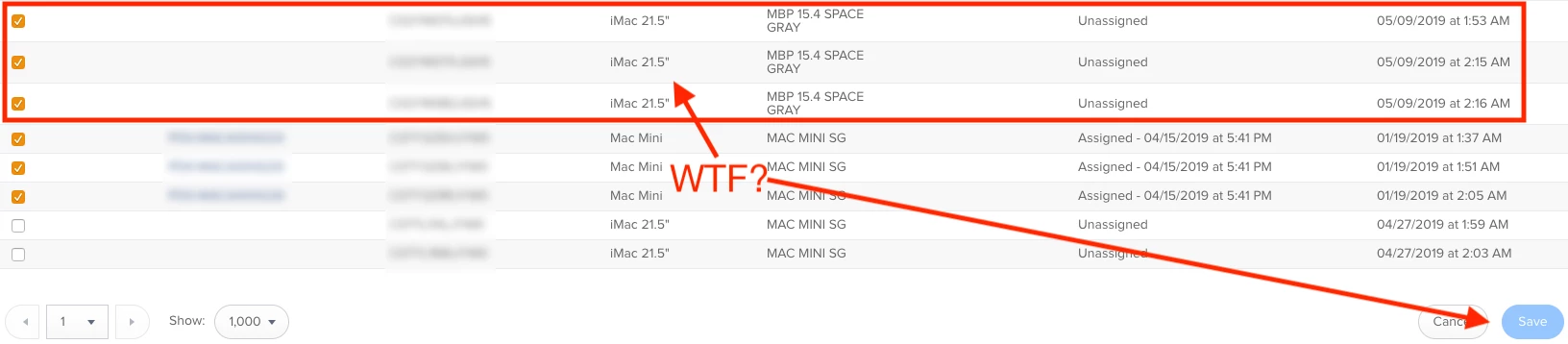
We received some new machines that are setup for DEP, and whenever I am going into the PreStage Enrollment page to click the box to make them active, it will not allow me to save changes. Basically, the "Save" button is "greyed" out and won't allow me to add those machines in to be DEP Enrolled.

This is a new behavior that I haven't experienced before. I was able to save these changes as recently as a month ago, but now it's non-functional.

Also, and it might be related, in the DEP breakdown, it's naming a bunch of Mac Models as iMac 21.5" when the Description is clearly not the same type (see attachment, Macbooks and Mac Minis are showing as "iMacs"). Could this be causing the save issues since there's a mismatch?

Does anyone know why this might be occurring?

Thanks!

~ JYH
Best answer by summoner2100

Which version of Jamf Pro are you on? I believe pre-10.12 there was an issues with Adblocker and Chrome not allowing saving, and the button being greyed. Pretty sure it was fixed since though.

5 replies

Forum|alt.badge.img+7
  • New Contributor
  • May 21, 2019

We had the same issues in jamf 10.11. After upgrading to 10.12 we can save changes to Prestage enrollments again.


summoner2100
Forum|alt.badge.img+7
  • Contributor
  • May 29, 2019

The screenshot looks like there are 3 ticked that are assigned. It might not like that as they're already in the prestage so can't save. Maybe?


Forum|alt.badge.img+3
  • Author
  • New Contributor
  • June 3, 2019

Interestingly enough, I was able to get them to save in a different browser. It wasn't allowing me to save in Chrome, but it was in Safari, oddly. So the issue is semi-resolved, but I hope an update to the JSS version will allow for saving in chrome again.


summoner2100
Forum|alt.badge.img+7
  • Contributor
  • Answer
  • June 5, 2019

Which version of Jamf Pro are you on? I believe pre-10.12 there was an issues with Adblocker and Chrome not allowing saving, and the button being greyed. Pretty sure it was fixed since though.


Forum|alt.badge.img+3
  • Author
  • New Contributor
  • June 5, 2019

We're still on 10.11.1, so that's probably the issue, especially since I use uBlock Origin. I'll update the JSS and see if that fixes the issue. Thanks!