
Hello fellow Jamf Admins,
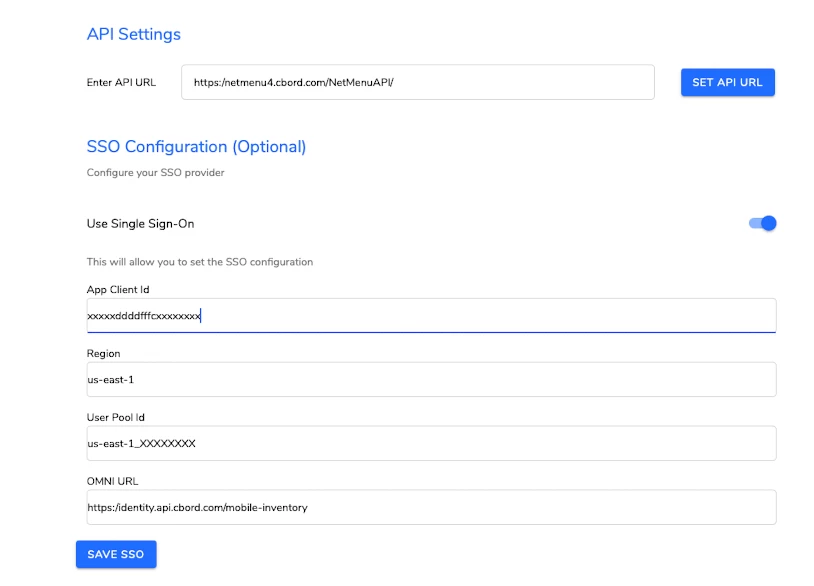
I would be extremely grateful if anyone has come across this App before (Hospital setting) called, “CBORD Mobile Inventory”. I am trying to add the App Config settings like I’ve done for plenty of our other Apps, but this particular App won’t give me a break. Below is a screen shot of what fields need to be filled out and the App Config I came up with and verified via AI. I am at a loss right now.
The last thing we want is for our end-users to have to enter the data manually as that would be a nightmare. Any assistance would be very much appreciated.
App Config I’ve tried (certain fields have been changed for obvious reasons).
<dict>
<key>serverURL</key> (<===== I have also tried “APIURL”)
<string>https://netmenu4.cbord.com/NetMenuAPI</string>
<key>appClientId</key>
<string>xxxxxddddfffcxxxxxxxx</string>
<key>region</key>
<string>us-east-1</string>
<key>userPoolId</key>
<string>us-east-1_XXXXXXXX</string>
<key>omniUrl</key>
<string>https://identity.api.cbord.com/mobile-inventory</string>
</dict>