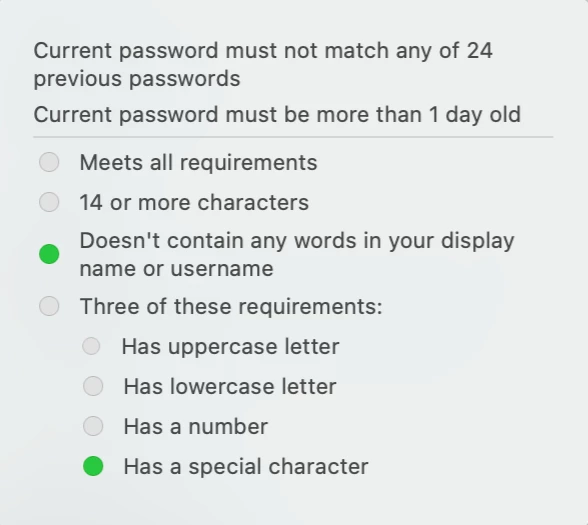
Question

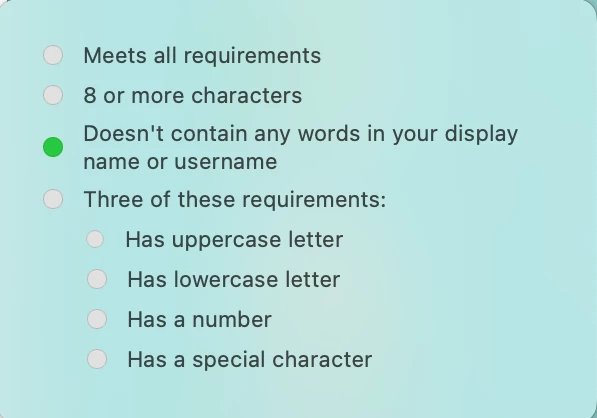
Change Password Requirement Popup

  • April 16, 2024
  • 4 replies
  • 8 views

Forum|alt.badge.img+4

Hi all,

I've been poking around to try and find a method in changing the password change popup notification message. Unfortunately, I've not found a lot of success. We only have the Jamf Pro product and do not have Connect.


Does anyone have an article or resource to point me toward in finding a solution to edit this message?
 

4 replies

Forum|alt.badge.img+14
  • Honored Contributor
  • April 16, 2024

Forum|alt.badge.img+4
  • Author
  • Contributor
  • April 16, 2024

Do you have a password policy configured?

https://support.apple.com/en-us/guide/deployment/depeadc2af0b/web


Hi!

Yes, I did set up a configuration profile for passcode and updated our current requirements. However, the flavor text does not change on that popup message even with the configuration profile on the device.


Forum|alt.badge.img+4
  • Author
  • Contributor
  • April 16, 2024

I was able to find my answer in another configuration profile that was using a single sign-on extension payload. I had to use some of the toggle switches in it to get the information changed.


Forum|alt.badge.img+1
  • New Contributor
  • April 17, 2024

Thank you so much for the link, My problem is solved now.