
Solved

Change Self Service description

  • September 13, 2016
  • 2 replies
  • 14 views

Forum|alt.badge.img+7

Hello,

This is probably a silly question but I've tried Googling/searching the forums but didn't find the results I wanted...

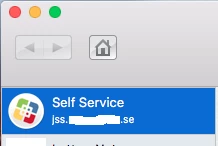
We've just started adding URLs to Self Service through Self Service Plug-Ins. This is all good, however this also creates a "Self Service"-button at the top of the menu and where the description is for the URL, there's now the address for where our JSS is hosted.

Is it possible to change this to something like "Self Service - Install applications" or similar instead of it displaying our URL?

Best answer by mm2270

No, this isn't possible right now, at least not without some kind of hacking of the JSS or the Self Service app.

But for reference, there's already a Feature Request on this, here. Its been under review for a while, so you may want to add a vote to it.

2 replies

mm2270
Forum|alt.badge.img+24
  • Legendary Contributor
  • Answer
  • September 13, 2016

No, this isn't possible right now, at least not without some kind of hacking of the JSS or the Self Service app.

But for reference, there's already a Feature Request on this, here. Its been under review for a while, so you may want to add a vote to it.


Forum|alt.badge.img+7
  • Author
  • Valued Contributor
  • September 14, 2016

Thank you, then I know!