Solved

Cisco Secure Client 5.1.0.136- AnyConnect VPN Service Not Enabled

  • December 21, 2023
  • 16 replies
  • 669 views

Forum|alt.badge.img+6

I've been down the rabbit hole of deploying Cisco's new Secure Client and I am running into an issue that I cannot find any documentation on. Some context: we only need the Umbrella Module for our school and nothing else that is loaded within Cisco's PKG. I have been successful with deploying the choice XML file, but I get the following pop-up in the installation: 
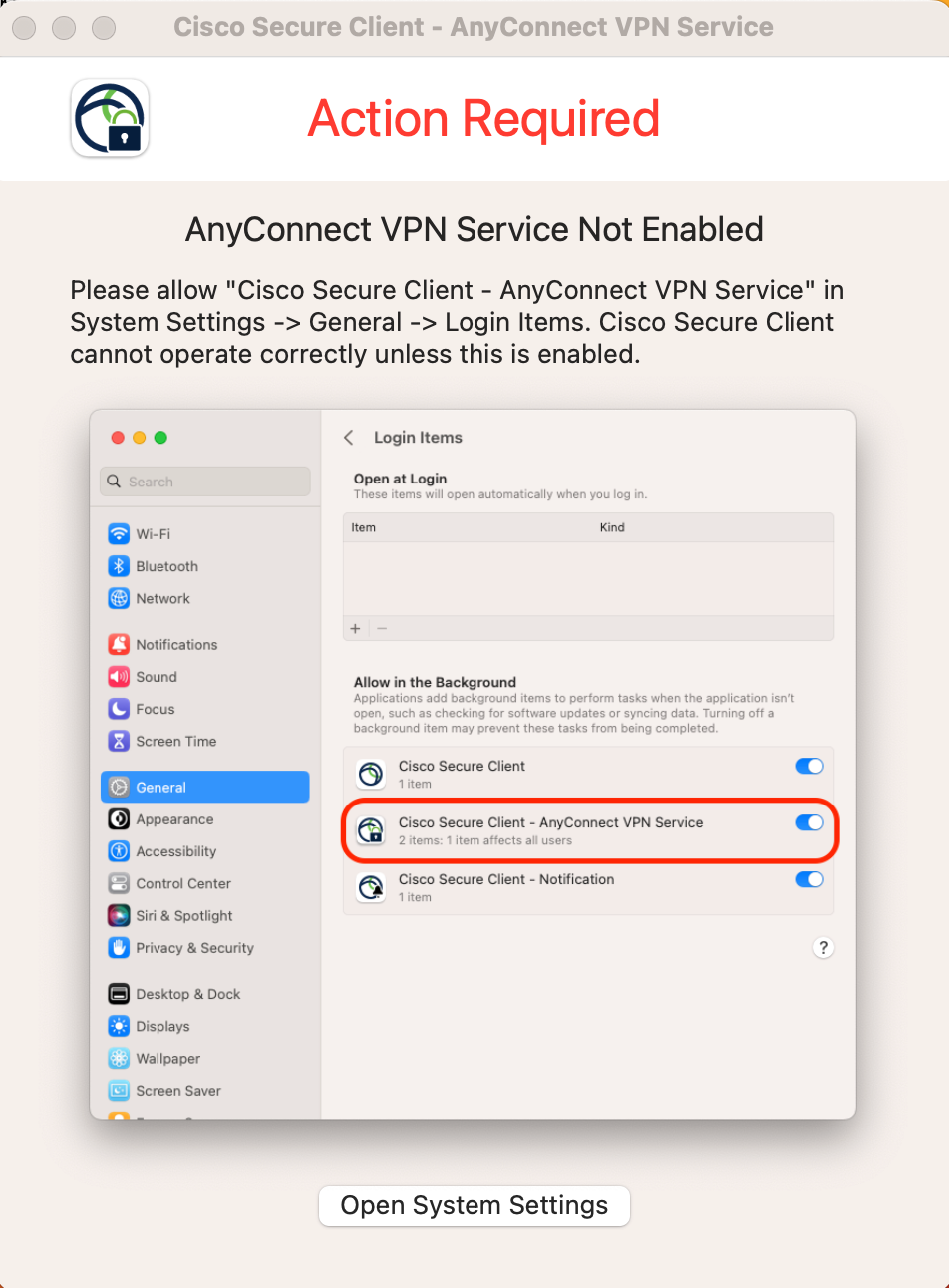
 I would like this permission to be enabled within the config profile I built in jamf, but I can't seem to locate any of the info I need to do so. I already have gone through Cisco's docs and pushed out the System Extensions payload, but that seems to be just for the Cisco Secure Client itself and not this "AnyConnect VPN Service." If I manually toggle it on, the Umbrella Roaming Module will activate and work as it should, but if this is not toggled on, then the roaming stays inactive.  


Any ideas? I am assuming there is something I am missing in the System Extensions payload, but I could be wrong... 
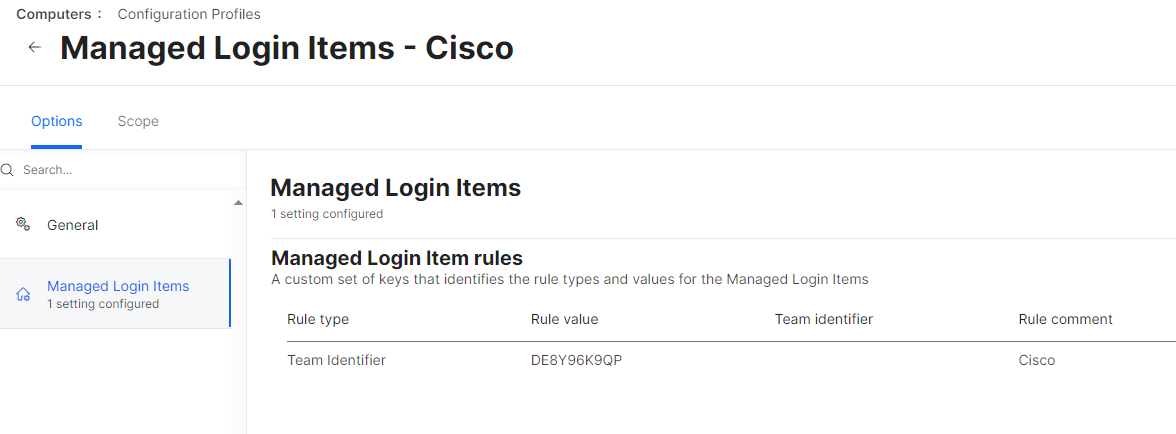
Best answer by dmccluskey

Looks like you need to make a 
Managed Login Items for cisco


16 replies

dmccluskey
Forum|alt.badge.img+8
  • Valued Contributor
  • Answer
  • December 21, 2023

Looks like you need to make a 
Managed Login Items for cisco


AJPinto
Forum|alt.badge.img+26
  • Legendary Contributor
  • December 21, 2023

The name displayed in that field is what Cisco wants it to be, not necessarily what it actually is. Cisco should have the documentation you need to get this approved. However, Cisco is also pretty well known for being beyond half effort with macOS. 


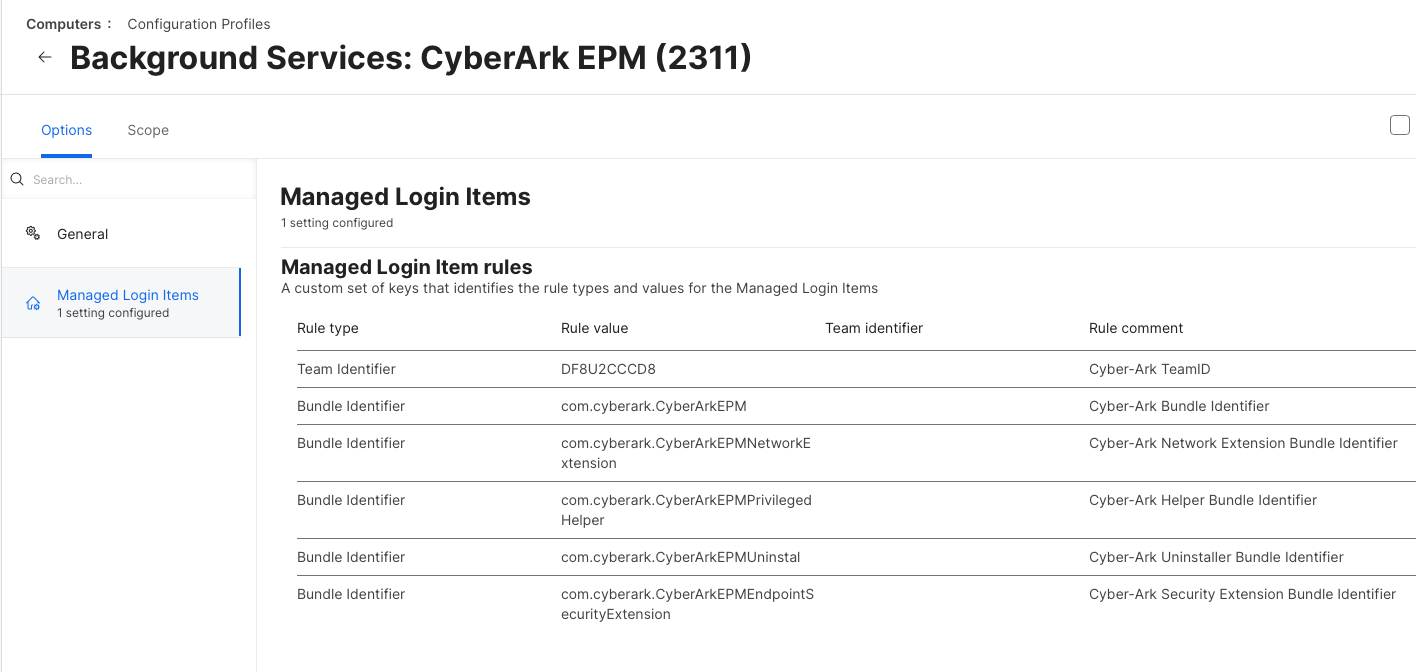
This is not a System Extension, it's a Background Service. You need to force enable the Background Service, or Managed Login Item as it's called in MDM. Below is an example of a configuration profile that would enable this toggle for an application called Cyber-Ark EPM. The general principle is the same for any Background Service approval. 

https://support.apple.com/guide/deployment/managed-login-items-payload-settings-dep07b92494/web

https://support.apple.com/guide/deployment/manage-login-items-background-tasks-mac-depdca572563/web


Forum|alt.badge.img+6
  • Author
  • Contributor
  • December 21, 2023

The name displayed in that field is what Cisco wants it to be, not necessarily what it actually is. Cisco should have the documentation you need to get this approved. However, Cisco is also pretty well known for being beyond half effort with macOS. 


This is not a System Extension, it's a Background Service. You need to force enable the Background Service, or Managed Login Item as it's called in MDM. Below is an example of a configuration profile that would enable this toggle for an application called Cyber-Ark EPM. The general principle is the same for any Background Service approval. 

https://support.apple.com/guide/deployment/managed-login-items-payload-settings-dep07b92494/web

https://support.apple.com/guide/deployment/manage-login-items-background-tasks-mac-depdca572563/web


Wow, yup that was it. Simple. I can't believe that step was missing from Cisco's Deployment docs. I just had to add the team id and the bundle id and boom. Thanks a ton! 


AJPinto
Forum|alt.badge.img+26
  • Legendary Contributor
  • December 21, 2023

Wow, yup that was it. Simple. I can't believe that step was missing from Cisco's Deployment docs. I just had to add the team id and the bundle id and boom. Thanks a ton! 


Woot, I'm glad you got it. 


@Jmardian wrote:

I can't believe that step was missing from Cisco's Deployment docs.


Oh, I can believe it was missing from their deployment docs. lol


Forum|alt.badge.img+6
  • Contributor
  • February 2, 2024

Woot, I'm glad you got it. 


@Jmardian wrote:

I can't believe that step was missing from Cisco's Deployment docs.


Oh, I can believe it was missing from their deployment docs. lol


Could you please post an example of the .mobileconfig
Would really appreciate it. 
Thanks


Forum|alt.badge.img+6
  • Contributor
  • February 2, 2024

Could you please post an example of the .mobileconfig
Would really appreciate it. 
Thanks


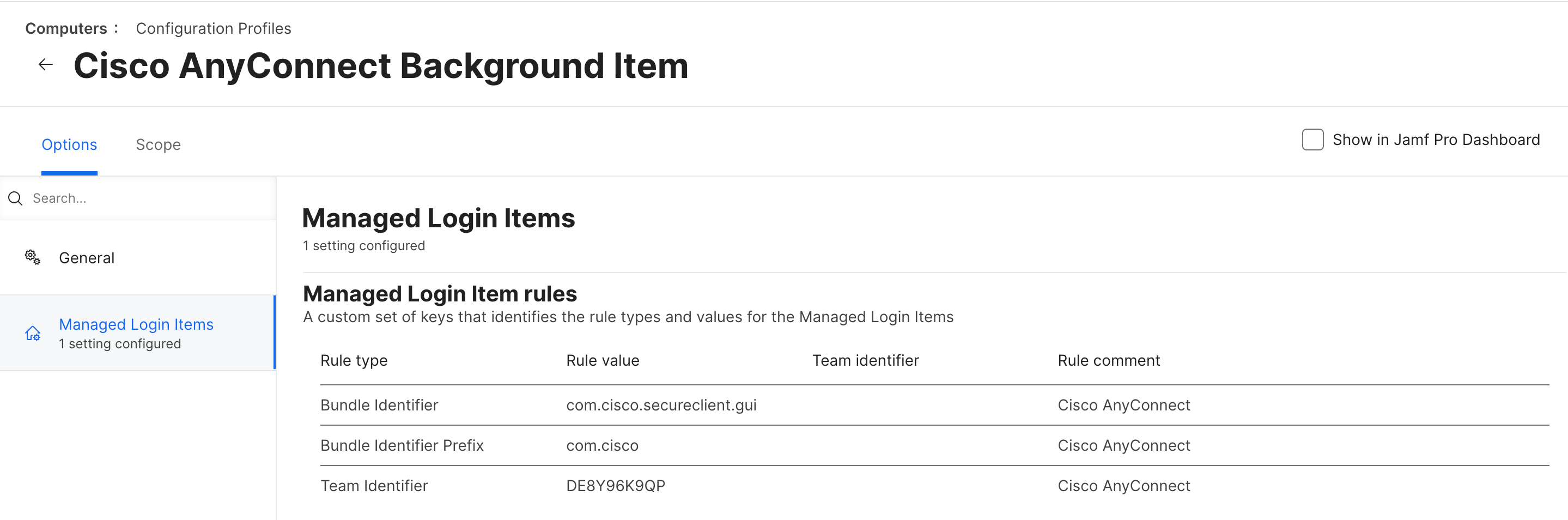
Got it working with the following config:


Forum|alt.badge.img+10

I have this working on 2 test Macs and on my production Mac, using the above config profile that @hhorn posted. However for 2 of my test users that I've deployed the same config profile to and the same version of AnyConnect (5.1.1.42), but they are still getting "no connection... Reattach failed"

What could be going wrong on my test users?


Forum|alt.badge.img+10

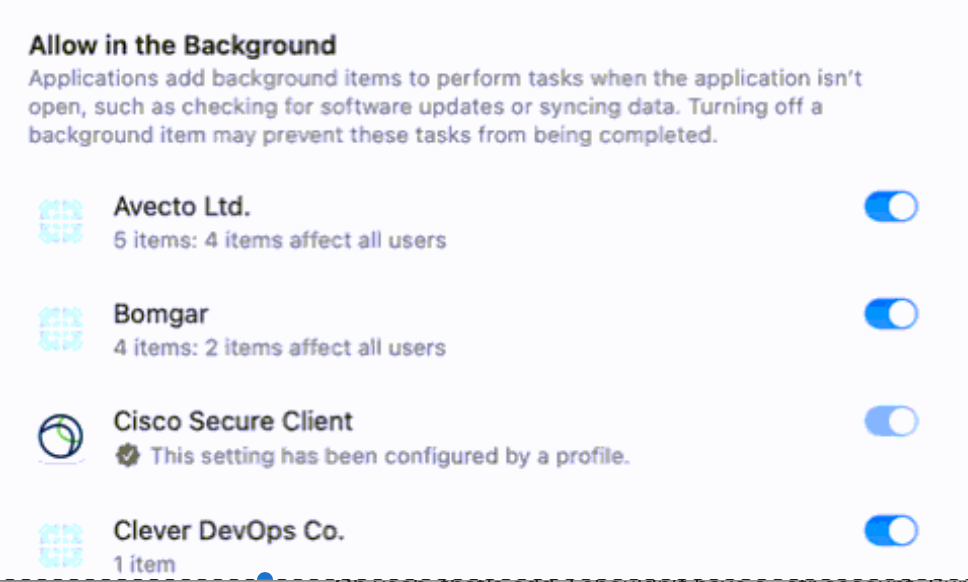
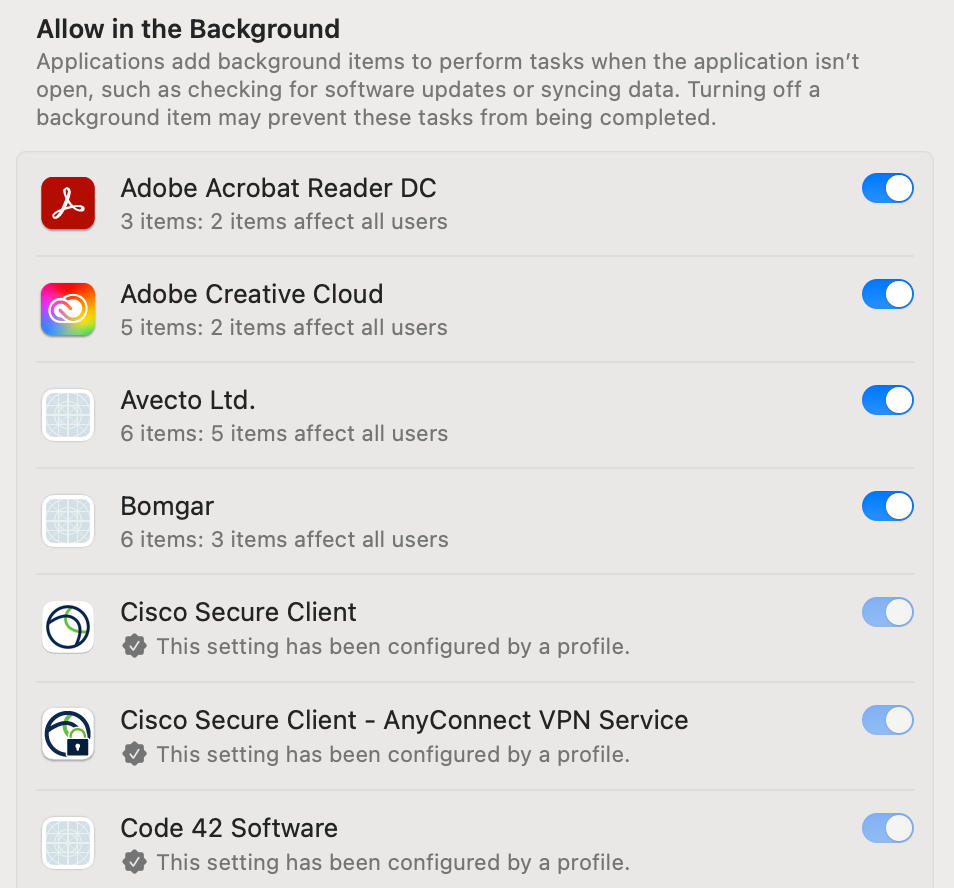
I found the problem is that the login item for "Cisco Secure Client – AnyConnnect VPN Service" isn't showing up on the devices that are having trouble. 

On my device where it is working, I do have the item:

How can I get "Cisco Secure Client – AnyConnnect VPN Service" to show up here?


Forum|alt.badge.img+3
  • New Contributor
  • February 15, 2024

I found the problem is that the login item for "Cisco Secure Client – AnyConnnect VPN Service" isn't showing up on the devices that are having trouble. 

On my device where it is working, I do have the item:

How can I get "Cisco Secure Client – AnyConnnect VPN Service" to show up here?


I had the same issue, it looks like a bug in newer Cisco install packages, I don't have the issue with 5.0 install packages.
I fixed it by manually starting the VPN service after the installation with:

open -a /opt/cisco/secureclient/bin/Cisco\\ Secure\\ Client\\ -\\ AnyConnect\\ VPN\\ Service.app


Forum|alt.badge.img+10

I had the same issue, it looks like a bug in newer Cisco install packages, I don't have the issue with 5.0 install packages.
I fixed it by manually starting the VPN service after the installation with:

open -a /opt/cisco/secureclient/bin/Cisco\\ Secure\\ Client\\ -\\ AnyConnect\\ VPN\\ Service.app


They finally have a fix that they provided to us in a test build of 5.1.3.18. We haven't deployed it to everyone yet but every device I've tested with it works as expected.


Bretterson
Forum|alt.badge.img+4
  • New Contributor
  • March 12, 2024

Got it working with the following config:


Just curious if there was a reason to do both "com.cisco" and "com.cisco.secureclient.gui"?


Forum|alt.badge.img+1
  • New Contributor
  • March 16, 2024

Hello, I have the same issue with Mac OS Sonoma 14.4 and Cisco 5.1.0.136. I did not understand how you solved it. Could you explain deeply how to do for fix the issue. I do not have in login items the Cisco app.

Many thanks in advance for the help


Forum|alt.badge.img+10

Hello, I have the same issue with Mac OS Sonoma 14.4 and Cisco 5.1.0.136. I did not understand how you solved it. Could you explain deeply how to do for fix the issue. I do not have in login items the Cisco app.

Many thanks in advance for the help


It is a bug with that version of AnyConnect. Cisco support provided us with a test built which solved the issue. The only way we could get the version you are using to work, is to run these commands either in Terminal or in a shell script after install.

sudo cp /opt/cisco/secureclient/bin/Cisco\\ Secure\\ Client\\ -\\ AnyConnect\\ VPN\\ Service.app/Contents/Resources/com.cisco.secureclient.vpnagentd.plist /Library/LaunchDaemons/ sudo launchctl bootstrap system /Library/LaunchDaemons/com.cisco.secureclient.vpnagentd.plist

danlaw777
Forum|alt.badge.img+17
  • Valued Contributor
  • March 21, 2024

It is a bug with that version of AnyConnect. Cisco support provided us with a test built which solved the issue. The only way we could get the version you are using to work, is to run these commands either in Terminal or in a shell script after install.

sudo cp /opt/cisco/secureclient/bin/Cisco\\ Secure\\ Client\\ -\\ AnyConnect\\ VPN\\ Service.app/Contents/Resources/com.cisco.secureclient.vpnagentd.plist /Library/LaunchDaemons/ sudo launchctl bootstrap system /Library/LaunchDaemons/com.cisco.secureclient.vpnagentd.plist

had this issue today, thanks for the great work!


Forum|alt.badge.img+1
  • New Contributor
  • March 27, 2024

Thank you very much!!! now it works!! Just someone else has the same issue: to fixing you should run the 2 codes separately.

Once again, Thank you!


Forum|alt.badge.img+8
  • Contributor
  • April 5, 2024

It is a bug with that version of AnyConnect. Cisco support provided us with a test built which solved the issue. The only way we could get the version you are using to work, is to run these commands either in Terminal or in a shell script after install.

sudo cp /opt/cisco/secureclient/bin/Cisco\\ Secure\\ Client\\ -\\ AnyConnect\\ VPN\\ Service.app/Contents/Resources/com.cisco.secureclient.vpnagentd.plist /Library/LaunchDaemons/ sudo launchctl bootstrap system /Library/LaunchDaemons/com.cisco.secureclient.vpnagentd.plist

Great fix! Did Cisco provide any documentation or perhaps a release note about this being fixed? I'd love to justify to my networking team why I'm requesting a newer version of Secure Client than the one they want me to deploy to our Macs.