Cisco Secure Client Repackager

  • December 5, 2025
  • 3 replies
  • 176 views

mvu
Forum|alt.badge.img+22

We’re moving away from Cisco Secure Client. But this utility is cool, and helpful.


• A macOS utility to repackage Cisco Secure Client DMG files for unattended deployment via Jamf Pro (or any MDM solution).

• huexley/CiscoRepackager

• https://github.com/huexley/CiscoRepackager?utm_campaign=MacAdmins.news&utm_medium=email&utm_source=MacAdmins.news_385

3 replies

mattjerome
Forum|alt.badge.img+11
  • Jamf Heroes
  • December 5, 2025

Thanks for this! I plan to use it for 5.1.13!


Jordy-Thery
Forum|alt.badge.img+15
  • Valued Contributor
  • December 8, 2025

This is a cool little tool indeed. 👌🏻


stheilgaard
  • New Contributor
  • April 13, 2026

I know it has been a procedure to repackage the Cisco Secure Client pkg, or maybe use InstallerChoice xml using the CLI installer so only the needed components got installed, but Cisco actually solved this.

Their recommendation is to use the webdeploy “package”, which could look like a macOS installer pkg, but it is actually a zip-archive. Yes, even Cisco knows that if you need to cheat your download through web filters, you should rename your zip-archives to .pkg. You can’t make this up 😁

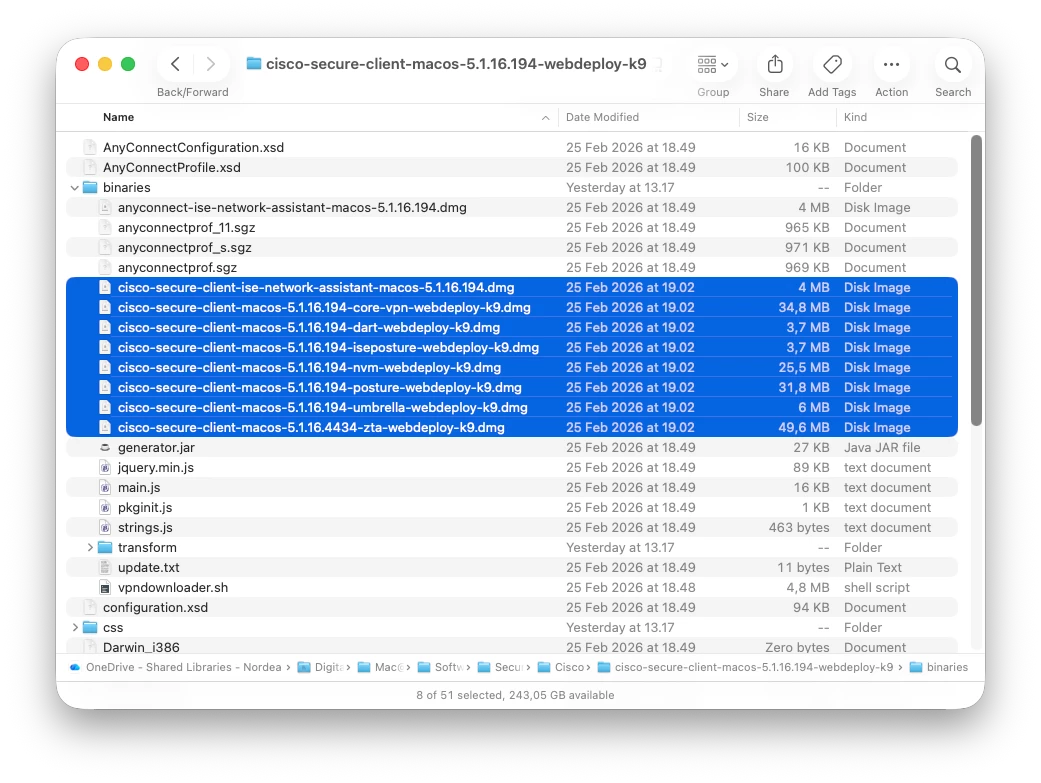
Rename the webdeploy pkg so it ends in “.zip”, then expand it, and navigate to the “binaries” folder. In here are the individual installer separated into individual dmg-files, so here you just grab the installers you need and mass-deploy them using your preferred MDM.

Cisco is still in the works of making some documentation to support this, so maybe we get more details later. But this IS the recommended procedure from Cisco to install Cisco Secure Client on macOS.

I will recommend to hide the uninstaller apps afterwords, by running a script that gives them the hidden flag, so users do not easily see these.