Solved

Company portal 5.2401.2 wit PSSO support

  • March 20, 2024
  • 36 replies
  • 382 views

Show first post

36 replies

Forum|alt.badge.img+1
  • New Contributor
  • March 22, 2024

To remove the notification, it is necessary to remove the SSOe profile completely, then deploy it again without PSSO.

it is not sufficient to remove only PSSO


Even deactivating it, it is populating users.

Do I need to do anything else?


Michael-Lopez
Forum|alt.badge.img+9

I have spent a few hours diagnosing this issue. Our organization is using SSOe to handle passing the PRT token around to our SSO applications in Entra/Azure. My mistake that I didn't keep up with the news that the SSOp would be turned on automatically with the CP deployed. 

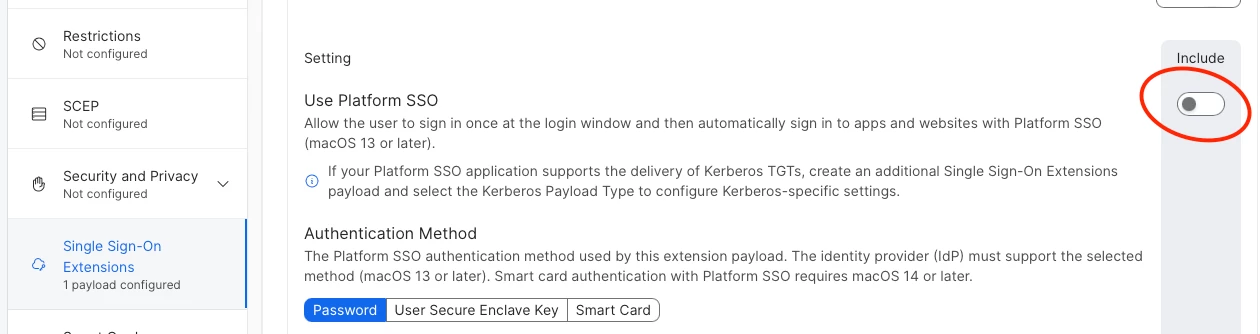
I deactivated the SSOp from the config profile, this is causing the banner to stay and cause a never ending login loop AFTER the SSOp is deactivated from the same config profile. 

Running the command app-sso platform -s you can see the output of signing into the banner. When running the command after every sign in attempt on the looping banner. You can see that the output of the command never changes from "POUserStateNeedsRegistration (2)" to "POUserStateNormal"

If you want to tail what the Company Portal app is doing in real time.

"tail -F ~/Library/Containers/com.microsoft.CompanyPortalMac.ssoextension/Data/Library/Caches/Logs/Microsoft/SSOExtension/*" 


Doing what n_leechi suggested of removing the entire profile and adding it back is solving the loop issue even though its removed. What I havent tested is how its affecting people who signed in different ways.


Michael-Lopez
Forum|alt.badge.img+9

I have spent a few hours diagnosing this issue. Our organization is using SSOe to handle passing the PRT token around to our SSO applications in Entra/Azure. My mistake that I didn't keep up with the news that the SSOp would be turned on automatically with the CP deployed. 

I deactivated the SSOp from the config profile, this is causing the banner to stay and cause a never ending login loop AFTER the SSOp is deactivated from the same config profile. 

Running the command app-sso platform -s you can see the output of signing into the banner. When running the command after every sign in attempt on the looping banner. You can see that the output of the command never changes from "POUserStateNeedsRegistration (2)" to "POUserStateNormal"

If you want to tail what the Company Portal app is doing in real time.

"tail -F ~/Library/Containers/com.microsoft.CompanyPortalMac.ssoextension/Data/Library/Caches/Logs/Microsoft/SSOExtension/*" 


Doing what n_leechi suggested of removing the entire profile and adding it back is solving the loop issue even though its removed. What I havent tested is how its affecting people who signed in different ways.


Also do not disable the device in Entra. It will prevent the users from using any products that use the IDP. Deleting seems to be the better solution. 


n_lecchi
Forum|alt.badge.img+13
  • Author
  • Contributor
  • March 25, 2024

Based on my testing with different environments and assistance from Jamf support, here is what I learned:

Problem
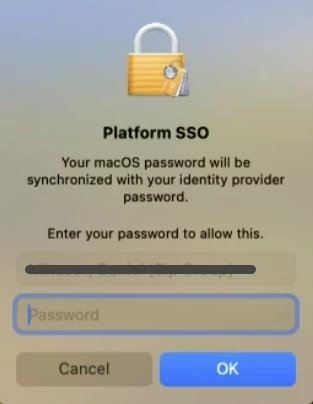
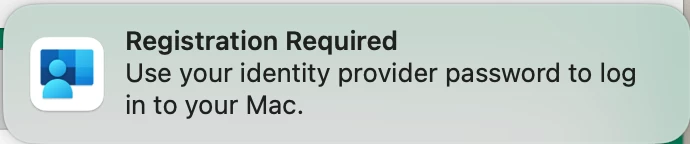
On Macs with Company Portal 5.24+ and PSSO enabled, users are prompted to register in Entra ID.

How to turn off the registration notification:

1. Remove the SSOe profile.
2. Disable PSSO in the SSO Extension profile.
3. Reinstall the SSOe profile without PSSO.


Manage device compliance registration (3 different scenarios):
1. If the end user entered his credentials in the PSSO window, he probably lost the WPJ key and needs to re-register for device compliance.

2. If the end user attempted to register before the PSSO settings were removed and the WPJ key is still present, they will need to manually delete the WPJ key, delete multiple records in Entra ID, and then register again.

3. If the end user has not attempted to re-register with PSSO, he only needs to try logging into a managed application after restarting the Mac. Perhaps he needs to re-register with device compliance.


This is not official information and may not cover all scenarios, but is just information based on my experience in these few days after the Company Portal upgrade.


rabbitt
Forum|alt.badge.img+17
  • Valued Contributor
  • Answer
  • March 25, 2024

For anyone following this topic, we have some remediation documented at https://www.jamf.com/blog/entra-id-platform-sso-device-compliance/ [link updated 4APR2024]


ath3rs
Forum|alt.badge.img+1
  • New Contributor
  • April 4, 2024

For anyone following this topic, we have some remediation documented at https://www.jamf.com/blog/entra-id-platform-sso-device-compliance/ [link updated 4APR2024]


Hey, this link no longer exists. Any ideas where this has gone? Thanks


DMH2000
Forum|alt.badge.img+7
  • Valued Contributor
  • April 4, 2024

Hey, this link no longer exists. Any ideas where this has gone? Thanks


@ath3rs Try this:  https://www.jamf.com/blog/entra-id-platform-sso-device-compliance/


rabbitt
Forum|alt.badge.img+17
  • Valued Contributor
  • April 4, 2024

Hey, this link no longer exists. Any ideas where this has gone? Thanks


Updated link.  Thank you.  


Forum|alt.badge.img+4
  • Contributor
  • April 5, 2024

We've followed the blog but are now faced with users devices appearing fine but are not passing their device info through to conditional access so are getting blocked.  The only way to fix this appears to be a complete cleanup of workplace join and re-registration.  Is anyone else having this issue?


DMH2000
Forum|alt.badge.img+7
  • Valued Contributor
  • April 5, 2024

@Rolden Here is what we are doing:

  1. Make sure user is off any VPN connections
  2. Make sure user has no updates pending as Profiles will not install if they are
  3. Delete Entra Joined object out of Entra
  4. Re-register Intune Integration
  5. Remove from SSO profile without signing out of Company Portal
  6. Repush the SSO profile
  7. Then sign out of company portal SSO and signed back in

This removes any Entra objects, registration creates a new Entra object and by removing/adding SSO profile, it refreshes Company Portal.


Forum|alt.badge.img+3
  • New Contributor
  • June 25, 2024

JAMF and Microsoft have fixed most of the bugs and the Secure Enclave is successful now The best part is Google Chrome works with passwordless authentication.  we still recommend on test devices only.