
Solved

Compliance Editor - CIS Level 1 benchmark with one false positive

  • August 14, 2024
  • 3 replies
  • 93 views

Forum|alt.badge.img+2

Good afternoon,

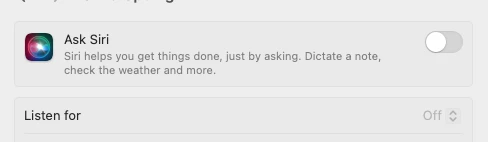
We are currently testing the Compliance Editor and have deployed the CIS Level 1 benchmark to three test devices via Jamf Pro. The benchmark appears to be fully implemented on these devices. However, the 'Sonoma CIS Benchmark Level 1 Audit' in Jamf is showing that the devices are non-compliant because Siri Listen was not disabled (system_settings_siri_listen_disable). I checked the devices, and Siri Listen was already disabled (screenshot below) before the CIS benchmark was applied. Does anyone know how can I resolve this false positive?


Thank you.

Best answer by boberito

Have you pushed the profile to disable it? The check is checking to see if the profile is in place. Right now (most likely) there actually is no value set for the preference it's checking

3 replies

boberito
Forum|alt.badge.img+22
  • Jamf Heroes
  • Answer
  • August 14, 2024

Have you pushed the profile to disable it? The check is checking to see if the profile is in place. Right now (most likely) there actually is no value set for the preference it's checking


jmahlman
Forum|alt.badge.img+17
  • Valued Contributor
  • August 14, 2024

Beat me to it, @boberito

I repled to this in slack but the one thing to remember about the MSCP checks is that it is not checking if Listen for is enabled…it’s checking if you have the control to explicitly disable it. A similar conversation was had on the project board: https://github.com/usnistgov/macos_security/discussions/410


Forum|alt.badge.img+2
  • Author
  • New Contributor
  • August 15, 2024

Thank you. The 'explicitly disabled' explanation clarifies things. I initially thought the remediation script would enforce the control, but it did not. Is there a profile I can upload instead which disables system_settings_siri_listen?
