Solved

Composer 10.28 - Couldn't communicate with a helper application

  • Apr 12, 2021 3:37 PM UTC
  • 36 replies
  • 1252 views

snowfox
Forum|alt.badge.img+9

Hi All,
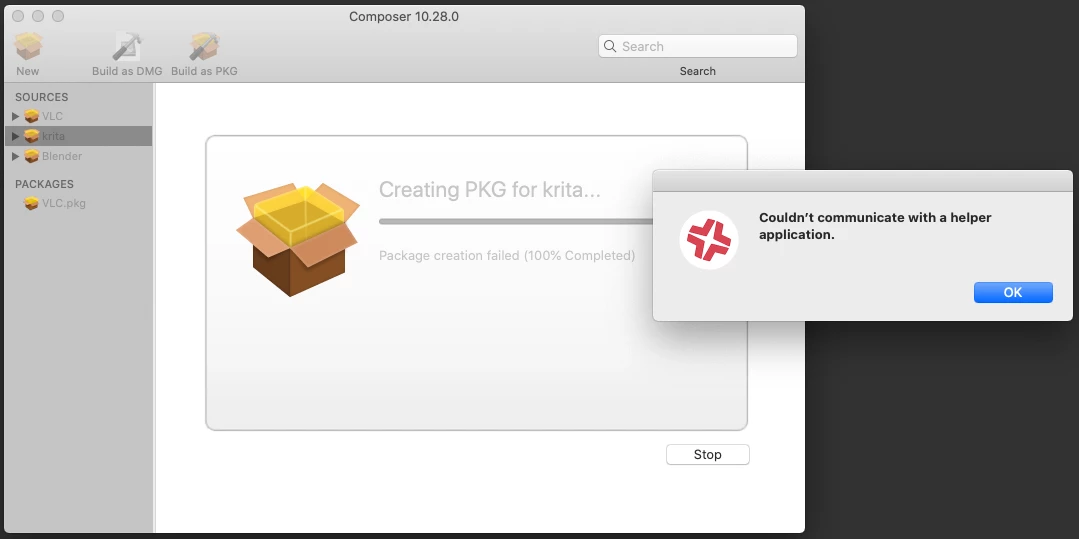
I've never had a problem before using composer to package apps until version 10.28. When packaging a drag and drop app such as Krita or Blender, Composer has started displaying this error message during the 'Build as PKG' build process - Couldn't communicate with a helper application.

I've never seen this before, it's doing it on a clean install of Catalina 10.15.7 and on a different machine with an upgrade to Big Sur 11.2.3.

It will package VLC successfully but not Krita or Blender.
It will create DMGs ok for all three.

All three are given the same owner/group & permissions before creating a new PKG. Root, Admin and 755.

Has anyone else encountered this issue and were you able to resolve it?
Thanks for any info!
Best answer by Reiven

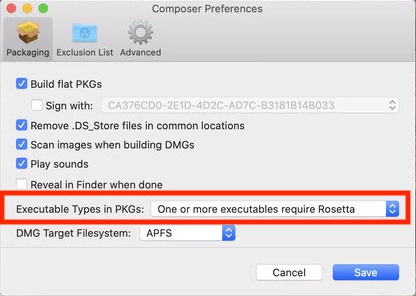
I was having the same issue. I checked the online manual and found that they added a new Preference for executable type I found that to be causing the issue. I can only hazard a guess that it is not detecting the executable type correctly. I went into Preferences and changed "Executable Types in PKGs:" to "One or More executables require Rosetta" from "Automatically detect executable types" it fixed the error.

View original

36 replies

Forum|alt.badge.img+5
  • New Contributor
  • Answer
  • Apr 14, 2021 8:57 PM UTC

I was having the same issue. I checked the online manual and found that they added a new Preference for executable type I found that to be causing the issue. I can only hazard a guess that it is not detecting the executable type correctly. I went into Preferences and changed "Executable Types in PKGs:" to "One or More executables require Rosetta" from "Automatically detect executable types" it fixed the error.


snowfox
Forum|alt.badge.img+9
  • Author
  • Contributor
  • Apr 16, 2021 11:31 AM UTC

Many thanks @reiven
That worked. Looks like the auto detect isn't detecting intel and universal binaries properly.


Kapil
Forum|alt.badge.img+5
  • New Contributor
  • May 10, 2021 3:51 PM UTC

@Reiven You save my day... Thanks a lot Buddy


Forum|alt.badge.img+7
  • Valued Contributor
  • May 15, 2021 8:27 PM UTC

@Reiven this worked for us thanks so much!


Forum|alt.badge.img+20
  • Contributor
  • Jun 3, 2021 6:11 PM UTC

got the same error and just made the same change in Composer and now it looks to be processing and just completed.


Forum|alt.badge.img+7
  • Contributor
  • Jun 11, 2021 5:23 PM UTC

Ditto. Thanks-a-lot!!!


chrisB
Forum|alt.badge.img+7
  • Valued Contributor
  • Jun 25, 2021 9:06 AM UTC

Thumbs up - thanks!


Forum|alt.badge.img+18
  • Valued Contributor
  • Jul 8, 2021 8:52 PM UTC

Thanks! We are digging into M1s now and that was literally a 60 second fix for our issue!


Forum|alt.badge.img+1
  • New Contributor
  • Jul 21, 2021 3:38 AM UTC

Thanks!


Hayden_Webb
Forum|alt.badge.img+6
  • Contributor
  • Aug 18, 2021 5:15 PM UTC

I was having the same issue. I checked the online manual and found that they added a new Preference for executable type I found that to be causing the issue. I can only hazard a guess that it is not detecting the executable type correctly. I went into Preferences and changed "Executable Types in PKGs:" to "One or More executables require Rosetta" from "Automatically detect executable types" it fixed the error.


Thank you!


EXP_SimonF
Forum|alt.badge.img+3
  • New Contributor
  • Feb 1, 2022 8:16 AM UTC

I was having the same issue. I checked the online manual and found that they added a new Preference for executable type I found that to be causing the issue. I can only hazard a guess that it is not detecting the executable type correctly. I went into Preferences and changed "Executable Types in PKGs:" to "One or More executables require Rosetta" from "Automatically detect executable types" it fixed the error.


it's now a year later, Jamf is up to 10.35 and this is still an issue. Thank you very much for this solution - worked a treat on my M1 Pro!


Forum|alt.badge.img+1
  • New Contributor
  • Feb 1, 2022 12:33 PM UTC

Thanks, resolved my problem with Composer


Forum|alt.badge.img+5
  • New Contributor
  • May 2, 2022 10:47 PM UTC

I was having the same issue. I checked the online manual and found that they added a new Preference for executable type I found that to be causing the issue. I can only hazard a guess that it is not detecting the executable type correctly. I went into Preferences and changed "Executable Types in PKGs:" to "One or More executables require Rosetta" from "Automatically detect executable types" it fixed the error.


Many Thanks 😊 


jordan_m1
Forum|alt.badge.img+5
  • Contributor
  • May 26, 2022 11:56 AM UTC

I was having the same issue. I checked the online manual and found that they added a new Preference for executable type I found that to be causing the issue. I can only hazard a guess that it is not detecting the executable type correctly. I went into Preferences and changed "Executable Types in PKGs:" to "One or More executables require Rosetta" from "Automatically detect executable types" it fixed the error.


Late reply but thank you! I've been beating my head against a Stata 17 package build for days. Finally got it!


Forum|alt.badge.img+4
  • New Contributor
  • Jun 15, 2022 7:08 PM UTC

Yes!  thank you spent a day trying to figure it out thinking it was my pacakge contents. 


AlanSmith
Forum|alt.badge.img+8
  • Valued Contributor
  • Jun 29, 2022 8:34 PM UTC

it's now a year later, Jamf is up to 10.35 and this is still an issue. Thank you very much for this solution - worked a treat on my M1 Pro!


And another 6 months later with 10.39  it is still a 'thing'.

The fix works perfectly, thanks.


Forum|alt.badge.img+4
  • Contributor
  • Aug 31, 2022 4:05 PM UTC

Yes!  thank you spent a day trying to figure it out thinking it was my pacakge contents. 


Thank you for this. Still seems to be the fix in 2022 with Composer v.10.40.0


Forum|alt.badge.img+4
  • New Contributor
  • Sep 20, 2022 3:40 PM UTC

I was having the same issue. I checked the online manual and found that they added a new Preference for executable type I found that to be causing the issue. I can only hazard a guess that it is not detecting the executable type correctly. I went into Preferences and changed "Executable Types in PKGs:" to "One or More executables require Rosetta" from "Automatically detect executable types" it fixed the error.


thank you that helped me a lot!!!


rcole
Forum|alt.badge.img+7
  • New Contributor
  • Oct 27, 2022 1:07 AM UTC

I was having the same issue. I checked the online manual and found that they added a new Preference for executable type I found that to be causing the issue. I can only hazard a guess that it is not detecting the executable type correctly. I went into Preferences and changed "Executable Types in PKGs:" to "One or More executables require Rosetta" from "Automatically detect executable types" it fixed the error.


Thank you for this. Fixed my issue with 10.42.0 as well.


Forum|alt.badge.img
  • New Contributor
  • Oct 28, 2022 4:30 PM UTC

@Reiven you saved my day. Cheers mate!


Forum|alt.badge.img+1
  • New Contributor
  • Nov 10, 2022 7:20 PM UTC

Still an issue on 10.41 and this is still the fix.  Thank you!!


summoner2100
Forum|alt.badge.img+7

Glad I found this post. Still an issue on 10.42.1 and on a Ventura client. lol 


mvu
Forum|alt.badge.img+25
  • Jamf Heroes
  • Mar 8, 2023 4:07 PM UTC

Worked for me on 10.44.1 and Ventura client. Oddly, this didn't happen before when I tried to package the same stuff. Started today.


asuneson
Forum|alt.badge.img+3
  • New Contributor
  • Apr 4, 2023 4:55 AM UTC

Late reply but thank you! I've been beating my head against a Stata 17 package build for days. Finally got it!


a bit late but how did you create the stata 17 and activation package in composer without it failing? i havent been able to figure it out!


Forum|alt.badge.img+1
  • New Contributor
  • Aug 3, 2023 8:55 PM UTC

This fix worked for me. I was experiencing this issue when packaging Krita today on an M2 Max-enabled MacBook pro. Using composer 10.48.1