Question

Crestron AirMedia app 3.1.12 not recognizing config.ini & room_list.xml

  • July 22, 2019
  • 17 replies
  • 76 views

Forum|alt.badge.img+5

I'm putting together a deployment for the newest version of Crestron AirMedia and i'm having some issues with the app picking up the room_list.xml that's been in use by an older version of AirMedia.

The config.ini file resides in the correct location for AirMedia to read it. The config.ini points to the location of room_list.xml which is pushed locally to the user's Mac. The AirMedia app has full disk access and accessibility in Security & Privacy. I don't see anything blocking AirMedia from trying to use these files.

The version before this one (can't remember the version number) can pull the room list without issue, however, it's not compatible with Mojave. I've also checked the deployment documentation and nothing has changed (.ini & .xml structure stayed the same, file location stayed the same).

Has anyone encountered this issue in their environment?

17 replies

whitebeer
Forum|alt.badge.img+7
  • Contributor
  • July 22, 2019

already made a bug report to Crestron that their documentation is wrong and told them where to put the files - for me it was the first deployment of Crestron AirMedia.

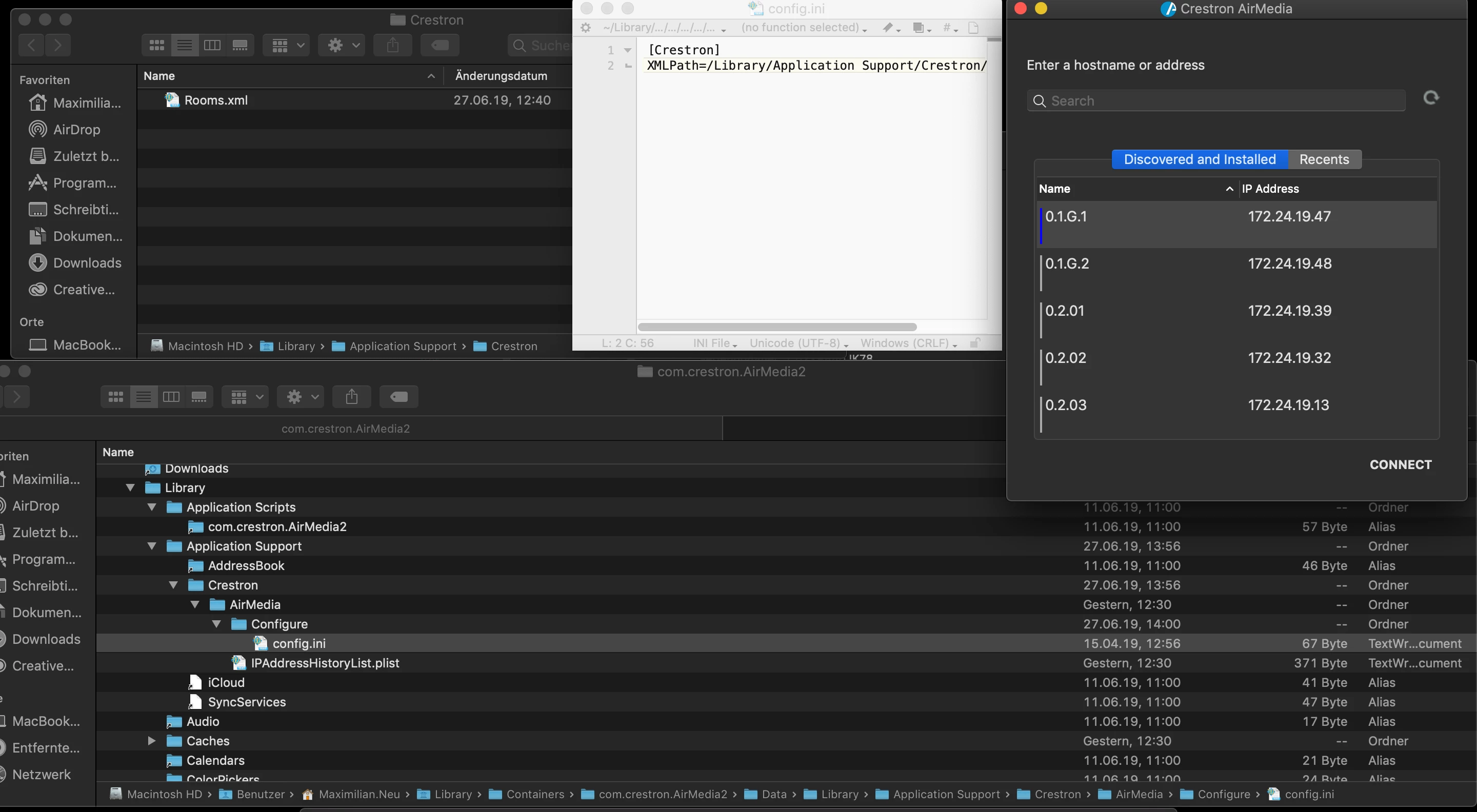
put the config.ini under /Users/<USER>/Library/Containers/com.crestron.AirMedia2/Data/Library/Application%20Support/Crestron/AirMedia/Configure
and it works again, but I don't like this workaround that much - they told me that it was because of the macOS 10.14.5 update ...


Forum|alt.badge.img+5
  • Author
  • Contributor
  • July 22, 2019
put the config.ini under /Users/<USER>/Library/Containers/com.crestron.AirMedia2/Data/Library/Application%20Support/Crestron/AirMedia/Configure

Sweet - i'll try that today and see how it goes. Thanks!


Forum|alt.badge.img+5
  • Author
  • Contributor
  • July 22, 2019
put the config.ini under /Users/<USER>/Library/Containers/com.crestron.AirMedia2/Data/Library/Application%20Support/Crestron/AirMedia/Configure

This didn't appear to work for me. Tried on 5 Macs.


whitebeer
Forum|alt.badge.img+7
  • Contributor
  • July 23, 2019

I made you a small collage with the setup working for us 😊


Forum|alt.badge.img+5
  • Author
  • Contributor
  • July 23, 2019

Set mine up exactly like yours - still no go.


whitebeer
Forum|alt.badge.img+7
  • Contributor
  • July 24, 2019

did you cross-check your rooms.xml with a windows client? that’s what I did just to be sure it’s a working one 😅


Forum|alt.badge.img+5
  • Author
  • Contributor
  • July 24, 2019

Yep - I'm using the exact same XML file used for our Windows machines and they work just fine.


Forum|alt.badge.img+5
  • Author
  • Contributor
  • July 29, 2019

Finally got it working - all i did was change the name of our XML file from room_list.xml to Rooms.xml. so weird.


Forum|alt.badge.img+3
  • New Contributor
  • August 28, 2019

@whitebeer @ajfunk ; Do you have Airmedia - script to update config.ini every time new IP is detected with active directory office name

or Script to update airmedia config file to pull the list of devices by AD site


Forum|alt.badge.img+5
  • Author
  • Contributor
  • August 28, 2019

@yateeshkumark - i deploy these ini and config files in a pkg through a policy. it's the easiest way i've found to update those kinds of files.


Forum|alt.badge.img+3
  • New Contributor
  • August 28, 2019

@ajfunk - thank you , is it possible to provide source of the ini or config files to fetch the information by AD site , would be helpful for packaging .


Forum|alt.badge.img+5
  • Author
  • Contributor
  • August 28, 2019

@ykk i'm honestly not sure, i just update the ini and XML files with new room info when necessary, re-package and re-deploy.

We're moving away from Crestron and toward Zoom at my org, so this will all be behind me soon.


Forum|alt.badge.img+3
  • New Contributor
  • August 28, 2019

@ajfunk - i meant about sharing the xml files to me as reference, so would be useful for packaging .


Forum|alt.badge.img+3
  • New Contributor
  • August 28, 2019

@ajfunk - possible to share the config.ini file of airmedia application as reference , we are planning to deploy the application in our environment


Forum|alt.badge.img+5
  • Author
  • Contributor
  • September 3, 2019

@ykk the config.ini is pretty basic:

[Crestron]
XMLPath=/Library/Application Support/Crestron/AirMedia/Configure/Rooms.xml

Forum|alt.badge.img+3
  • New Contributor
  • October 16, 2019

@ajfunk : thank you, can you share the complete script of airmedia


Forum|alt.badge.img
  • New Contributor
  • July 22, 2020

Hey Guys,
I need help with this one as i am trying to overwrite the config.ini as my XML path is located Via a URL link.
[Crestron]
XMLPath=https://example.com.au/corporate/crestron/room_list.xml (Example of it)
Is there a shell script anyone recommends to help overwrite the file with the text above.

Kind Regards,
Jay