Question

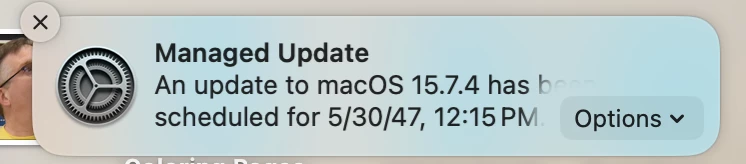
DDM Software Update with a out of wack date

  • March 16, 2026
  • 2 replies
  • 61 views

atomczynski11
Forum|alt.badge.img+18

DDM Software Update is working fantastic for the most part.
Majority of the fleet has updated.
I’ve created static groups to act as manual rings. 

I have few stranglers that will not update. There is enough storage, user has secure token, computers are ADE enrolled. Computers are checking in.

I have the following screenshot from one endpoint.
Management, Operating System shows “No Updates in progress”.

How do I fix this?
 

2 replies

mvu
Forum|alt.badge.img+22
  • Jamf Heroes
  • March 17, 2026

Try toggling off the Software Updates? Or are you using Blueprints?


Forum|alt.badge.img+3
  • New Contributor
  • March 17, 2026

I’ve seen Jamf’s DDM “No Updates in progress” state when the Mac never actually creates/accepts the update *plan* (so Jamf has nothing to track), even though the declaration is still in scope.


A couple quick checks that usually narrow it down:

1) On an affected Mac, confirm the OS actually sees the update: `softwareupdate --list` (and verify you don’t have an update deferral profile holding it back).

2) Confirm the device is in a state where DDM updates will run: on AC power, enough free space, user session not blocking required UI, and for major upgrades make sure you have a volume owner / bootstrap token situation that allows the upgrade.

3) If it’s stuck, I’ve had luck removing the device from the DDM update scope (or toggling the feature off/on), then re-adding to force Jamf to generate a fresh plan.


If you want a quick “what’s actually happening under the hood” explainer for Apple’s DDM update flow + common limitations, this write-up is handy: Adhoc OS Updates for Apple Devices