Question

Defer major macOS updates macOS 27

  • June 16, 2026
  • 20 replies
  • 478 views

BCPeteo
Forum|alt.badge.img+11

So It seems Apple has removed some MDM control of macOS updates in macOS 27 and they are only allowing using DDM commands to do this.

Wanting to know if the Defer Major macOS updates MDM profile setting will work in macOS 27 or is this gone too? (I would assume that deferring upgrading to 27 will still work since older versions of the OS still support MDM update control. This is more about the future) 

I see with Jamf 11.29 that the download & schedule install is now DDM and works on prem but what we are really looking for is a way to continue Defer Major macOS updates for 90 days. We are not in Jamf cloud and not really looking to move.

20 replies

PaulHazelden
Forum|alt.badge.img+14
  • Jamf Heroes
  • June 17, 2026

Pretty sure that in OSX 27 the MDM command to defer will not work.
BUT...
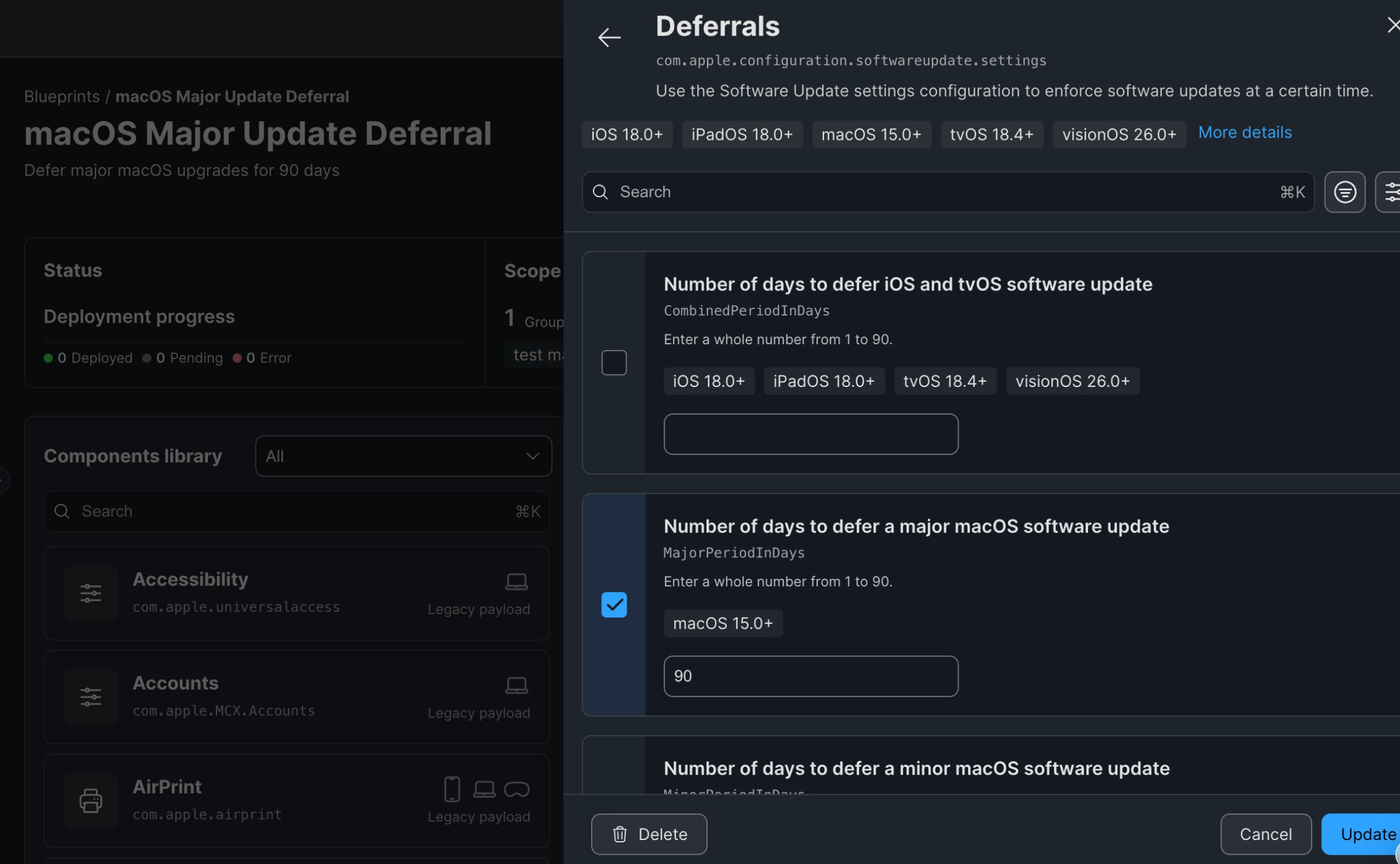
If you use Blueprints with DDM, then you can go back to having major OSX version deferals at 90 days.There is a deferal section in the Blueprints for Software Updates.
I think if you set up SSO sign in to your on Prem then you can get access to Blueprints.


BCPeteo
Forum|alt.badge.img+11
  • Author
  • Contributor
  • June 17, 2026

Thanks as noted above I do not have JAMF Cloud nor do we have Jamf ID SSO setup (we have our own SSO on prem for jamf) so I do not have access to blue prints.

It would be nice if JAMF enabled DDM macOS deferrals for on prem like they are doing for the Download & schedule DDM command. 


PaulHazelden
Forum|alt.badge.img+14
  • Jamf Heroes
  • June 17, 2026

The deferrals may be on their way. I was at JNL London yesterday, and they showed it in a demo, said there were upgrades coming at the end of the month.
It’s Apple and their push for DDM, that is driving this. They did say there are things in progres for on Prem servers.


BCPeteo
Forum|alt.badge.img+11
  • Author
  • Contributor
  • June 22, 2026

Thank you for that info, look forward to learning more.


Antzonic
Forum|alt.badge.img
  • New Contributor
  • June 25, 2026

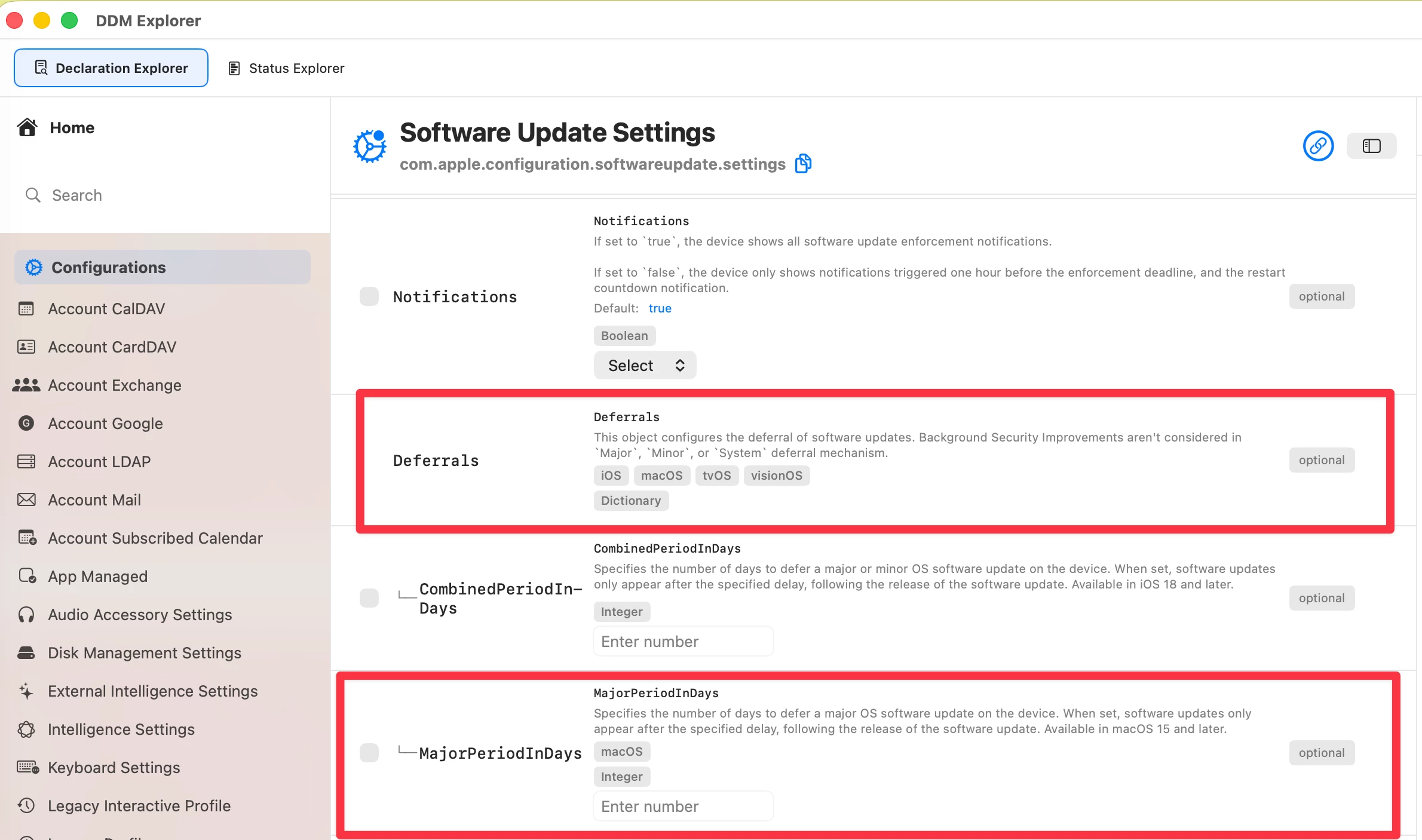
If you want to check out all the available declarations payloads and keys for Software Update Settings and others download Jamfs awesome DDM Explorer

MajorPeriodInDays deferrals is there :) You can copy the json output and test 


BCPeteo
Forum|alt.badge.img+11
  • Author
  • Contributor
  • June 25, 2026

Cool, But those only work in blue prints now right?


FerrisBNA
Forum|alt.badge.img+6
  • Contributor
  • June 25, 2026

Will adding the update as a Restriction still work?


PaulHazelden
Forum|alt.badge.img+14
  • Jamf Heroes
  • June 26, 2026

Will adding the update as a Restriction still work?

Should still work with 26 and lower, but will not work with 27. I say should, because this is Apple and they may pull it from 26 as well, the notifications when they announced did not exclude future versions of 26.


Forum|alt.badge.img+3
  • Contributor
  • July 2, 2026

Thank you for that info, look forward to learning more.

HI, i also have a on prem Jamf Pro instance, and i’m interested in how you setup the MacOS upgrade restriction.

Thank you


mfletch
Forum|alt.badge.img+9
  • Contributor
  • July 2, 2026

You should be able to configure a Profile with a Restrictions payload to disable Software Update (System Settings>General>Software Update)


Forum|alt.badge.img+3
  • Contributor
  • July 2, 2026

You should be able to configure a Profile with a Restrictions payload to disable Software Update (System Settings>General>Software Update)

Thank you for your answer, could you screen how you configure it in Jamf?

Just to be sure i made the good things


mfletch
Forum|alt.badge.img+9
  • Contributor
  • July 2, 2026

Create a new Profile and on the left, scroll down and look for Restrictions payload and click it and then click configure and you will see a box that says “Restrict items in System Preferences”, click that and then check the box for “Disable selected items” and then scroll down and find Software Update and check it. Then scope the profile to your test machine.


Forum|alt.badge.img+3
  • Contributor
  • July 2, 2026

Ok thats what i did, i will try on my test machine, does it also block minor security system update?

if yes, it would be anoying 


Forum|alt.badge.img+3
  • Contributor
  • July 2, 2026

Thank you


BCPeteo
Forum|alt.badge.img+11
  • Author
  • Contributor
  • July 2, 2026

Create a new Profile and on the left, scroll down and look for Restrictions payload and click it and then click configure and you will see a box that says “Restrict items in System Preferences”, click that and then check the box for “Disable selected items” and then scroll down and find Software Update and check it. Then scope the profile to your test machine.

I think point is this will not work in macOS 27 as apple is using DDM to do this now


Forum|alt.badge.img+3
  • Contributor
  • July 2, 2026

Ok need to know how to manage this with DDM on Jamf, i don’t understand how it works


BCPeteo
Forum|alt.badge.img+11
  • Author
  • Contributor
  • July 2, 2026

Ok need to know how to manage this with DDM on Jamf, i don’t understand how it works

With Jamf pro cloud you use blue prints

https://learn.jamf.com/r/en-US/jamf-pro-blueprints-configuration-guide/Configuring_the_Software_Updates_Component


BCPeteo
Forum|alt.badge.img+11
  • Author
  • Contributor
  • July 2, 2026

Ok need to know how to manage this with DDM on Jamf, i don’t understand how it works

With Jamf pro cloud you use blue prints

https://learn.jamf.com/r/en-US/jamf-pro-blueprints-configuration-guide/Configuring_the_Software_Updates_Component

Also Derflounder has a guide on deferrals with blueprints https://derflounder.wordpress.com/2026/01/26/deploying-apple-software-update-deferrals-using-blueprints-in-jamf-pro/


Forum|alt.badge.img+3
  • Contributor
  • July 2, 2026

Ok need to know how to manage this with DDM on Jamf, i don’t understand how it works

With Jamf pro cloud you use blue prints

https://learn.jamf.com/r/en-US/jamf-pro-blueprints-configuration-guide/Configuring_the_Software_Updates_Component

Thank you but, i don’t have Jamf Cloud, i’m on premise Jamf Pro instance.


Forum|alt.badge.img+4
  • Contributor
  • July 15, 2026

By using Blueprint.

  1. Add the Software Update Settings component.
  2. Go to Deferrals.
  3. Enable Number of days to defer a major macOS software update.
  4. Set it to 90.
  5. Scope the Blueprint 

This is what I'm using to block macOS 27 for 90 days.