Question

Defer major macOS updates macOS 27

  • June 16, 2026
  • 39 replies
  • 3676 views

Show first post

39 replies

mvu
Forum|alt.badge.img+25
  • Jamf Heroes
  • September 15, 2026

If you don’t want your Macs to see a minor or major upgrade, you have to do something on your MDM. Use a deferral.


Forum|alt.badge.img+11
  • Valued Contributor
  • September 15, 2026

Did not set deferrals, but had all our Macs set to update to a specific version (was 26.6.2). Yesterday Macs were showing that they were already on the latest allowed version of macOS for our organization. Today they’re offering macOS 26.7 and 27 - ridiculous.

This year I created a new Config Profile just for the Major Deveral and it looks like that it works for now, keep fingers crossed 👍


mvu
Forum|alt.badge.img+25
  • Jamf Heroes
  • September 15, 2026

That will change next year for iOS/macOS 27.


BCPeteo
Forum|alt.badge.img+11
  • Author
  • Contributor
  • September 15, 2026

That will change next year for iOS/macOS 27.


Yes we know this that's why we are asking Jamf to get the DDM Major block setting into Jamf pro on prem since we do not have access to Blue Prints.


jamfdude
Forum|alt.badge.img
  • New Contributor
  • September 15, 2026

I spoke to a different support rep while waiting for the one assigned to my “conversation” and he asked me to provide a system reports for the impacted system which I did. He also stuck to the party line that the MDM-based deferral payload keys are “deprecated” but conceded they should work for macOS 26 and earlier. In my case, I’ve found 2 computers running 15.x that are being offered 27.0 and 1 computer running 26.x that is not being offered 27.0. All seem to have the same/proper MDM payloads set. I’ve also enrolled a test unit on 15.x and confirmed it has the proper payloads set and it immediately starts offering 27.0 before I even launch software update for the first time (the “1” badge is visible on the icon before I even click it and once I do that’s what it’s flagging).

JAMF support also says blueprints require OIDC SSO to be tied into JAMF Account and that is ONLY available for JAMF cloud so I’m not sure what us on-premise folks are supposed to do other than look fro a new MDM provider in the next 2 years when it’s DDM or bust.


Forum|alt.badge.img+11
  • Valued Contributor
  • September 16, 2026

​@jamfdude Just to double-check: there was no configuration profile with software update settings installed on the Macs beforehand?
If that was the case, then what happened aligns with my experience. The Macs sometimes pull the very latest macOS version, even if that wasn't requested in the MDM/DDM command.


  • New Contributor
  • September 16, 2026

+1 on this. Many of us with on-prem requirements are facing the exact same challenge ahead of macOS 27 rollouts.

Because traditional configuration profile restrictions won't cut it once macOS 27 drops, we really need the DDM com.apple.configuration.management.test / softwareupdate.settings declaration payloads exposed natively in Jamf Pro without requiring Cloud-only Blueprints.

In the interim, has anyone tested deploying custom declaration payloads via the Jamf Pro API or using tools like DDM Explorer to see if an on-prem instance can push the JSON payload directly? Would love to know if anyone found a viable stopgap.


jamfdude
Forum|alt.badge.img
  • New Contributor
  • September 16, 2026

​@JevermannNG negative, there was a configuration profile installed on the macs beforehand and it’s been in place for some time. JAMF profile logs shows it was installed on most of the fleet back in April 2026. It’s also (now) been set to install as part of the pre-stage enrollment to ensure it’s there as early as possible and even then I’m finding macOS 27 being offered immediately on first boot using a test unit I have re-enrolled several times to try and sort this out. JAMF support confirmed on a VM running 15.x that the profile worked for them so I’m at a loss as to why it’s not working consistently for me now. I’ve also asked them for advice on how to “clean up” a system that may have fallen into this trap but haven’t heard back yet. If you or anyone else know of a way to reset the software update catalog which has already”learned” about macOS 27’s availability so that hopefully the profile will keep it from returning once it’s deleted that would be deluxe. The software update settings pushed via JAMF pro are set to not automatically download any software FWIW so they haven’t downloaded Golden Gate yet, but that doesn’t stop software update from showing it to users and would no doubt allow them to install it if they asked it to.


​@nityamb1508 I had considered that but hadn’t tried it yet as I wasn’t sure it was possible. If it is viable I would give it a shot


Forum|alt.badge.img+11
  • Valued Contributor
  • September 16, 2026

​@jamfdude could you post the code of the Software Update CP here?

I would create a plain new CP which just contains the setting for the major software update and push it to all clients. Check if there is any other CP which might contain the same setting and disable it.

I tried to block the macOS Golden Gate Installer with Jamfs “Restricted software” feature but couldnt figure out how … has anyone some Tips on this?


Forum|alt.badge.img+11
  • Valued Contributor
  • September 16, 2026

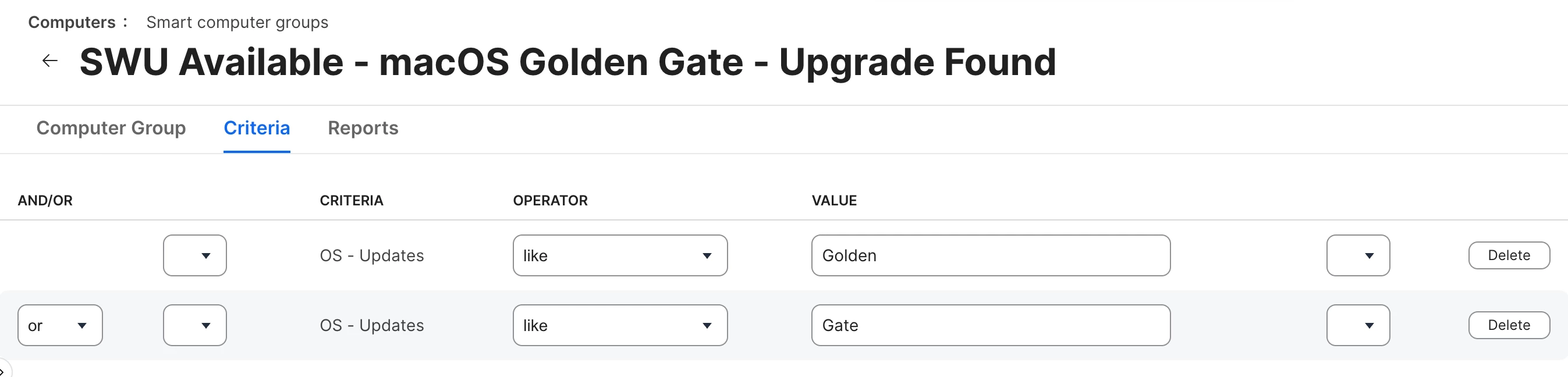
​@jamfdude Maybe the following EA helps you to find Macs in your fleet who get the macOS Golden Gate offered. I use it for a Smart Group which lists me Macs:
 

EA: “OS - Updates”

#!/bin/bash

SoftwareUpdatePList="/Library/Preferences/com.apple.SoftwareUpdate.plist"
UpdateLookingFor="macOS"

# Check if the plist and key exist first to avoid defaults read errors
if [ ! -f "$SoftwareUpdatePList" ]; then
echo "<result>Plist Not Found</result>"
exit 0
fi

UpdateIsAvailable=$(/usr/bin/defaults read "$SoftwareUpdatePList" RecommendedUpdates 2>/dev/null | grep "$UpdateLookingFor")

if [ -n "$UpdateIsAvailable" ]; then
FinalResult="$UpdateIsAvailable"
else
RecommendUpdates=$(/usr/bin/defaults read "$SoftwareUpdatePList" RecommendedUpdates 2>/dev/null)
if [[ "$RecommendUpdates" =~ [[:alnum:]] ]]; then
FinalResult="RecommendUpdates - $RecommendUpdates"
else
FinalResult="RecommendUpdates - Not Found"
fi
fi

echo "<result>$FinalResult</result>"
exit 0

The Smart Group looking for Macs who get macOS 27 offered:


jamfdude
Forum|alt.badge.img
  • New Contributor
  • September 16, 2026
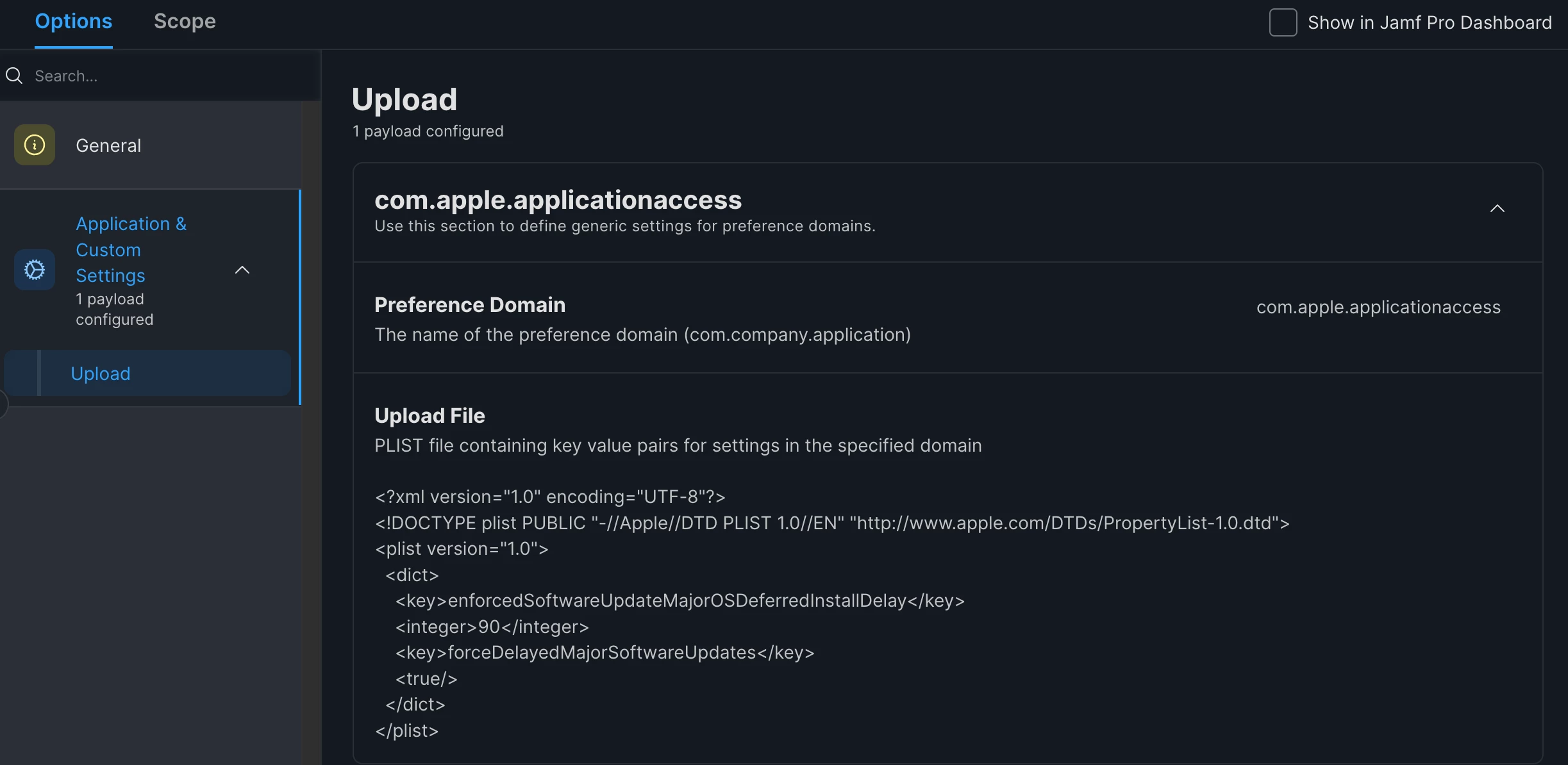
here’s the profile

there is nothing else in it but this restriction

there is another profile @ “/Library/Managed Preferences/com.apple.applicationaccess.new.plist” that is setting “familyControlsEnabled = false” the source of which I”m unsure of. I asked JAMF support about if that would be in conflict given it starts off with the same com.apple.applicationaccess but they said no b/c it’s in a different preference domain

I also find the 2 deferred keys in com.apple.SoftwareUpdate which I think is from when it used to be an option that could selected in JAMF via a check box and then filling in the # of days in a form field but I believe that’s been (re)moved from the UI but probably still exists in the profile payload from when it was available. I don’t think that should be in conflict either as it’s also in a different preference domain.

thanks for the EA idea, I was going to take a poll but will just wait for this to report in from the fleet instead. It won’t help stomp out the issue but will at least give me an idea as to its scope.

Restricted Software only works to stop clients from running the full installer and unfortunately cannot block a “detla” install like the one seen in the software update preference pane. Oddly, JAMF support recommended this too and I had to explain that to them which doesn’t bode well IMO. They’re now transferring my ticket to engineer because they cannot reproduce my issue.

​@JevermannNG FYI your smart group might need to be modified. On my unit the EA reads “macOS 27” when macOS 27 shows up in the SU preference lane. A regex for .*macOS 27.* should do the trick


Forum|alt.badge.img+11
  • Valued Contributor
  • September 16, 2026

​@jamfdude  Thank you for the hint!

I can confirm that Macs running on macOS 15.7.5 get macOS 27 offered.


Forum|alt.badge.img+11
  • Valued Contributor
  • September 16, 2026

​@jamfdude  My expierence with Jamf Pro tought me to use signed CPs.

The best way is to create CPs with

iMazing

https://imazing.com/profile-editor

or Profile Creator

https://github.com/ProfileCreator/ProfileCreator

to sign the created CP and upload it to the Jamf Server.

This ensures that Jamf does not make any changes on the CP.


jamfdude
Forum|alt.badge.img
  • New Contributor
  • September 17, 2026

I don’t believe JAMF is modifying the profiles here, but my JAMF instances are setup to sign all profiles. JAMF support was able to identify a misconfiguration on my instance that is/was likely the source of the leak that caused this issue. There was a second profile that pushed a restrictions payload and in the “Functionality” tab of that one is where the checkbox & form field I was referring to here can be found:

> I also find the 2 deferred keys in com.apple.SoftwareUpdate which I think is from when it used to be an option that could selected in JAMF via a check box and then filling in the # of days in a form field but I believe that’s been (re)moved from the UI but probably still exists in the profile payload from when it was available.

Unfortunately the person who created this particular restriction profile didn’t check that box so I think it was overriding the other profile which was setting the override via “Application & Custom Settings”

However, despite fixing that issue the update is still shown. JAMF support advised to use this command to check the state of the override:

osascript -l JavaScript -e "$.NSUserDefaults.alloc.initWithSuiteName('com.apple.applicationaccess').objectForKey('forceDelayedMajorSoftwareUpdates').js"

but despite it saying true the update is still shown in the softwareupdate preference pane. JAMF support also advised to kill softwareupdated & wipe out everything under /Library/Updates and try to refresh the updates but this cannot be done I believe due to SIP.. I also tried disabling SIP and then doing this but even after that checking for updates found/displayed macOS 27 so I’m waiting to see what support has to offer next.