Question

Deploying FortiClient (VPN only)

  • September 9, 2025
  • 5 replies
  • 365 views

Forum|alt.badge.img+3

Hello everyone 

We are trying to deploy FortiClient VPN only from this link https://fortinetweb.s3.amazonaws.com/docs.fortinet.com/v2/attachments/76cde386-1f8c-11ef-8c42-fa163e15d75b/FortiClient_7.4_Jamf_Deployment_Guide.pdf

the Application installed perfectly but we have issue with configuration of the app
1- To grant FortiTray permissions to load and grant network access.
2- To grant full disk access to load the following FortiClient processes

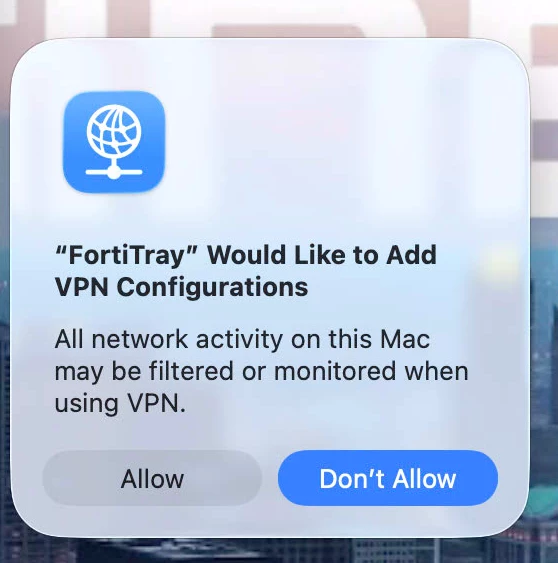
I have made the same as what they mentioned in the pdf but the user get popup to allow them.

what I want is:
1- These configuration only install if they install FortiClient.
2- Not popup any thing to the user when install FortiClient to allow for permission
3- If someone can please shared with me the configuration.

5 replies

agungsujiwo
Forum|alt.badge.img+8
  • Contributor
  • September 9, 2025

Hello everyone 

We are trying to deploy FortiClient VPN only from this link https://fortinetweb.s3.amazonaws.com/docs.fortinet.com/v2/attachments/76cde386-1f8c-11ef-8c42-fa163e15d75b/FortiClient_7.4_Jamf_Deployment_Guide.pdf

the Application installed perfectly but we have issue with configuration of the app
1- To grant FortiTray permissions to load and grant network access.
2- To grant full disk access to load the following FortiClient processes

I have made the same as what they mentioned in the pdf but the user get popup to allow them.

what I want is:
1- These configuration only install if they install FortiClient.
2- Not popup any thing to the user when install FortiClient to allow for permission
3- If someone can please shared with me the configuration.

Hi ​@ShZaidan ,

It seems you may have missed this part: FortiClient_Configuration_Profile.JAMF.mobileconfig. To prevent pop-up messages, the configuration profile FortiClient_Configuration_Profile.JAMF.mobileconfig must be edited according to the steps provided and deployed to the scoped Mac users before installing the app. Important: If the configuration profile fails to install or has not completed installation, do not install the app. Doing so will result in persistent pop-up messages.


scottb
Forum|alt.badge.img+18
  • Valued Contributor
  • January 28, 2026

Hello everyone 

We are trying to deploy FortiClient VPN only from this link https://fortinetweb.s3.amazonaws.com/docs.fortinet.com/v2/attachments/76cde386-1f8c-11ef-8c42-fa163e15d75b/FortiClient_7.4_Jamf_Deployment_Guide.pdf

the Application installed perfectly but we have issue with configuration of the app
1- To grant FortiTray permissions to load and grant network access.
2- To grant full disk access to load the following FortiClient processes

I have made the same as what they mentioned in the pdf but the user get popup to allow them.

what I want is:
1- These configuration only install if they install FortiClient.
2- Not popup any thing to the user when install FortiClient to allow for permission
3- If someone can please shared with me the configuration.

Hi ​@ShZaidan ,

It seems you may have missed this part: FortiClient_Configuration_Profile.JAMF.mobileconfig. To prevent pop-up messages, the configuration profile FortiClient_Configuration_Profile.JAMF.mobileconfig must be edited according to the steps provided and deployed to the scoped Mac users before installing the app. Important: If the configuration profile fails to install or has not completed installation, do not install the app. Doing so will result in persistent pop-up messages.

Hi ​@ShZaidan - I have tried in vein to get this profile to deploy in Jamf.

I got it from the admin and uploaded it to Jamf Pro.
Scoped my test Mac and it fails 100% of the time.

Any ideas on how to remedy this.  Tried a few times repeating and no luck.

Thank you 

Scott


Jordy-Thery
Forum|alt.badge.img+14
  • Valued Contributor
  • January 29, 2026

That guide is specifically for EMS as far as I can see. 

Take a look here for an offline installer + config: https://github.com/pro4tlzz/ITSupportTools/blob/main/jamf/forticlient/install-configure/installing-forticlient-vpn-with-configuration-settings.md

As for the configuration profile (no pop-ups) there’s a couple downloads on the MacAdmins Slack. Take a look here: https://macadmins.slack.com/archives/C01UJR7LQBS/p1654805958972759?thread_ts=1654153797.524029&channel=C01UJR7LQBS&message_ts=1654805958.972759


scottb
Forum|alt.badge.img+18
  • Valued Contributor
  • January 29, 2026

Thank you ​@Jordy-Thery - this is a lesson in severe frustration.

I have to face a group deploying this and try to explain why I can’t seem to figure it all out.

This is absolutely the worst product I’ve ever had to build/support on the Macs/Jamf.

I will take a look at “mpermann’s” suggestions there…

Thus far, any profile I upload won’t install.
Looks like I have to build one from scratch as I have no signing cert at the moment…

Again, thanks!


Jordy-Thery
Forum|alt.badge.img+14
  • Valued Contributor
  • January 30, 2026

Thank you ​@Jordy-Thery - this is a lesson in severe frustration.

I have to face a group deploying this and try to explain why I can’t seem to figure it all out.

This is absolutely the worst product I’ve ever had to build/support on the Macs/Jamf.

I will take a look at “mpermann’s” suggestions there…

Thus far, any profile I upload won’t install.
Looks like I have to build one from scratch as I have no signing cert at the moment…

Again, thanks!

Yup. Forticlient is no fun at all. 🙈