Question

Deploying Notability App New License Key in JAMF School

  • January 29, 2026
  • 2 replies
  • 29 views

wchan
Forum|alt.badge.img

Hi, 

The available guide is for JAMF Pro. Any advice for JAMF School how to deplay the XML?


Thank you

2 replies

Jordy-Thery
Forum|alt.badge.img+14
  • Valued Contributor
  • January 29, 2026

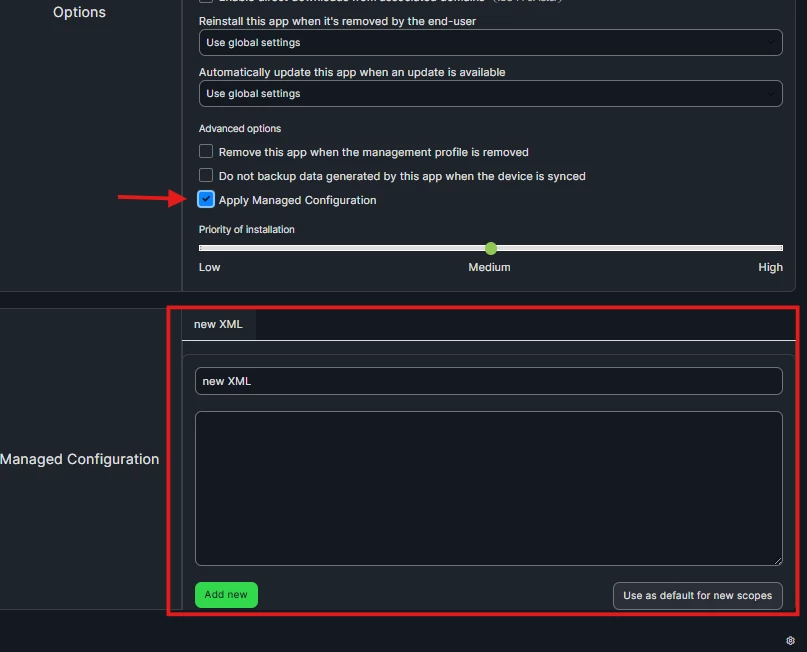
In Jamf School if you navigate to the Notability app you can see the options at the right side. Click ‘show advanced options’ there you can check ‘apply managed configuration’ and it will allow you to paste in your XML. 


GregBobbett
Forum|alt.badge.img+12
  • Jamf Heroes
  • January 29, 2026

What Jordy said [screen clip below]. One thing that you should check/test is that you may need to strip out the first couple of lines of the XML code. At least with Goodnotes we had to only use the XML starting with “<plist>” to it’s closing “</plist>” before it would apply the license and versioning correctly. Not sure if that’s a Jamf School thing or a Goodnotes thing, but thought I’d mention it in case you hit a stumbling block.