Just checking to see if anybody else is running in to this issue. When we started deploying Office updates, we were using Installomator, but we started seeing some issues where not all of the office apps were updating. We then switched to the package, but we're having the same issue, where some of the office apps aren't updating and it breaks the app, so we have to just rerun the installer. The other issue is, after it updates, it sometimes removes the icons from the dock, but not all it'll just remove one.

Solved
Deploying Office 365 updates issues

 +13
+13Best answer by sdagley
How do setup the deferral updates in Jamf? Is it a conf profile? For our deployments, we provide specific dates for each deployment, if the update comes out on the 14th, we test it on alpha, beta would be the 15th, UAT would 17th and production would be around the 25th. Willing to try and just move dates around.
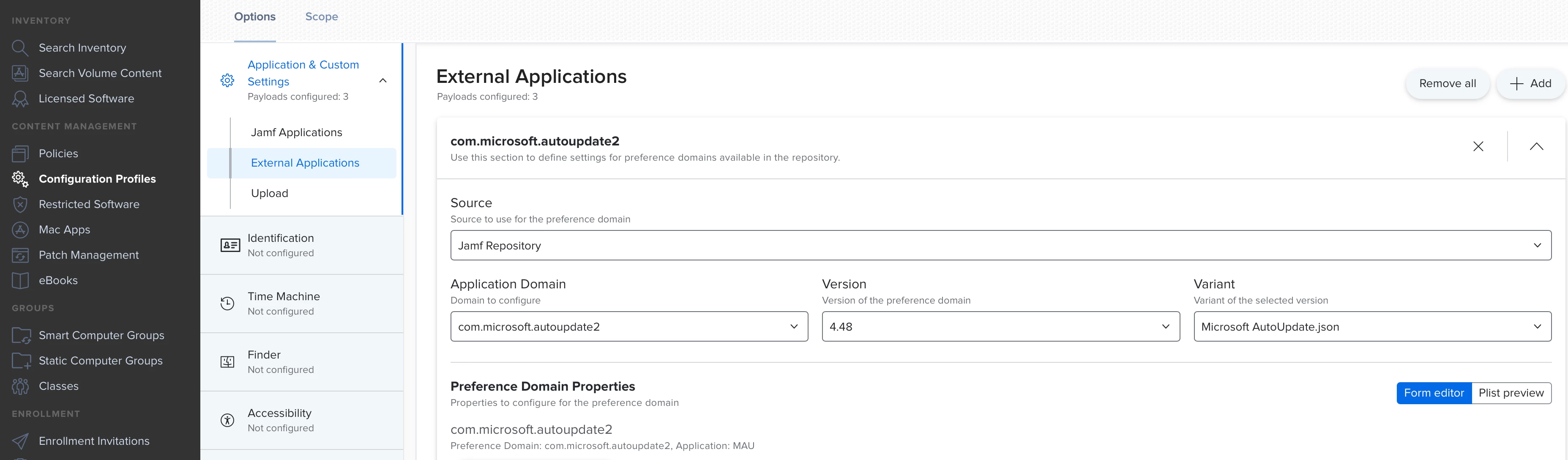
@SMR1 Yes, the deferral updates are setup using a Configuration Profile as shown in @mvu 's response:
Add an "Application & Custom Settings->External Application" payload to a profile, then select the following options: Source->Jamf Repository, Application Domain->com.microsoft.autoupdate2, Version->4.54, Variant->Microsoft AutoUpdate.json
For "Update channel" select "Current Channel (Deferred)" and you'll see the "Deferred updates" settings option appear listing the deferred channels discussed in the article by @kevinmcox I linked to in one of my previous responses.





Enter your E-mail address. We'll send you an e-mail with instructions to reset your password.