Solved

Disable Guided Access?

  • Sep 17, 2020 1:29 PM UTC
  • 12 replies
  • 984 views

Forum|alt.badge.img+2

Hey,
is there a possibility to disable the Guided access? The students are frequently setting codes, which is very annoying...

Best answer by Daniel_O

Hi Ekiem,

I know some time has past since you asked this question, but I have just come across this issue myself today, very annoying!

After trolling through the forums and not finding the answer I was after, I decided to try a few things and low and behold I have had some success.
This is what I did;
I first sent out commands for "Clear Passcode" and "Clear Screen Time Passcode", I don't think these had anything to do with my success, but this is what I did first!
I next placed the iPad in "Lost Mode".
at this point the iPad still wouldn't respond to the Home button being pressed and I was feeling a little deflated, however after trying for another 10 minutes or so online trying to find 'THE' answer.... I decided to remove "Lost Mode".
This seemed to do the trick, the usual Lost Mode removed screen faced me and after pressing the Home button, viola, one iPad no longer in Guided Access Mode!!

This may not be able to help you after 10 months of posting, but hopefully if others have this problem and find this post it will work for you too.

Thanks,
Daniel.

View original

12 replies

Daniel_O
Forum|alt.badge.img+4
  • New Contributor
  • Answer
  • Aug 2, 2021 5:01 AM UTC

Hi Ekiem,

I know some time has past since you asked this question, but I have just come across this issue myself today, very annoying!

After trolling through the forums and not finding the answer I was after, I decided to try a few things and low and behold I have had some success.
This is what I did;
I first sent out commands for "Clear Passcode" and "Clear Screen Time Passcode", I don't think these had anything to do with my success, but this is what I did first!
I next placed the iPad in "Lost Mode".
at this point the iPad still wouldn't respond to the Home button being pressed and I was feeling a little deflated, however after trying for another 10 minutes or so online trying to find 'THE' answer.... I decided to remove "Lost Mode".
This seemed to do the trick, the usual Lost Mode removed screen faced me and after pressing the Home button, viola, one iPad no longer in Guided Access Mode!!

This may not be able to help you after 10 months of posting, but hopefully if others have this problem and find this post it will work for you too.

Thanks,
Daniel.


Forum|alt.badge.img
  • New Contributor
  • Nov 17, 2021 12:42 PM UTC

Hi Ekiem,

I know some time has past since you asked this question, but I have just come across this issue myself today, very annoying!

After trolling through the forums and not finding the answer I was after, I decided to try a few things and low and behold I have had some success.
This is what I did;
I first sent out commands for "Clear Passcode" and "Clear Screen Time Passcode", I don't think these had anything to do with my success, but this is what I did first!
I next placed the iPad in "Lost Mode".
at this point the iPad still wouldn't respond to the Home button being pressed and I was feeling a little deflated, however after trying for another 10 minutes or so online trying to find 'THE' answer.... I decided to remove "Lost Mode".
This seemed to do the trick, the usual Lost Mode removed screen faced me and after pressing the Home button, viola, one iPad no longer in Guided Access Mode!!

This may not be able to help you after 10 months of posting, but hopefully if others have this problem and find this post it will work for you too.

Thanks,
Daniel.


That helped me! Thanks for your insight.


Daniel_O
Forum|alt.badge.img+4
  • New Contributor
  • Nov 17, 2021 9:57 PM UTC

That helped me! Thanks for your insight.


No problem Jordan, if what I did and have shared has helped at least one other, then I'm happy 🙂


Forum|alt.badge.img
  • New Contributor
  • Jan 20, 2022 4:18 PM UTC

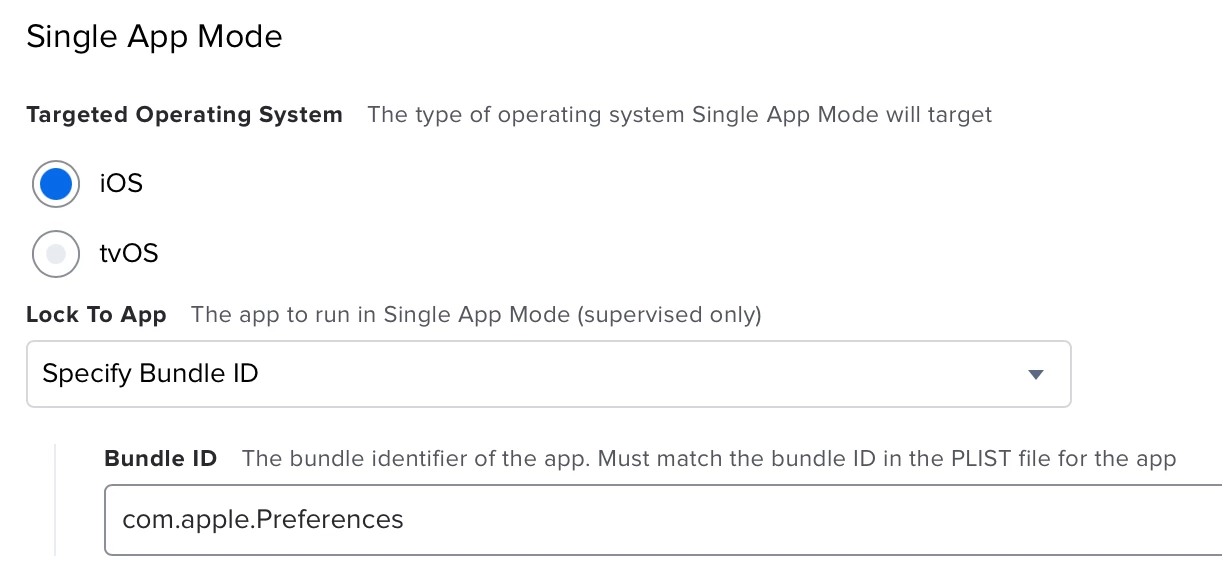
I have discovered that you can create a configuration profile that only has a "Single App Mode" payload with the settings included in the photo below (none of the check boxes are marked). When scoping this config profile to the student, it bumped them out of the app they were locked in, and said "Guided Access app unavailable. Please contact your administrator." I then removed the student from the config profile's scope, and saved after "distributing to all". From what I can tell, the turns off guided access in the Settings app without needing to know the password.


Forum|alt.badge.img+1
  • New Contributor
  • Feb 11, 2022 1:18 PM UTC

Hi Ekiem,

I know some time has past since you asked this question, but I have just come across this issue myself today, very annoying!

After trolling through the forums and not finding the answer I was after, I decided to try a few things and low and behold I have had some success.
This is what I did;
I first sent out commands for "Clear Passcode" and "Clear Screen Time Passcode", I don't think these had anything to do with my success, but this is what I did first!
I next placed the iPad in "Lost Mode".
at this point the iPad still wouldn't respond to the Home button being pressed and I was feeling a little deflated, however after trying for another 10 minutes or so online trying to find 'THE' answer.... I decided to remove "Lost Mode".
This seemed to do the trick, the usual Lost Mode removed screen faced me and after pressing the Home button, viola, one iPad no longer in Guided Access Mode!!

This may not be able to help you after 10 months of posting, but hopefully if others have this problem and find this post it will work for you too.

Thanks,
Daniel.

This worked great, thank you.


Daniel_O
Forum|alt.badge.img+4
  • New Contributor
  • Feb 13, 2022 10:09 PM UTC

This worked great, thank you.


No worries JWay 👍


Forum|alt.badge.img
  • New Contributor
  • Mar 8, 2022 2:35 PM UTC

Hi Ekiem,

I know some time has past since you asked this question, but I have just come across this issue myself today, very annoying!

After trolling through the forums and not finding the answer I was after, I decided to try a few things and low and behold I have had some success.
This is what I did;
I first sent out commands for "Clear Passcode" and "Clear Screen Time Passcode", I don't think these had anything to do with my success, but this is what I did first!
I next placed the iPad in "Lost Mode".
at this point the iPad still wouldn't respond to the Home button being pressed and I was feeling a little deflated, however after trying for another 10 minutes or so online trying to find 'THE' answer.... I decided to remove "Lost Mode".
This seemed to do the trick, the usual Lost Mode removed screen faced me and after pressing the Home button, viola, one iPad no longer in Guided Access Mode!!

This may not be able to help you after 10 months of posting, but hopefully if others have this problem and find this post it will work for you too.

Thanks,
Daniel.


I issued a clear password command then restarted the device and then that fixed it


Forum|alt.badge.img+1
  • New Contributor
  • Apr 11, 2022 9:58 AM UTC

How can we just Remove (disable the option itself to enable/disable) Guided Access?


amy_tyler
Forum|alt.badge.img+1
  • New Contributor
  • Jun 10, 2022 1:44 PM UTC

This worked for me to setting Lost mode, then canceling the lost mode! Thank you for the tip!


Forum|alt.badge.img+1
  • New Contributor
  • Sep 28, 2022 1:57 AM UTC

Just here to say thank you @Daniel_O ! This helped me too with removing guided access. I was about to wipe the device but glad I found this post first. Thanks!


Forum|alt.badge.img+1
  • New Contributor
  • Oct 25, 2022 9:22 PM UTC

The Guided access would be stuck on the iPad if the app in the Single App Mode is not installed yet. The iPad will get confused. You can simply either install the App with automatic install, or you can disable the single App Mode, then your Guided Access will be disabled as well.

No need to set lost mode or anything.


Forum|alt.badge.img
  • New Contributor
  • Mar 19, 2023 11:06 PM UTC

I can confirm this still works, as it did for me today. Thank you for the advice!