Solved

Disabling Airplay receiver

  • Dec 20, 2021 10:58 PM UTC
  • 7 replies
  • 694 views

Forum|alt.badge.img+6

Hi all,


How can I disable System Prefs -> sharing -> airplay receiver via a script? I don't really know the libraries to the point which would allow me to go and locate them.


It auto turns on when the machine comes online

Best answer by ljcacioppo

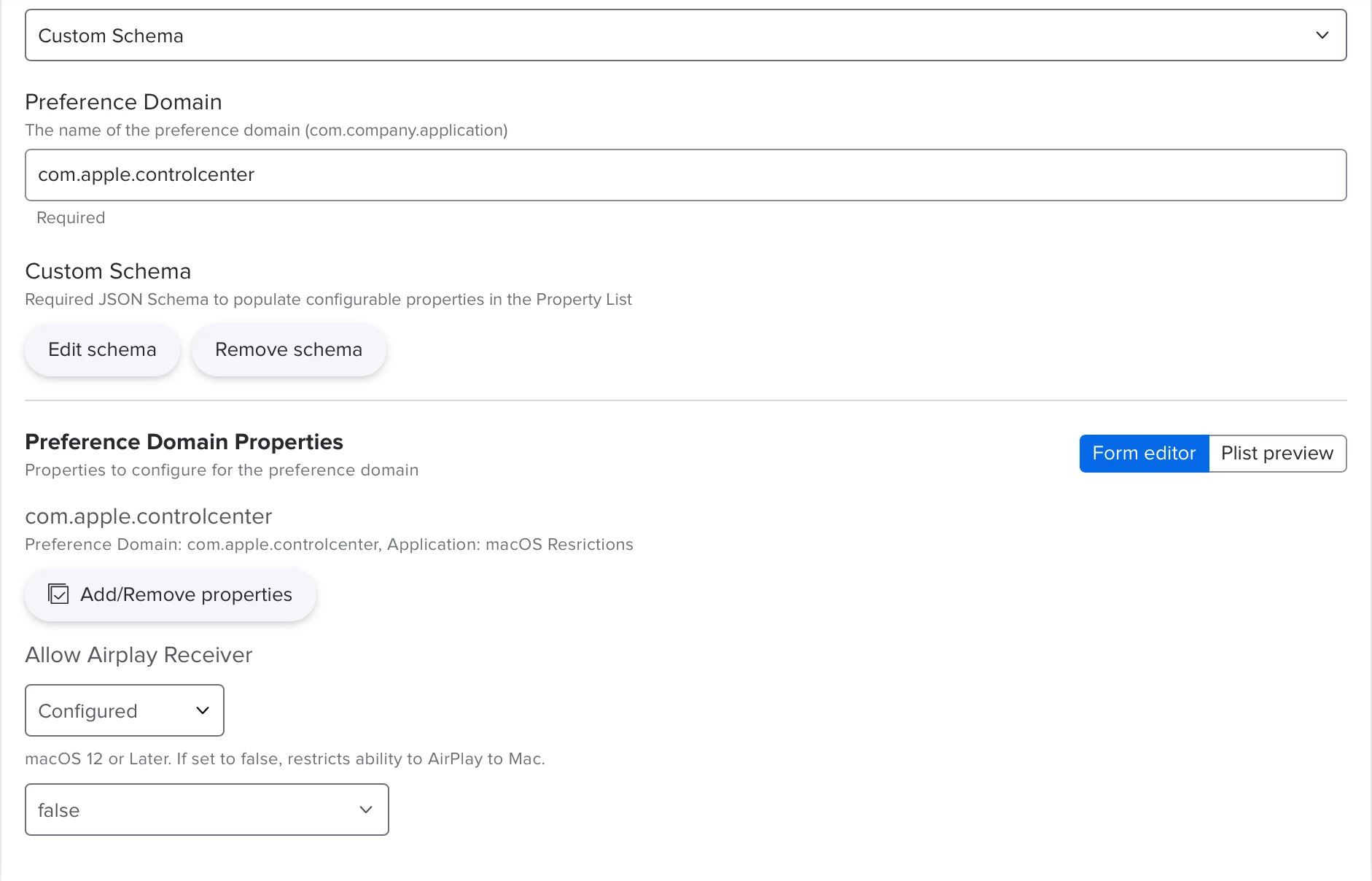
You can disable airplay receiver with a configuration profile.
I use a json schema to set this via Configuration Profile -> Applications and Custom Settings -> External Applications

Then I use com.apple.controlcenter as the domain and paste in the following schema: https://github.com/Jamf-Custom-Profile-Schemas/ljcacioppo-schemas/blob/main/com.apple.controlcenter....

Once that schema is there, it should reveal a dropdown true false option
 

View original

7 replies

ljcacioppo
Forum|alt.badge.img+17
  • Jamf Heroes
  • Answer
  • Dec 21, 2021 3:07 PM UTC

You can disable airplay receiver with a configuration profile.
I use a json schema to set this via Configuration Profile -> Applications and Custom Settings -> External Applications

Then I use com.apple.controlcenter as the domain and paste in the following schema: https://github.com/Jamf-Custom-Profile-Schemas/ljcacioppo-schemas/blob/main/com.apple.controlcenter....

Once that schema is there, it should reveal a dropdown true false option


Forum|alt.badge.img+3
  • New Contributor
  • Sep 7, 2022 5:10 PM UTC

You can disable airplay receiver with a configuration profile.
I use a json schema to set this via Configuration Profile -> Applications and Custom Settings -> External Applications

Then I use com.apple.controlcenter as the domain and paste in the following schema: https://github.com/Jamf-Custom-Profile-Schemas/ljcacioppo-schemas/blob/main/com.apple.controlcenter....

Once that schema is there, it should reveal a dropdown true false option


I got this to work, but it only shuts off AirPlay receiver, and the end user can just turn it back on. Did I do something wrong? I am looking to restrict it so nobody can turn it on. 


Forum|alt.badge.img+8
  • Valued Contributor
  • Feb 15, 2023 10:42 PM UTC

Have there been any new discoveries on this? I want to disable (not just turn off) the airplay receiver for student macbooks. 


Forum|alt.badge.img+8
  • Valued Contributor
  • Feb 15, 2023 10:44 PM UTC

You can disable airplay receiver with a configuration profile.
I use a json schema to set this via Configuration Profile -> Applications and Custom Settings -> External Applications

Then I use com.apple.controlcenter as the domain and paste in the following schema: https://github.com/Jamf-Custom-Profile-Schemas/ljcacioppo-schemas/blob/main/com.apple.controlcenter....

Once that schema is there, it should reveal a dropdown true false option


This is a great contribution but it doesn't solve the problem of how to disable the airplay receiver. It turns off the receiver, but students can turn it right back on.


ljcacioppo
Forum|alt.badge.img+17
  • Jamf Heroes
  • Feb 15, 2023 10:56 PM UTC

This is a great contribution but it doesn't solve the problem of how to disable the airplay receiver. It turns off the receiver, but students can turn it right back on.


You can actually now use the "allowAirPlayIncomingRequests" key in the com.apple.applicationaccess domain to control this.

I'll update my schema for restrictions later today and reply


ljcacioppo
Forum|alt.badge.img+17
  • Jamf Heroes
  • Feb 15, 2023 11:50 PM UTC

Have there been any new discoveries on this? I want to disable (not just turn off) the airplay receiver for student macbooks. 


I updated my com.apple.applicationaccess json schema to have the new key to disable airplay receiver: https://github.com/Jamf-Custom-Profile-Schemas/ljcacioppo-schemas/blob/main/com.apple.applicationaccess.json


Forum|alt.badge.img+6
  • Contributor
  • May 15, 2025 7:46 PM UTC

@ljcacioppo jason profile works as intended many thanks. But why it is still not availble as a restrictions payload in JAMF.