
Solved

Disallow Apple Music on iOS not working?

  • October 13, 2017
  • 4 replies
  • 19 views

Forum|alt.badge.img+9

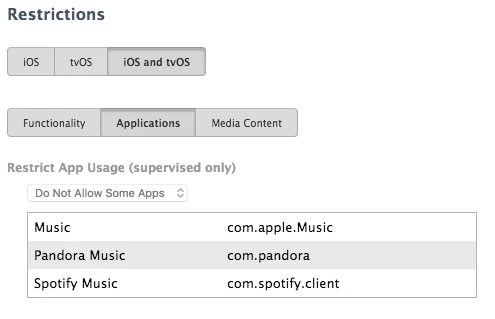
I've been tasked with blocking Music and related apps on a student iPad. I threw together a restriction profile with "Allow Apple Music" unchecked under iOS Functionality as well as Music, Spotify, and Pandora added to Restrict App Usage under the iOS and tvOS Applications tab, and then loaded the profile on a test iPad, but Music, Pandora, and Spotify are still present and accessible.

Anyone know what I'm doing wrong?

This is an iOS 11.0.2 iPad using JSS 9.101.0.
Best answer by JKoopman

Never mind. Tried a different identical test iPad and the profile worked, then updated the previous iPad to 11.0.3 and suddenly it worked too. Can't explain it.

4 replies

Forum|alt.badge.img+8
  • Valued Contributor
  • October 13, 2017

It's working for us with similar configuration. The only thing I can think of is to make sure that the iPad is supervised.


Forum|alt.badge.img+9
  • Author
  • Contributor
  • October 13, 2017

Yep, the iPad is definitely supervised.


Forum|alt.badge.img+21
  • Valued Contributor
  • October 13, 2017

This worked on a second test iPad. There must have been some kind of conflict or something hinkey with the first one.


Forum|alt.badge.img+9
  • Author
  • Contributor
  • Answer
  • October 13, 2017

Never mind. Tried a different identical test iPad and the profile worked, then updated the previous iPad to 11.0.3 and suddenly it worked too. Can't explain it.