
Solved

Display computer name or IP Number in menu bar [macOS Sequoia]

  • Oct 29, 2024 12:35 PM UTC
  • 9 replies
  • 546 views

PE14_2
Forum|alt.badge.img+8

Hi there, 

This option was working till macOS Sequoia. 

sudo defaults write /Library/Preferences/com.apple.loginwindow AdminHostInfo HostName

This is working with a profile but now with macOS Sequoia it stops working. 

Anyone see the same problem and is there a solution?

Thanks

Best answer by hlans

In macOS 15 Sequoia: click and drag from the clock.

View original

9 replies

Shyamsundar
Forum|alt.badge.img+14
  • Jamf Heroes
  • Oct 29, 2024 1:34 PM UTC

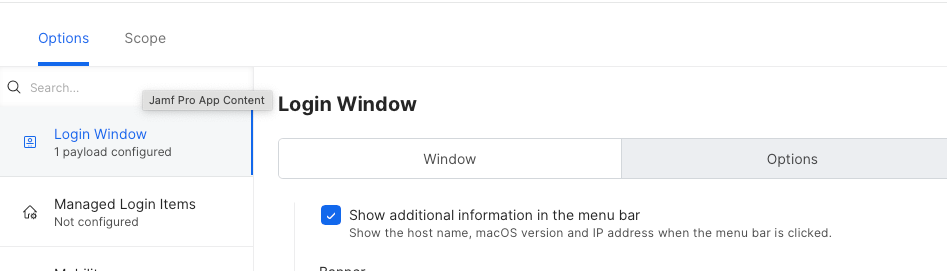
Configure the Login window Option and Select 

Show additional information in the menu bar


PaulHazelden
Forum|alt.badge.img+14
  • Jamf Heroes
  • Oct 29, 2024 2:07 PM UTC

I was using Nomad for logins and I found the Host info had moved from the top right of the screen, to the bottom left of the Nomad login window. So try clicking in different places on the screen.


PE14_2
Forum|alt.badge.img+8
  • Author
  • Valued Contributor
  • Oct 30, 2024 7:57 AM UTC

Configure the Login window Option and Select 

Show additional information in the menu bar


@Shyamsundar thanks for input, that settings is what I am using 


PE14_2
Forum|alt.badge.img+8
  • Author
  • Valued Contributor
  • Oct 30, 2024 7:58 AM UTC

I was using Nomad for logins and I found the Host info had moved from the top right of the screen, to the bottom left of the Nomad login window. So try clicking in different places on the screen.


Thanks for input - I click on different places but no succes


dmccluskey
Forum|alt.badge.img+9
  • Valued Contributor
  • Oct 30, 2024 7:04 PM UTC


IP in menubar is  great app we deploy on all our macs.

Monkeybread Software - Freeware - IP in menubar 4.7.1

We also have a plist they we deploy with it.


<dict> <key>DisplayText</key> <true/> <key>SmallFont</key> <true/> </dict> </plist>

and a start up item payload.


PE14_2
Forum|alt.badge.img+8
  • Author
  • Valued Contributor
  • Oct 31, 2024 7:29 AM UTC


IP in menubar is  great app we deploy on all our macs.

Monkeybread Software - Freeware - IP in menubar 4.7.1

We also have a plist they we deploy with it.


<dict> <key>DisplayText</key> <true/> <key>SmallFont</key> <true/> </dict> </plist>

and a start up item payload.


Thanks for your input, put the option (what is not working) gives not only the IP numer but also computername (sometimes handy here)


Forum|alt.badge.img+3
  • New Contributor
  • Answer
  • Apr 1, 2025 10:20 PM UTC

In macOS 15 Sequoia: click and drag from the clock.


PE14_2
Forum|alt.badge.img+8
  • Author
  • Valued Contributor
  • Apr 2, 2025 7:02 AM UTC

In macOS 15 Sequoia: click and drag from the clock.


Thanks, it seems to work, but you need to clock to cycle between IPnumber/ComputerName/System version but it works again.


PE14_2
Forum|alt.badge.img+8
  • Author
  • Valued Contributor
  • Apr 2, 2025 7:02 AM UTC

Thanks, it seems to work, but you need to clock to cycle between IPnumber/ComputerName/System version but it works again.


"need to click on the clock"