Solved

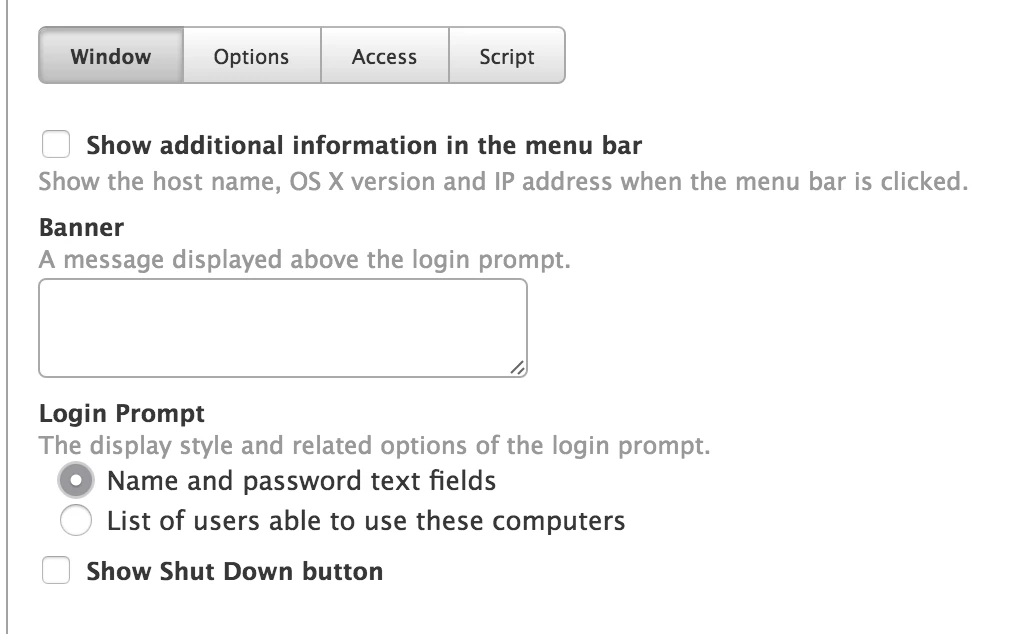
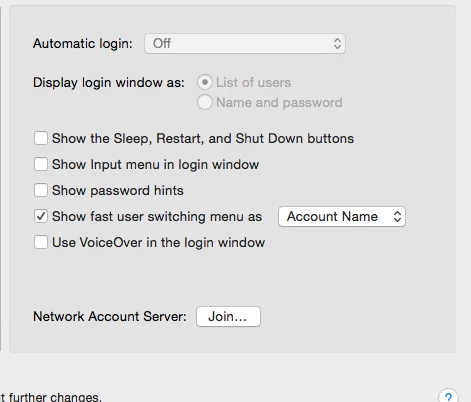
Display login window as: List of users grayed out.

  • May 24, 2016
  • 10 replies
  • 9 views

Forum|alt.badge.img+7

Can't get List Of Users to work. Is grayed out.

Best answer by Zeek

I got it fixed!

https://jamfnation.jamfsoftware.com/article.html?id=144

sudo dscl . -mcxdelete /Computers/localhost

That clear any stubborn management profiles.

Thanks for your help guys.

10 replies

bentoms
Forum|alt.badge.img+35
  • Hall of Fame
  • May 24, 2016

@Zeek Are your Macs FileVault encrypted?


Forum|alt.badge.img+8
  • Contributor
  • May 24, 2016

Do you have any login window preferences set with a profile on that machine?


Forum|alt.badge.img+7
  • Author
  • Contributor
  • May 24, 2016

We don't use FileVaul


Forum|alt.badge.img+7
  • Author
  • Contributor
  • May 24, 2016

"This is dimmed because its managed by your administrator" but the computer is deleted from Casper and not manage anymore.


Forum|alt.badge.img+8
  • Contributor
  • May 24, 2016

When you deleted from the JSS did you also jamf removeFramework on the machine itself?


Forum|alt.badge.img+7
  • Author
  • Contributor
  • May 24, 2016

Yes i did.


Forum|alt.badge.img+7
  • Author
  • Contributor
  • May 24, 2016

I think its a Casper Issue but can't find what cousin the problem.


Forum|alt.badge.img+8
  • Contributor
  • May 24, 2016

Assuming there's no residual Profiles installed on the machine?

If you sudo /usr/bin/profiles -P

Does anything show?

If so there's some good info here https://jamfnation.jamfsoftware.com/discussion.html?id=7096 and http://krypted.com/mac-security/manage-profiles-from-the-command-line-in-os-x-10-9/


Forum|alt.badge.img+7
  • Author
  • Contributor
  • May 24, 2016

There is no profiles installed.


Forum|alt.badge.img+7
  • Author
  • Contributor
  • Answer
  • May 24, 2016

I got it fixed!

https://jamfnation.jamfsoftware.com/article.html?id=144

sudo dscl . -mcxdelete /Computers/localhost

That clear any stubborn management profiles.

Thanks for your help guys.