Solved

Download Safari 13 installer?

  • September 23, 2019
  • 70 replies
  • 465 views

mhasman
Forum|alt.badge.img+22

Can't find on Apple Safari 13 installer. Available via Software Update, but I would like to package it in deployment policy. Please share download URL - Thanks! :)

Best answer by mvu

For Mojave:

http://swcdn.apple.com/content/downloads/21/46/041-98185-A_T4U6Z3I0PX/tcq0z3b6tmc1xfmz68wfsuhf9dapt5v1u4/Safari13.0MojaveAuto.pkg

70 replies

mvu
Forum|alt.badge.img+20
  • Jamf Heroes
  • Answer
  • September 24, 2019

For Mojave:

http://swcdn.apple.com/content/downloads/21/46/041-98185-A_T4U6Z3I0PX/tcq0z3b6tmc1xfmz68wfsuhf9dapt5v1u4/Safari13.0MojaveAuto.pkg


mhasman
Forum|alt.badge.img+22
  • Author
  • Valued Contributor
  • September 24, 2019

@mvu Thank you Michael!


mvu
Forum|alt.badge.img+20
  • Jamf Heroes
  • September 24, 2019

Sure. For High Sierra:

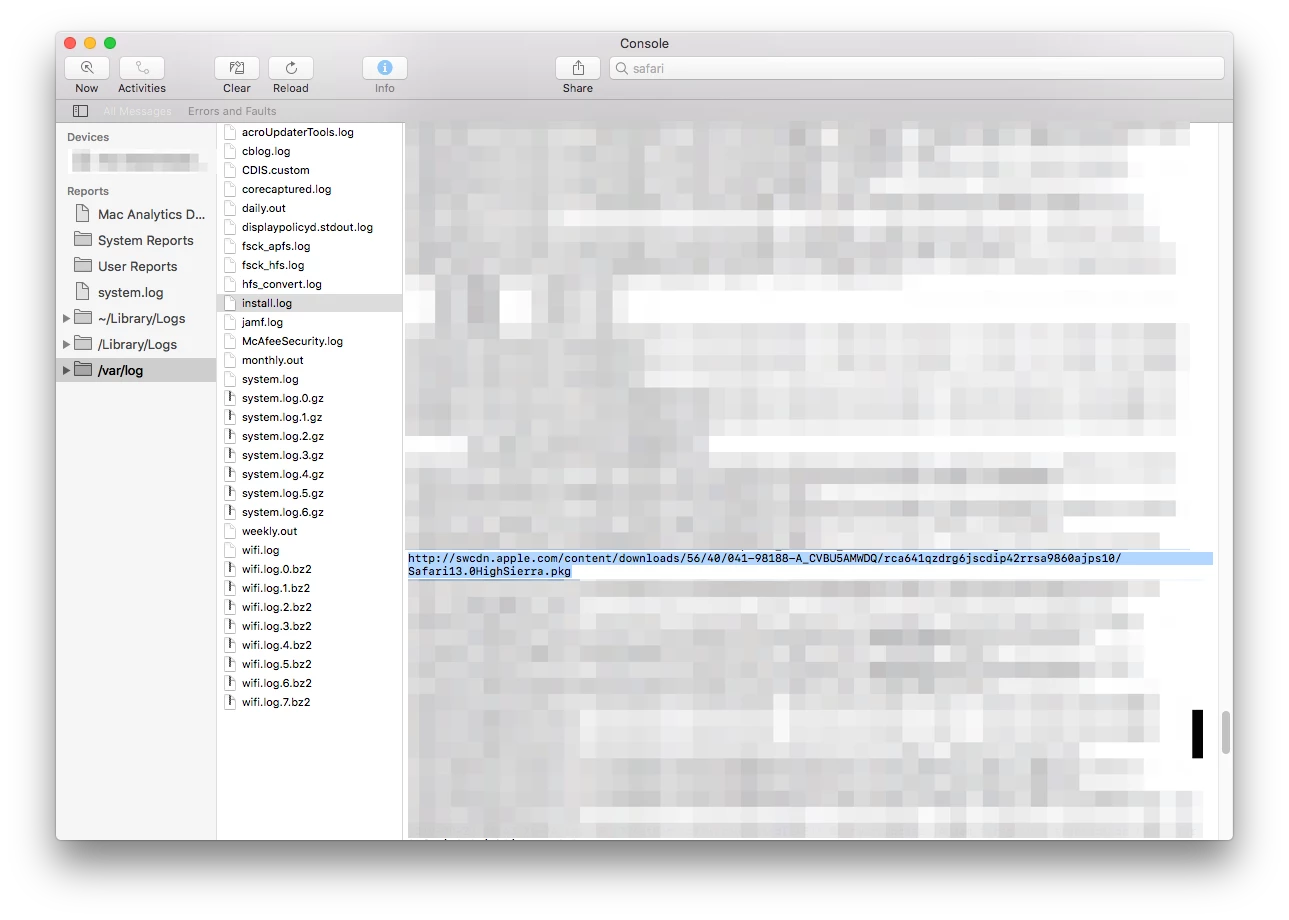
http://swcdn.apple.com/content/downloads/56/40/041-98188-A_CVBU5AMWDQ/rca641qzdrg6jscdip42rrsa9860ajps10/Safari13.0HighSierra.pkg


Forum|alt.badge.img+12
  • Valued Contributor
  • September 24, 2019

How does on go about finding these things?


mhasman
Forum|alt.badge.img+22
  • Author
  • Valued Contributor
  • September 24, 2019

Thanks again!


mvu
Forum|alt.badge.img+20
  • Jamf Heroes
  • September 24, 2019


Sure thing.

There are two ways that I know of to get the Safari package.

• For the URL, I opened Console.app on a Mac that already has the Safari update installed. Click on /var/log. Click on install.log. Search for "Safari." As you read the log, you'll want to scroll up to find the URL, which is listed just before the Mac installs the actual package.

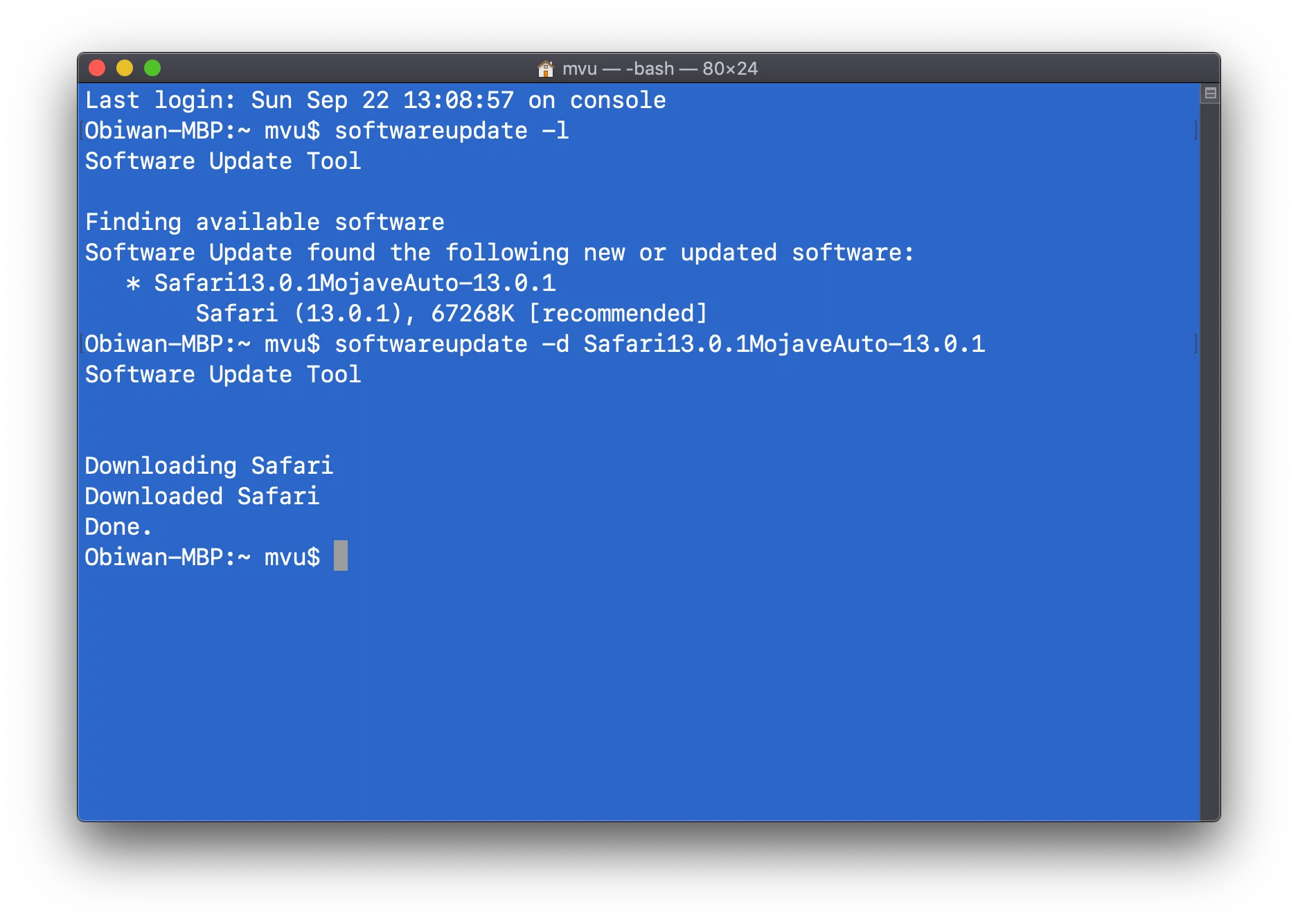
• Another way to get the package is through Terminal. On a Mac that needs the Safari update, open Terminal. Type softwareupdate -l. Copy the entire Safari line listed (I believe the one below *). From here, type softwareupdate -d and paste the entire Safari line there and hit enter. The Mac will download the Safari package. Finally, go to Macintosh HD/Library/Updates to find the Safari package.


Forum|alt.badge.img+12
  • Valued Contributor
  • September 24, 2019

Whoa! Thank you so much! This will come in handy :)


mvu
Forum|alt.badge.img+20
  • Jamf Heroes
  • September 24, 2019

Here's a screenshot for Terminal method. I got the one-liner wrong above...


mhasman
Forum|alt.badge.img+22
  • Author
  • Valued Contributor
  • September 24, 2019

What, 13.0.1? Already? :)


mhasman
Forum|alt.badge.img+22
  • Author
  • Valued Contributor
  • September 25, 2019

@mvu Michael, any chance you have URLs for 13.0.1, please?


mvu
Forum|alt.badge.img+20
  • Jamf Heroes
  • September 25, 2019

For Mojave:

http://swcdn.apple.com/content/downloads/20/52/041-88937-A_82KXGV6YE3/l5w5xx65lkxi9zvce2pwwc0rrs8cx8wvoh/Safari13.0.1MojaveAuto.pkg


mvu
Forum|alt.badge.img+20
  • Jamf Heroes
  • September 25, 2019

For High Sierra:

http://swcdn.apple.com/content/downloads/41/46/091-58885-A_KVZJXS0KNU/tcpkev88s30ezg1apij0ezd9hz86s1fsq3/Safari13.0.1HighSierra.pkg


mhasman
Forum|alt.badge.img+22
  • Author
  • Valued Contributor
  • September 25, 2019

Thank you very much!


Forum|alt.badge.img+5
  • Contributor
  • September 25, 2019

Thanks! This is super useful right now as we are seeing a few computers come through that can't open Safari all of a sudden. I think it's to do with the 13.0.1 update.


Forum|alt.badge.img+6
  • Contributor
  • October 1, 2019

Hello Newbie here :)

@mvu Thank you very much, trying to find those Safari direct links, every time a new update came out, was a nightmare for me :(
I am very lucky to find this thread, and I have only registered to Jamf Nation to say Thanks

Camelia


mvu
Forum|alt.badge.img+20
  • Jamf Heroes
  • October 1, 2019

You're welcome @a.holley and @camelia . And welcome to Jamf Nation!


mhasman
Forum|alt.badge.img+22
  • Author
  • Valued Contributor
  • October 1, 2019

@camelia Welcome to Jamf Nation!


Forum|alt.badge.img+5
  • Contributor
  • October 7, 2019

Safari 13.0.2

For Mojave:

http://swcdn.apple.com/content/downloads/57/42/061-22618-A_H11M3KQ3KY/mijvhn2wrv2e6yia7n0q387gisjprg62sa/Safari13.0.2MojaveAuto.pkg


Forum|alt.badge.img+6
  • Contributor
  • October 8, 2019

Version 13.0.2 (13608.2.40.1.2)

For High Sierra

http://swcdn.apple.com/content/downloads/41/14/061-22609-A_UWMHO1JVLK/qsu7caolis8klyqu6nv6xlui49hzi67xb2/Safari13.0.2HighSierra.pkg


anverhousseini
Forum|alt.badge.img+12
  • Valued Contributor
  • October 8, 2019

You could just use the SUS Inspector.app: https://github.com/hjuutilainen/sus-inspector


Forum|alt.badge.img+5
  • Contributor
  • October 8, 2019

@anverhousseini

How are you using this?

Are you using it with jamf Pro?

Thanks


Forum|alt.badge.img+5
  • Contributor
  • October 29, 2019

Safari 13.03 installer Mojave.

http://swcdn.apple.com/content/downloads/18/07/061-30476/klpioeu2l00532f540gly7aoyibwnejl4w/Safari13.0.3MojaveAuto.pkg


mhasman
Forum|alt.badge.img+22
  • Author
  • Valued Contributor
  • October 29, 2019

@PE2000 Thank you Peter!


Forum|alt.badge.img+6
  • Contributor
  • November 12, 2019

Safari 13.0.3 (13608.3.10.10.1) for High Sierra 10.13.6

http://swcdn.apple.com/content/downloads/30/12/061-30238/n64j5axyrbdkv49ol0rj3me1ij8nt7rv7h/Safari13.0.3HighSierraAuto.pkg


Forum|alt.badge.img
  • New Contributor
  • November 25, 2019

Hi Nation! I must be doing something wrong. When I go to these links I just keep getting "File Not Found". Are you not opening these URLs from browser?