Looking for an EA that can distinguish between Firefox (mainline) and Firefox ESR.
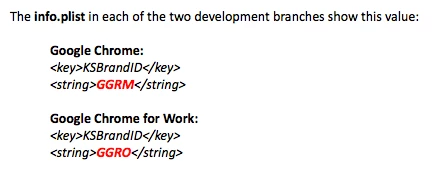
Google Chrome provides a key that tells you if user has Google Chrome installed or Google Chrome For Work installed. Located in /Applications/Google Chrome.app/Contents/Info.plist:
I plan to submit a feature request, to ask for a key to be used, similar to what Google is doing.
In the mean time, wondered how folks here telling whether user has Firefox ESR or not?
PS, already have EA to tell if config files are in the Firefox.app bundle, but that won't help us if someone is running mainline release with config files.
Don
Best answer by mm2270
Aha! I found something! This should do it.
#!/bin/sh

## Get release of Firefox (Release or ESR)

if [ -d "/Applications/Firefox.app" ]; then
    Type=$(awk -F'-' '/SourceRepository/{print $NF}' /Applications/Firefox.app/Contents/Resources/application.ini)
else
    Type="N/A"
fi

case "$Type" in
    esr*)
    result="Firefox ESR" ;;
    release)
    result="Firefox Mainline" ;;
    N/A)
    result="Not Installed" ;;
    *)
    result="Unknown" ;;
esac

echo "<result>$result</result>"
So basically, the application.ini file does indicate the app bundle's SourceRepository on one of the lines, which can easily be read in the script. Voila! I'm glad you brought this up again, since I can now incorporate this into one of my own scripts.
I had looked into this myself once, not because we use Firefox ESR here, but because I was trying to determine the difference for a script I have. Unfortunately, I came up empty at the time. The two applications look exactly the same to a script, and in the Finder, etc. There's really no distinction other than the actual version number, but obviously you can't just go by the version number.
I'll take another peak at this and see if there's something that you can use, but it doesn't look hopeful.
#!/bin/sh

## Get release of Firefox (Release or ESR)

if [ -d "/Applications/Firefox.app" ]; then
    Type=$(awk -F'-' '/SourceRepository/{print $NF}' /Applications/Firefox.app/Contents/Resources/application.ini)
else
    Type="N/A"
fi

case "$Type" in
    esr*)
    result="Firefox ESR" ;;
    release)
    result="Firefox Mainline" ;;
    N/A)
    result="Not Installed" ;;
    *)
    result="Unknown" ;;
esac

echo "<result>$result</result>"
So basically, the application.ini file does indicate the app bundle's SourceRepository on one of the lines, which can easily be read in the script. Voila! I'm glad you brought this up again, since I can now incorporate this into one of my own scripts.
I'm a JAMF newbie and need to find which users are using ESR. What are the steps to running this script? I assume I add it to the section in JAMF Settings > Computer Management > Scripts, but then what other configuration do I need to do after that to see the results?