Question

eduroam and 802.1x Profiles

  • January 23, 2014
  • 11 replies
  • 154 views

Forum|alt.badge.img+13

Anyone using eduroam with 802.1x Login Window or System profiles?
If yes, how you guys manage it with users who travel to multiple organisations with different eduroam configs?

e.g.- We have our 802.1x for eduroam working fine as Login Window and System profile in our organisation but if one of our users go overseas and try to connect to their eduroam it will fail as the computer already has a configuration profile for eduroam but with different settings.
Only way we can get it to work is to delete the config profile and manually connect to eduroam.

Thanks

11 replies

Forum|alt.badge.img+5
  • Contributor
  • January 23, 2014

Hi,
Good to know, we are in the process of getting Eudoram ready at our institute and will check this as well.


Forum|alt.badge.img+9
  • Contributor
  • January 23, 2014

We have iPads using an eduroam Wifi config that seems to work fine at other institutions.

Is the problem you are seeing isolated to one institution when they go overseas ? Is it failing to authenticate properly ? What kiind of symptoms are you seeing ?


Forum|alt.badge.img+13
  • Author
  • Contributor
  • January 23, 2014

@ewu-oit
That's good to hear.
No not isolated to one institution even when they go to other institutions in the same country too.
Failing to authenticate.

I think it has to do with the certificate trust settings and other wi-fi settings due to different ogranisational settings ( different organisations use different EAP types...etc).
Also on iPads you can use username@yourorganisation.edu format but on OS X machine we use just the username.

Can you please show me your settings of the profile if possible (cert trust, EAP settings, Trusted Server Certificate Names, etc..)?


Forum|alt.badge.img+7
  • Contributor
  • January 24, 2014

Hi there,

We are using eduroam aswell on our Macbooks and iPads.
Here's the settings we are distributing:

SSID: eduroam
Security Type: WPA / WPA 2 Enterprise
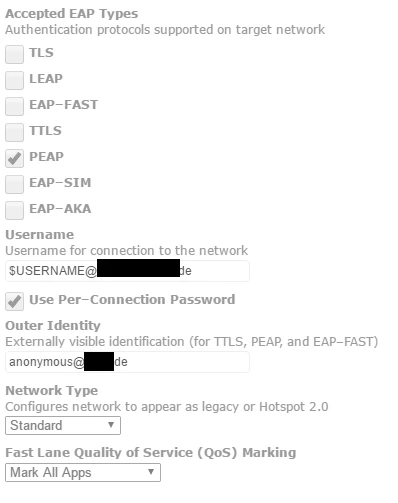
Accepted EAP Types: PEAP
Username: $USERNAME@eduroam.realm.de
Outer Identity: anonymous@eduroam.realm.de

Since all eduroam Networks should be configured to forward the Requests to the realm mentioned in the Outer Identity, there should not be any Problem globally. To be sure it's working locally and on all remote eduroam networks , you have to add the @eduroam.realm.de after the Username, else it will always try to authenticate on the local realm.

We also imported our Certificates with a seperate Configprofile, just in case its needed for the Authentication.


Forum|alt.badge.img+13
  • Author
  • Contributor
  • January 28, 2014

@bofh][/url
Thanks for the information. Have you ever used this as a login window profile or system profile?


Forum|alt.badge.img+7
  • Contributor
  • January 28, 2014

@Kumarasinghe
You're welcome!

We are using it as an User Level Profile. The Certificates are coming with a Machine Level Profile.
Not sure if it will work properly using a system profile, but it should.


Forum|alt.badge.img+13
  • Author
  • Contributor
  • January 31, 2014

@bofh][/url][/url
Do you have to put the username manually when you try to connect to eduroam or will it automatically get it when a user logs in?
In your config Username: $USERNAME@eduroam.realm.de is present and the $USERNAME should populate automatically but we don't get it populated (v8.62).


Forum|alt.badge.img+7
  • Contributor
  • January 31, 2014

@Kumarasinghe

Usually we don't have put in the Username if we connect. It just asks for the Password.
We are using 9.22 atm.


Forum|alt.badge.img+8
  • New Contributor
  • February 7, 2017

@bofh when I put in $USERNAME@Domain.com all that is passed through to the radius server is "@Domain.com" and if I remove "@Domain.com" I get the AD user name as it should be but it won't authenticate because I don't have the "@Domain.com". How do I get it to pass the entire current user name and the "@Domain.com"?


Forum|alt.badge.img+7
  • Contributor
  • February 8, 2017

@ABigRock


Thats what we use. it's working like that if your computers/ipads/iphones have proper User&Location settings within the jss


burdett
Forum|alt.badge.img+7
  • Valued Contributor
  • June 19, 2018

We are using eduroam on our Macbooks and iPads.
I came across the eduroam Configuration Assistant Tool at https://cat.eduroam.org/
This made it easy to choose our University, download the .mobileconfig file for our specific devices and upload the signed .mobileconfig file into JAMF Pro Configuration profiles.