Question

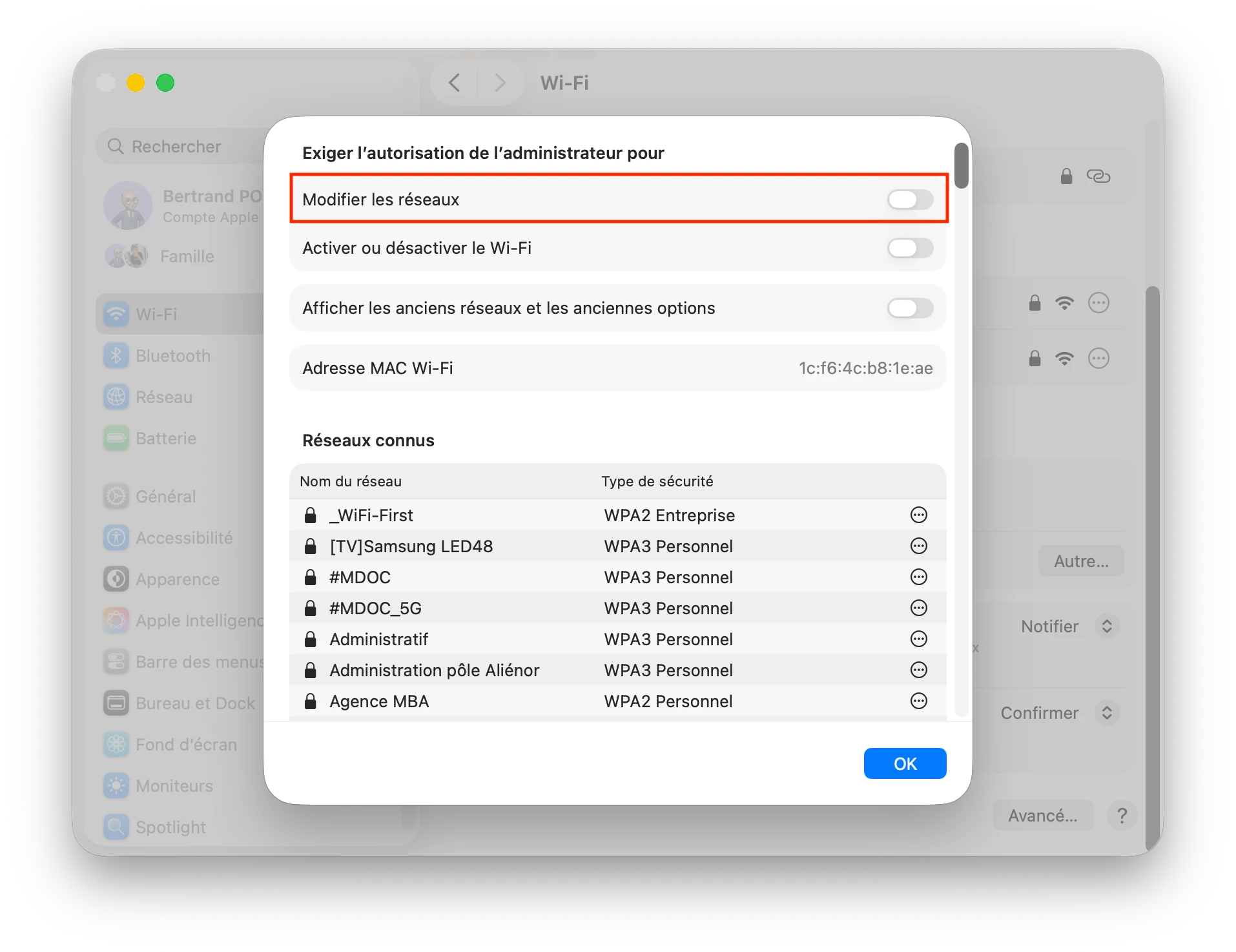
Enable/Disable admin rights to change wifi setup

  • September 1, 2026
  • 4 replies
  • 32 views

Bertrand_P
Forum|alt.badge.img

Hi all !

How can I enable/disable admin rights to change wifi setup, by script or config profile ?

It’s located graphically in the advance pane on the wifi preference pane.


Thank for all of your suggestions :-)



4 replies

dletkeman
Forum|alt.badge.img+18
  • Jamf Heroes
  • September 1, 2026

I pulled this up quickly with Gemini, but it’s valid.


Method 1: Configuration Profile (Recommended)

Deploying a Mobile Device Management (MDM) profile using the com.apple.MCX payload payload key structure or custom XML profile enforces this restriction reliably without script drift.

Use the com.apple.MCX domain keys:

  • RequireAdminIBSS: Require admin authorization to create computer-to-computer networks.

  • RequireAdminNetworkChange: Require admin authorization to change Wi-Fi networks.

  • RequireAdminPowerToggle: Require admin authorization to turn Wi-Fi on or off.

You can upload a custom .mobileconfig payload to Jamf Pro:

<?xml version="1.0" encoding="UTF-8"?>
<!DOCTYPE plist PUBLIC "-//Apple//DTD PLIST 1.0//EN" "http://www.apple.com/DTDs/PropertyList-1.0.dtd">
<plist version="1.0">
<dict>
<key>PayloadContent</key>
<array>
<dict>
<key>PayloadDisplayName</key>
<string>Wi-Fi Restrictions</string>
<key>PayloadIdentifier</key>
<string>com.company.wifi.restrictions</string>
<key>PayloadType</key>
<string>com.apple.MCX</string>
<key>PayloadUUID</key>
<string>A6E32630-18D0-4E8A-98C3-11884C6BD81E</string>
<key>PayloadVersion</key>
<integer>1</integer>
<key>RequireAdminIBSS</key>
<true/>
<key>RequireAdminNetworkChange</key>
<true/>
<key>RequireAdminPowerToggle</key>
<true/>
</dict>
</array>
<key>PayloadDisplayName</key>
<string>Wi-Fi Authorization Policy</string>
<key>PayloadIdentifier</key>
<string>com.company.wifipolicy</string>
<key>PayloadOrganization</key>
<string>Organization</string>
<key>PayloadScope</key>
<string>System</string>
<key>PayloadType</key>
<string>Configuration</string>
<key>PayloadUUID</key>
<string>4C34D82F-BD2D-4E38-96B6-D4A27A1A7034</string>
<key>PayloadVersion</key>
<integer>1</integer>
</dict>
</plist>

Method 2: Shell Script via networksetup

To set these toggles via Jamf policy script, run the networksetup binary against the active Wi-Fi interface (typically en0).

To require admin rights (Enable restrictions):

#!/bin/bash

# Find active Wi-Fi interface identifier
WIFI_INT=$(/usr/sbin/networksetup -listallhardwareports | /usr/bin/awk '/Hardware Port: Wi-Fi/{getline; print $2}')

if [ -n "$WIFI_INT" ]; then
# Require admin authorization to change networks
/usr/sbin/networksetup -setnetworkownership "$WIFI_INT" off

# Require admin to turn Wi-Fi on or off / modify settings
/usr/sbin/networksetup -setairportpower "$WIFI_INT" off # If needed, or use security authorizationdb
fi

To remove admin requirement (Allow non-admins):

#!/bin/bash

WIFI_INT=$(/usr/sbin/networksetup -listallhardwareports | /usr/bin/awk '/Hardware Port: Wi-Fi/{getline; print $2}')

if [ -n "$WIFI_INT" ]; then
# Allow standard users to change networks
/usr/sbin/networksetup -setnetworkownership "$WIFI_INT" on
fi

Method 3: Security Authorization Database (security authorizationdb)

For fine-grained control over network preferences in macOS Monterey, Ventura, and Sonoma, target the underlying Right in the security database directly:

# Require admin rights to modify network interfaces
/usr/bin/security authorizationdb write system.preferences.network allow-root

# Revert to default (allow standard users with admin approval prompt as configured)
/usr/bin/security authorizationdb write system.preferences.network authenticate-admin


Bertrand_P
Forum|alt.badge.img
  • Author
  • New Contributor
  • September 1, 2026

Hi dletkeman

“I pulled this up quickly with Gemini, but it’s valid.”

I’m sorry but none of these solutions works.

I’ve asked Claude before posting and try many things ;-)

What I'd like to setup : 


Forum|alt.badge.img+16
  • Valued Contributor
  • September 1, 2026

I’ve tested this in the past. It’s been awhile since I last used it but you can give it a go. You can set it up to grant temp admin rights to the user. If you are using Self Service+ you can also achieve the same thing but easier.

https://github.com/jamf/MakeMeAnAdmin/blob/master/MakeMeAnAdmin.sh


dletkeman
Forum|alt.badge.img+18
  • Jamf Heroes
  • September 1, 2026

I dug into this a bit more.  Modern macOS versions don’t use the networksetup command to grant authorization.

I tried making the change through the command line using the command:

sudo security authorizationdb write system.preferences.network deny

However I could still join new SSIDs and forget them.  After asking Gemini some more it said this:

That happens because system.preferences.network only protects full pane-level administrative locks in System Settings—it does not govern joining SSIDs from the menu bar or modifying keychains.

Why system.preferences.network Missed It

  • Joining SSIDs: Joining a Wi-Fi network from the Control Center or Menu Bar relies on com.apple.wifi / location services prompts and user keychain creation (system.keychain), not System Settings modification.

  • Forgetting SSIDs: Standard users own saved Wi-Fi items in their local/login keychain scope unless locked down by policy.


I tried following up with a few more things but I could always join the SSID or forget it.  I didn’t try the other way of allowing it.  I don’t have time right now to follow up on it more.  Interesting issue.