Solved

Enforce screensaver and password to unlock

  • November 24, 2022
  • 5 replies
  • 75 views

Forum|alt.badge.img+4

Hi folks,
Does anyone know a way to enforce the screensaver after 20 minutes of inactivity and require password to unlock in Ventura?
I've been trying through a script but it doesn't seem to work, and end-users are still able to change the settings through System Settings.

Thank you!

Best answer by karthikeyan_mac

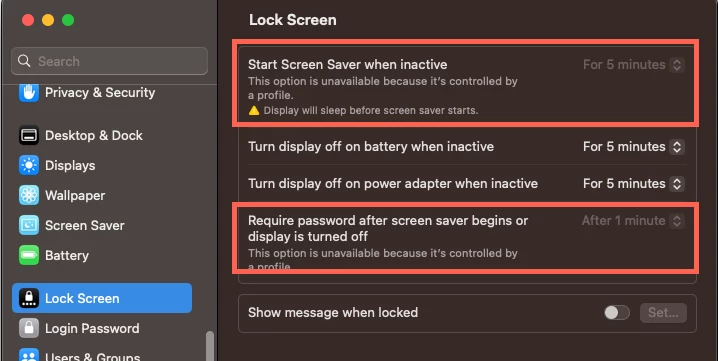
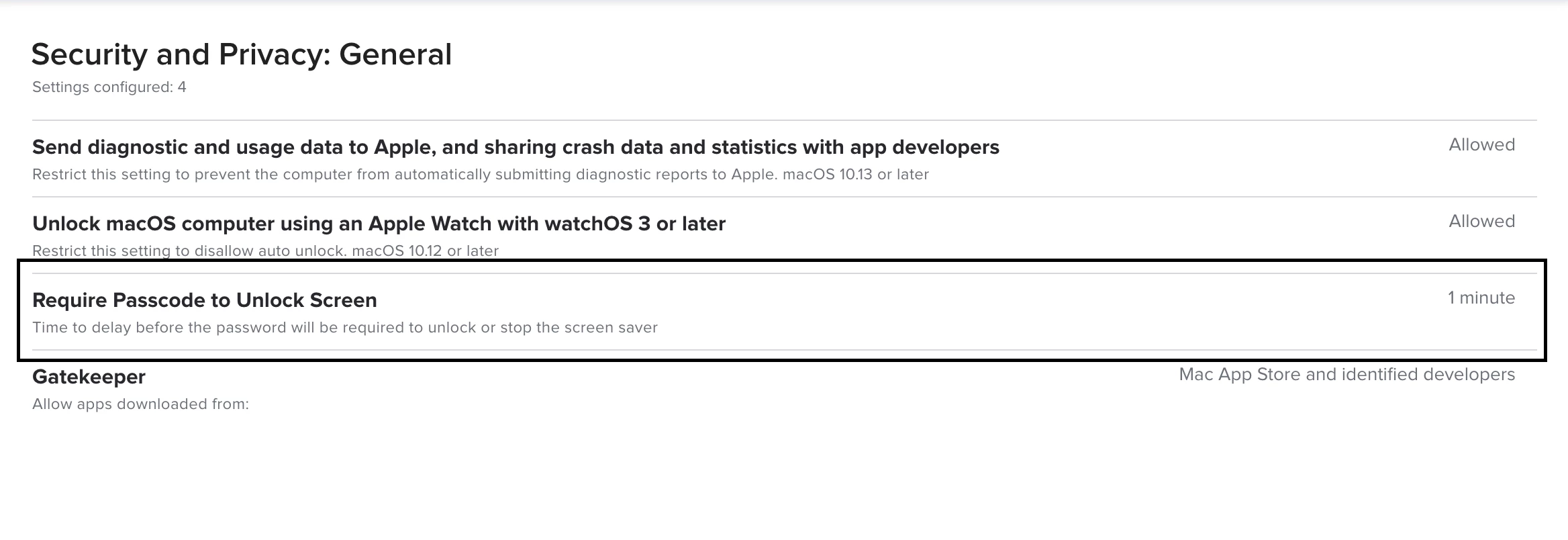
@Manu_ssi We have a config profile with Login Window payload configured with "Start screen saver after 4 minutes of Inactivity" and Security and Privacy:General payload "Require Passcode to Unlock Screen" to 1 minute. This disables the Lock Screen settings in System Settings.
Thanks,


5 replies

karthikeyan_mac
Forum|alt.badge.img+18
  • Honored Contributor
  • Answer
  • November 25, 2022

@Manu_ssi We have a config profile with Login Window payload configured with "Start screen saver after 4 minutes of Inactivity" and Security and Privacy:General payload "Require Passcode to Unlock Screen" to 1 minute. This disables the Lock Screen settings in System Settings.

Thanks,



Forum|alt.badge.img+4
  • Author
  • New Contributor
  • November 25, 2022

Thank you @karthikeyan_mac, that seems to be working.
Unfortunately it comes with several other login settings that need to be configured in the LoginWindow payload, but it seems to be the only way to lock the setting for end-users.


AntMac
Forum|alt.badge.img+10
  • Valued Contributor
  • November 28, 2022

piotrr
Forum|alt.badge.img+8
  • Contributor
  • November 29, 2022

I haven't tested it in Ventura yet, but in my experience setting the screen saver for 20 minutes will prevent users from setting the screen saver to anything less than 20 minutes too. 

Don't forget to change the grace period too. 


tdenton
Forum|alt.badge.img+11
  • Valued Contributor
  • September 14, 2023

I have 20 minutes for screensaver to kick in if the machine is not being used. This doesn't to happen despite been set in system preferences.


Seems to work fine if someone is logged in. I assume it should kick in for login screen.


Running Ventura and jamf connect.