I noticed that my MacBookPro13,2 (10.13.2-17C88) wasn't successfully sending inventory reports to Jamf Pro (v10.0.0). I tried to remedy this by initially running a sudo jamf manage command and then escalated to full-on framework removal via sudo jamf removeFramework and re-enrolling. When doing so, I received Enroll return code: 2 in the /var/log/jamf.log file. I repeated these steps by trying to enroll into our development Jamf Pro instance running the v10.2.0 beta release but receive the same error. FWIW I've tried a QuickAdd package and also user-initiated enrollment through the web interface. Neither work and I've rebooted and deleted the asset/device from Jamf each time. DEP is a non-issue as they aren't any PreStage enrollments scoped to this particular device. Any thoughts?

Solved
Enrollment Issues: Error Code 2

 +21
+21Best answer by sepiemoini
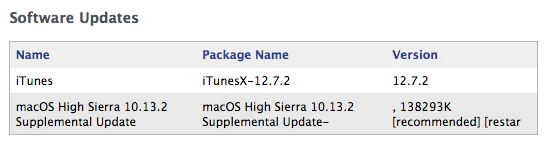
Yeah, macOS High Sierra 10.13.2 Supplemental Update is the culprit here. Following the update, I'm back in business. Enrollment and recon are both functioning properly again. If you're on 10.13.2, be sure to apply the macOS High Sierra 10.13.2 Supplemental Update that came out earlier today.







Enter your E-mail address. We'll send you an e-mail with instructions to reset your password.