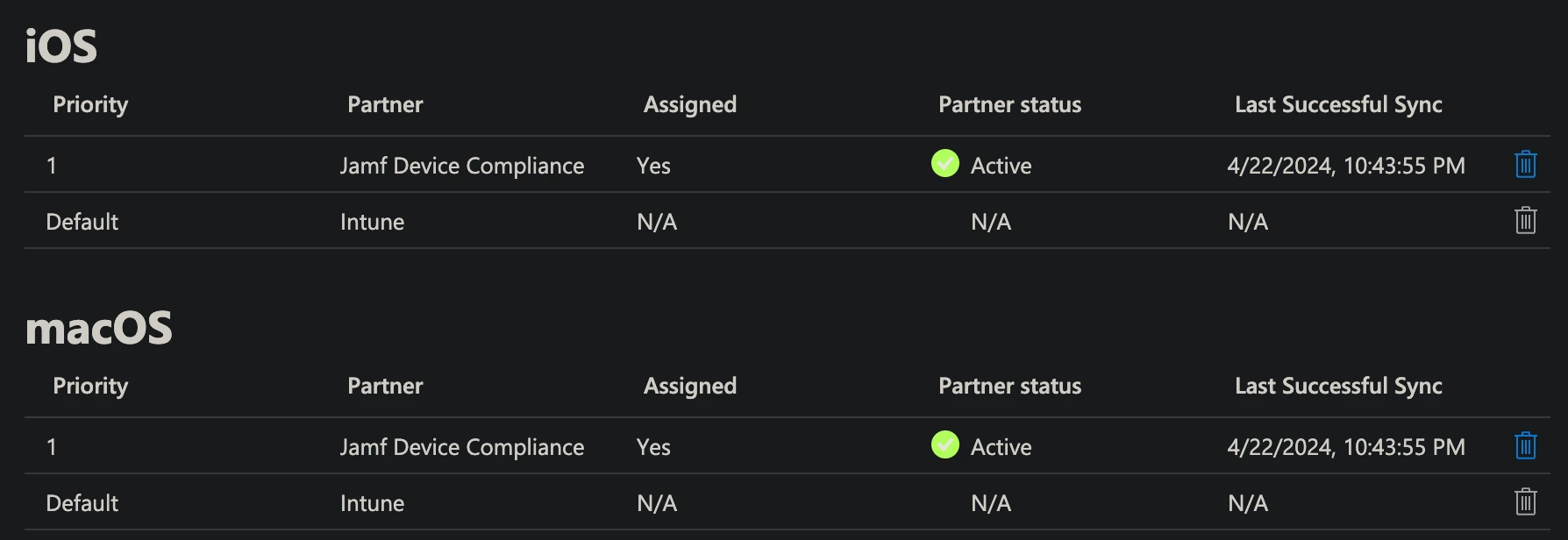
I've setup the "Device Compliance" in Jamf as well as the "Partners Compliance Management" in Entra ID successfully and syncs daily with Jamf. However, it appears that after a macOS device has registered in Entra ID, a day later it's no longer compliant and "MDM" is no longer reporting as "Microsoft Intune" but as "N/A".
In Intune, all macOS devices are also not reporting any compliance status. Any suggestions?
Best answer by DBrowning
Interesting.....you should have never seen Mac devices in Intune then. You should only see them in Entra (portal.azure.com). I'd recommend taking a look at this: https://github.com/benwhitis/Jamf_Conditional_Access/wiki/MacOS-Conditional-Access-Best-Practices as well to make sure you are setting things up. After that, I'd suggest opening tickets with Jamf and MS to see if there is anything else.
Since you can only register a device in 1 MDM, you will not see devices or get updates in Intune. You will only see devices in Entra. It sounds like maybe you are going from Intune to Jamf for your MDM?
Since you can only register a device in 1 MDM, you will not see devices or get updates in Intune. You will only see devices in Entra. It sounds like maybe you are going from Intune to Jamf for your MDM?
Thank you for your quick response, DBrowning. As you may already know, this is the Microsoft documentation I was following to setup Device Compliance in Jamf. You might be right about Macs not reporting in Intune, since can't any documentation that states of macs report to Intune. However, the leaves the question about macs not reporting as compliant a day after the device is register.
Also, one other piece of information to note is that the Company Portal app reports the mac as not managed. In the past, it use to report that it was managed.
Interesting.....you should have never seen Mac devices in Intune then. You should only see them in Entra (portal.azure.com). I'd recommend taking a look at this: https://github.com/benwhitis/Jamf_Conditional_Access/wiki/MacOS-Conditional-Access-Best-Practices as well to make sure you are setting things up. After that, I'd suggest opening tickets with Jamf and MS to see if there is anything else.
Thank you, DBRowning, for your time. I'll review the documentation further, but just one follow-up question. The documentation you suggested appears to cover the topic about Conditional Access Best Practices, will this help with Device Compliance?
Thank you, DBRowning, for your time. I'll review the documentation further, but just one follow-up question. The documentation you suggested appears to cover the topic about Conditional Access Best Practices, will this help with Device Compliance?
Thank you, DBRowning, for your time. I'll review the documentation further, but just one follow-up question. The documentation you suggested appears to cover the topic about Conditional Access Best Practices, will this help with Device Compliance?
Hi Jose, have you made any progress on this, i'm also experiencing the same issue.
Hi Jose, have you made any progress on this, i'm also experiencing the same issue.
Hi Rolinda,
Sorry for the late reply, We're still looking into the issue, but we hope to have an solution soon. Will get back to you, if you haven't already fixed the issue.
We are experiencing the same N/A status issue, but only on iOS/iPadOS devices. We have successfully configured "Device Compliance" in Jamf as well as "Partner Compliance Management" in Entra ID and are syncing them daily with Jamf. Someone else ?
We are experiencing the same N/A status issue, but only on iOS/iPadOS devices. We have successfully configured "Device Compliance" in Jamf as well as "Partner Compliance Management" in Entra ID and are syncing them daily with Jamf. Someone else ?
seeing this issue as well, N/A compliant status for our ipads. We have not moved MacOS yet, hesitant to at this point. Any updates or fixes?
we're seeing this from a macOS perspective. Some devices are okay but struggling with Entra evaluating and showing compliant for some of our devices. We've worked through the troubleshooting steps and not seeing issues or at least the ones defined in that article. This is going to become a large issue if we cannot solve this soon. JAMF says we are good on this side but that doesn't help get our users access to what they should have
@Jose_Amaya were you able to resolve this issue? I am also facing the exact same issue for our macOS, the device shows N/A in the compliant state on Entra ID end despite the Jamf Compliance connector is active & healthy?
We have the same issue here, there are no noticeable errors on either side (Jamf and Entra ID) and for all the new devices we have set up we are getting the N/A status under compliance. Anyone have any working solutions or leads on where to look for errors?
My apologies to the community for the late response. We were able to address the problem (thanks to Julie Flanakin, Jamf Engineer). Here are the steps taken to address the compliance issues for macOS devices:
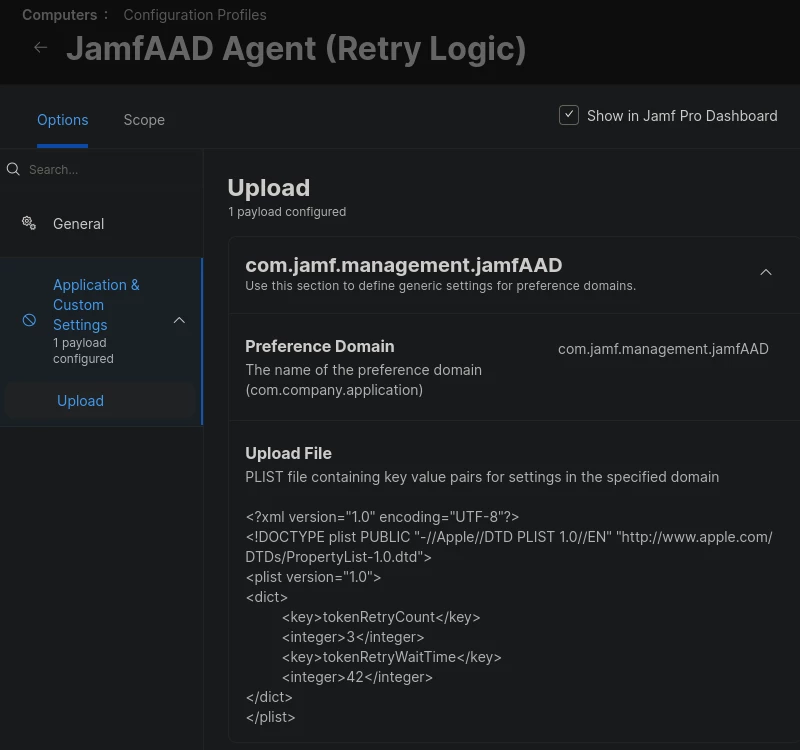
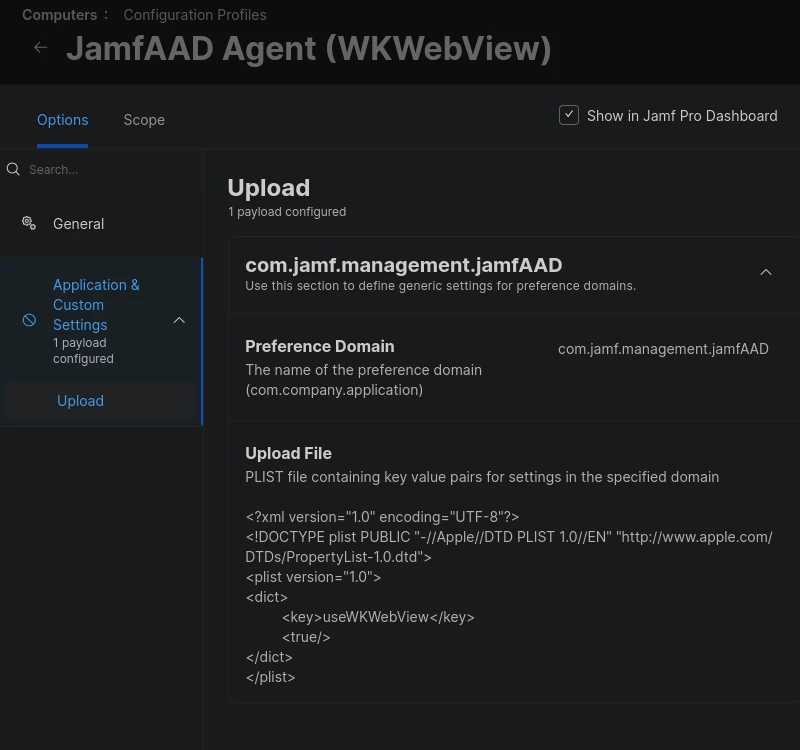
From Jamf Pro, create two separate configuration profiles for "Retry Logic" and 'WKWebView".
Set both configuration profiles use the same Preference Domain: com.jamf.management.jamfAAD
Set both configuration profiles for the "General" payload, set to apply at the "Computer Level" and "Install Automatically".
Set the payload for the "Application & Custom Settings" > "Upload" to use the following plist configuration below for "Retry Logic" and 'WKWebView" (see below as well as snapshots)
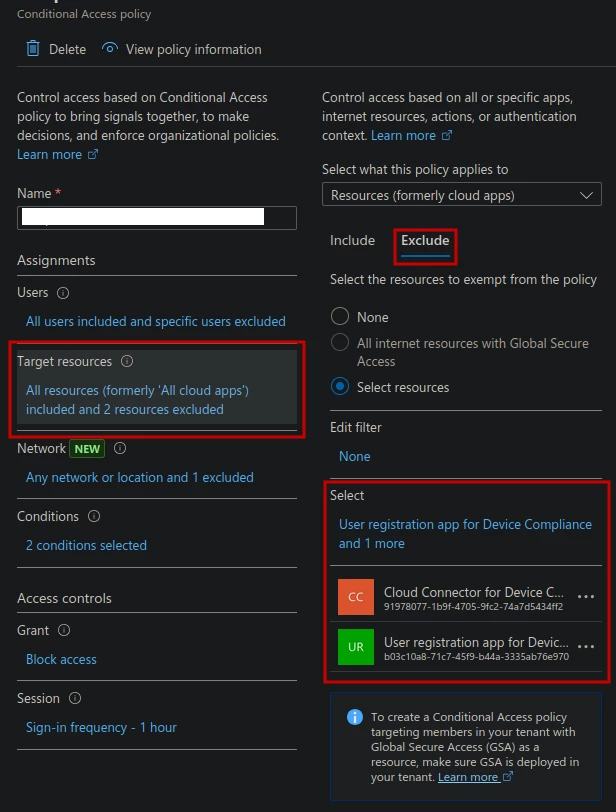
In Entra ID, set to exclude from Conditional Access Policy the "User registration app for Device Compliance" and the "Cloud Connector for Device Compliance" apps. (see last snapshot below)
Plist for the "Retry Logic" configuration profile: