Question

Extension atribute update for latest macOS supported


Forum|alt.badge.img+4

Hi,

I’m using a extension attribute for the latest macOS suppported on managed Mac in my Jamf Pro instance.

The extension attribute i use is update for macOS Tahoe, but i haven’t found an update to support latest Mac and macOS 27.

Could you help me?

Thanks

6 replies

a_govind.sharma
Forum|alt.badge.img+2

Hi ​@LaurentCh ,

 Review and test the updated extension attribute from the GitHub repository below, as it includes support for newer macOS releases and Mac models:

https://github.com/MLBZ521/MacAdmin/blob/master/Jamf%20Pro/Extension%20Attributes/Get-LatestOSSupported.sh


Regards,
Govind Sharma


Forum|alt.badge.img+4
  • Author
  • Contributor
  • October 1, 2026

Thank you, i try


angryant
Forum|alt.badge.img+5
  • Contributor
  • October 1, 2026

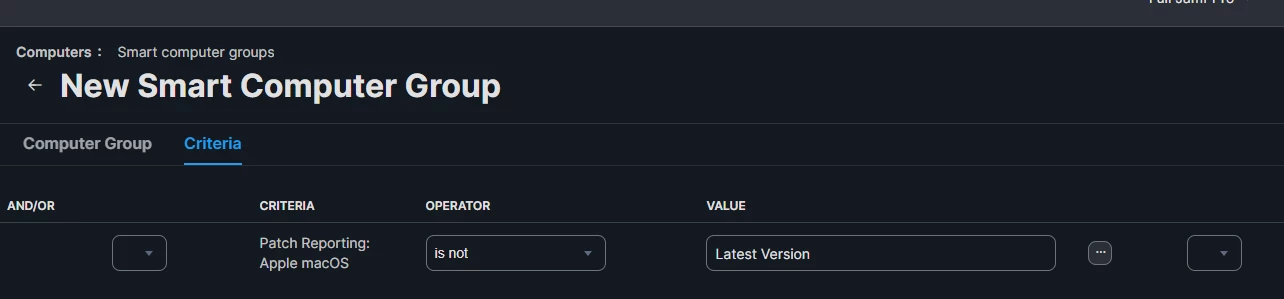
Add Apple macOS Apple (Combined Definition) into Patch Management.    You can then create a smart group with a criteria Patch Reporting Software Title, choose Patch Reporting: Apple macOS, is not, Latest Version.


Forum|alt.badge.img+4
  • Author
  • Contributor
  • October 1, 2026

I tried with tu updated script on the link ​@a_govind.sharma give to me, but its not seems working, on my computer a MacBook Air M4 on GoldeGate, the extension attribute told me the latest macOS supported on my mac is Tahoe


Forum|alt.badge.img+3
  • Employee
  • October 1, 2026

If I’ve understood correctly, you want to find out the latest OS each device is capable of running, right?

So a couple of things, currently all Apple silicon devices still support the latest OS so you might want to start by looking at whether a device is Apple Silicon or not. 

/usr/bin/uname -m

if that equals “arm64” then the latest version will be Golden Gate etc

Otherwise with Intel devices, you’ll need to compare the model number against the Apple list of supported versions. 
 

/usr/sbin/sysctl -n hw.model

I think for Tahoe it only supported:
MacBookPro16,1

MacBookPro16,2

MacBookPro16,4

iMac20,1

iMac20,2

MacPro7,1


So if the model matches one of those then highest is Tahoe etc. If you’re starting to go older than that then you’ll need to look up the models yourself but I would probably just flag them as being older than Tahoe and need refreshing. 

Pop those together into your extension attribute and you should be good to go. 

Hope that helps. 


Forum|alt.badge.img+4
  • Author
  • Contributor
  • October 2, 2026

Thank you ​@roblee thats right, i’m looking to display the latest macOS supported on each Mac.

It works well for most of Macs i manage with Jamf, Intel Mac displays the latest version depends on the Mac version, but for the Mac with Silicon, it stay on Tahoe as latest macOS capable, i would like it displays GoldenGate if it can