Question

Fast way of re-enrolling - any trick?

  • March 13, 2019
  • 11 replies
  • 523 views

Forum|alt.badge.img+10

If a clients breaks for some reason it there any "trick" to do a fast re-enrollment of the client, so it don't start to install all the packages again that already is installed on the computer ?

Actually it is only the profiles that must be loaded and rest of enrollment process must be skipped.

11 replies

Hugonaut
Forum|alt.badge.img+15
  • Esteemed Contributor
  • March 13, 2019

My enrollments policies execution frequency is 'Once per computer' flagged for enrollment. If the end user for some reason loses the jamf mdm profile or w/e, as long as the computer & history are still in the jamf pro dashboard - just not checking - they've gotten all the policies already & I can re enroll them with the enrollment process being skipped. You may want to look into something like this.


Forum|alt.badge.img+10
  • Author
  • Contributor
  • March 13, 2019

So you do first a jamf removemdmprofile as I cannot succed to re-apply profiles if they already exist on the machine, but for some reason is broken?


Hugonaut
Forum|alt.badge.img+15
  • Esteemed Contributor
  • March 13, 2019

sudo jamf -removeFramework is what i would do - then re enroll


Forum|alt.badge.img+9
  • Valued Contributor
  • March 13, 2019

Unfortunately, the fastest way to re-enroll a machine involves getting your hands on it. I've re-enrolled machines by using the command: sudo jamf reenroll -prompt command, then I have to enter my Jamf Pro credentials. It'll also ask for SSH user and credentials, I just press enter and go through those.


Forum|alt.badge.img+10
  • Author
  • Contributor
  • March 15, 2019

Just tried the sudo jamf reenroll -prompt.

After i do this I have to manually and go in approve the MDM. But all profiles are not verified, so seems not to work

My enrolment process policies I always have run only once per computer. But even I do a sudo jamf removeframework and re-enroll via normal browser link, the whole process is starting up again with all policies, even I have not removed the computer from Jamf. So it should not run once again, but it does it :(


Forum|alt.badge.img+6
  • New Contributor
  • March 15, 2019

Any luck with this?

sudo jamf enroll -prompt -noPolicy


Forum|alt.badge.img+10
  • Author
  • Contributor
  • March 15, 2019

Thanks. THe enrollment works then and no policies is applied. But my client is still broken afterwards with pending commands.


Forum|alt.badge.img+10
  • Author
  • Contributor
  • April 12, 2019

I am still struggeling with this "quick re-enrollment". All my normal enrollment policies are set to "run once per computer" - and all policies have triggers
But If I run the sudo jamf removeframework and afterwards to a user initiated enrollment all the policies are triggered again even I have not deleted the computer object in Jamf that was created at the first enrollment ?

Is this as it should be or since all enrollment policies are set to "run once per computer" should not run again during re-enrollment ?


mark_mahabir
Forum|alt.badge.img+15
  • Jamf Heroes
  • April 12, 2019

This solution might also be useful reading for you.


Forum|alt.badge.img+11
  • Valued Contributor
  • April 12, 2019

Once your fleet is beyond macOS High Sierra 10.13.2, re-enrollment also involves ensuring the computer is in a state of User Approved MDM. There's been some good discussion on this thread. https://www.jamf.com/jamf-nation/discussions/26435/macos-10-13-2-and-user-approved-mdm-enrollment


scottb
Forum|alt.badge.img+18
  • Valued Contributor
  • April 12, 2019

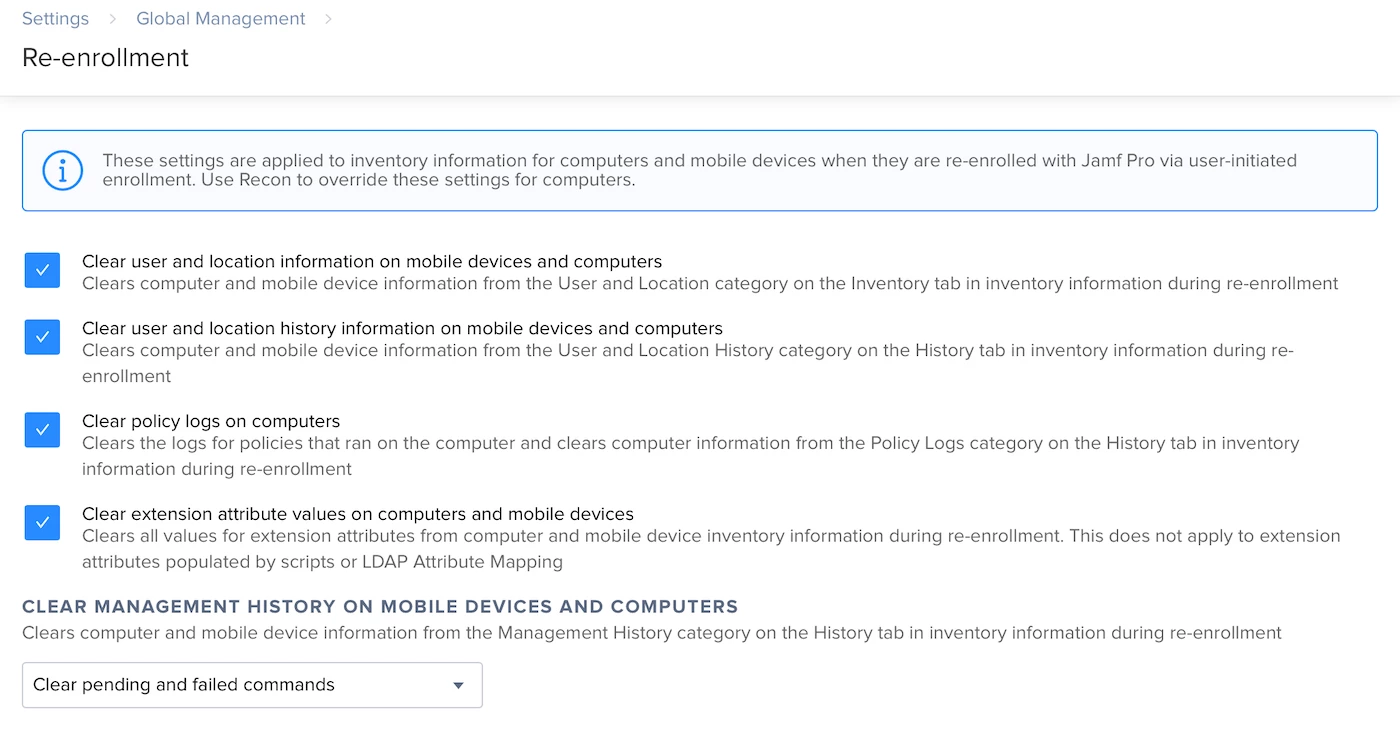
You might want to play with some of these settings in this case.
You can control to an extent, the re-enrollment actions on each Mac.