Question

GlobalProtect IOS Install

  • December 4, 2020
  • 4 replies
  • 53 views

Forum|alt.badge.img+1

Hi All, does anybody have a working XML for Palo Alto GlobalProtect on IOS? I can get the client installed but not configured at all. Palo support punted it saying it's not a supported MDM :(

4 replies

Forum|alt.badge.img+1
  • New Contributor
  • December 18, 2020

I'm looking for this as well. I'm looking for the configuration template to set our hostname and to disable auto-enabled mode for the iOS app. This will be put in the 'App Configuration' for the app in the Mobile Device Apps.


Forum|alt.badge.img+15
  • Esteemed Contributor
  • December 18, 2020

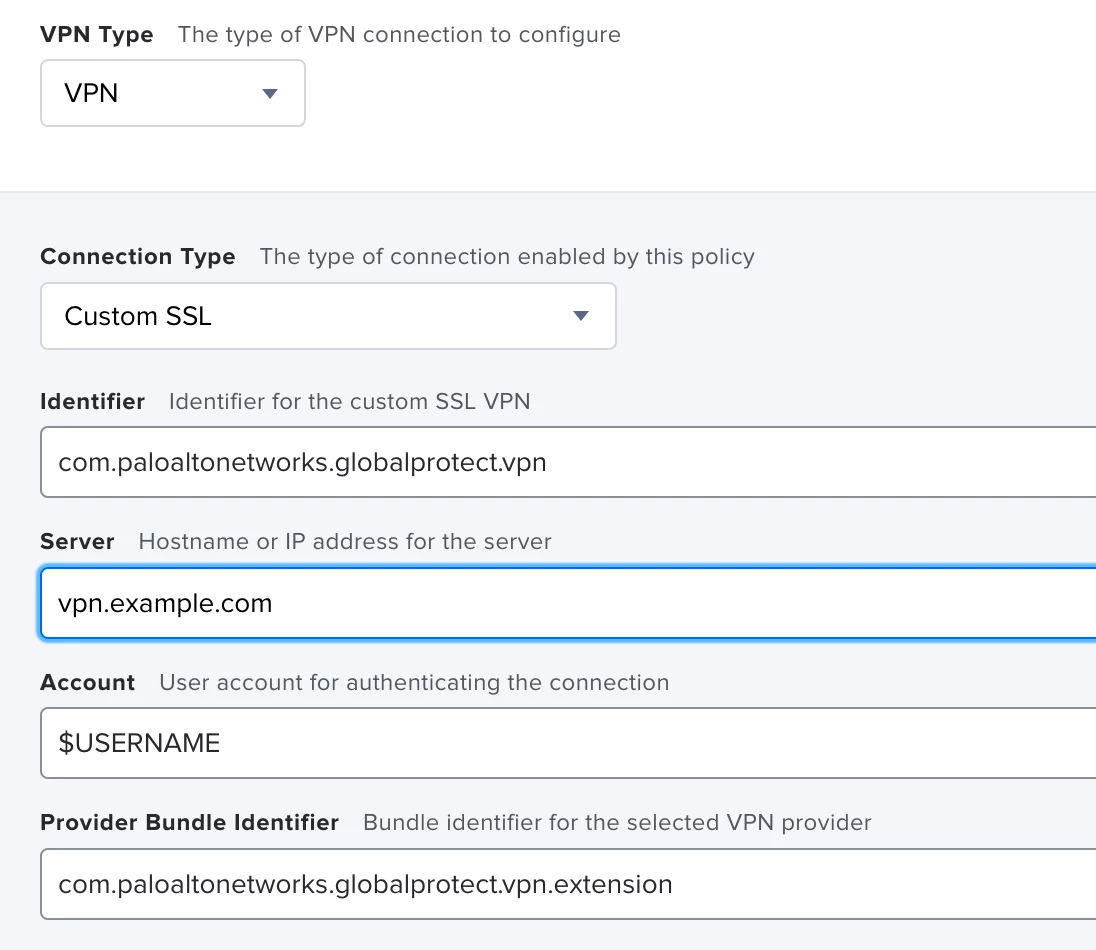
Palo Alto's documentation for the iOS app is severely lacking. The provider bundle identifier doesn't appear to be documented anywhere. Here is what's currently working for us:


Forum|alt.badge.img+3
  • New Contributor
  • April 19, 2022

Palo Alto's documentation for the iOS app is severely lacking. The provider bundle identifier doesn't appear to be documented anywhere. Here is what's currently working for us:


I am very interested in getting GlobalProtect for iOS up and running without having endUsers configure portal addresses prior to connecting - PA Networks documentation doesn't cover anything for deployment using Jamf; has anyone had success installing GP for iOS and configuring VPN portal addresses and other basic settings ? 


Forum|alt.badge.img+2

I am very interested in getting GlobalProtect for iOS up and running without having endUsers configure portal addresses prior to connecting - PA Networks documentation doesn't cover anything for deployment using Jamf; has anyone had success installing GP for iOS and configuring VPN portal addresses and other basic settings ? 


Where you ever able to get this configured? Currently researching how to accomplish this for our iPads and the documentation is lacking.