Solved

Goverlan - system access permissions

  • August 4, 2021
  • 7 replies
  • 23 views

Forum|alt.badge.img+4

Hi guys


We use Goverlan in our company for remote screen sharing and troubleshooting. Up until now, this was only possible on Windows computers, but the latest version also has support for Mac. I deployed the Goverlan Reach Client without issues, but it does need some permissions, which I have some trouble activating remotely.
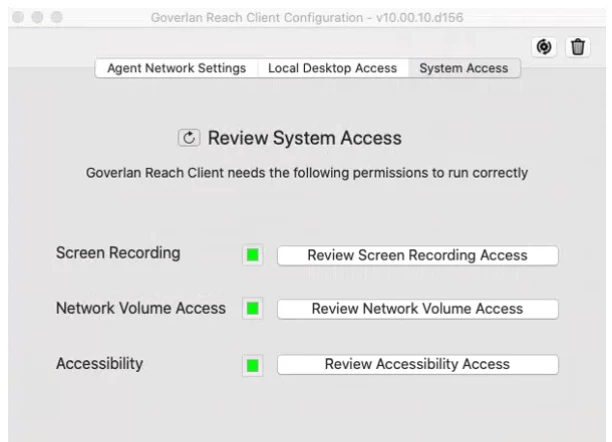
 

These are the needed permissions. Users can manually review and allow these, but not all users are tech savvy enough to do this. Is there any way to allow these through Jamf?


Thanks!

Valérie
Best answer by DBrowning

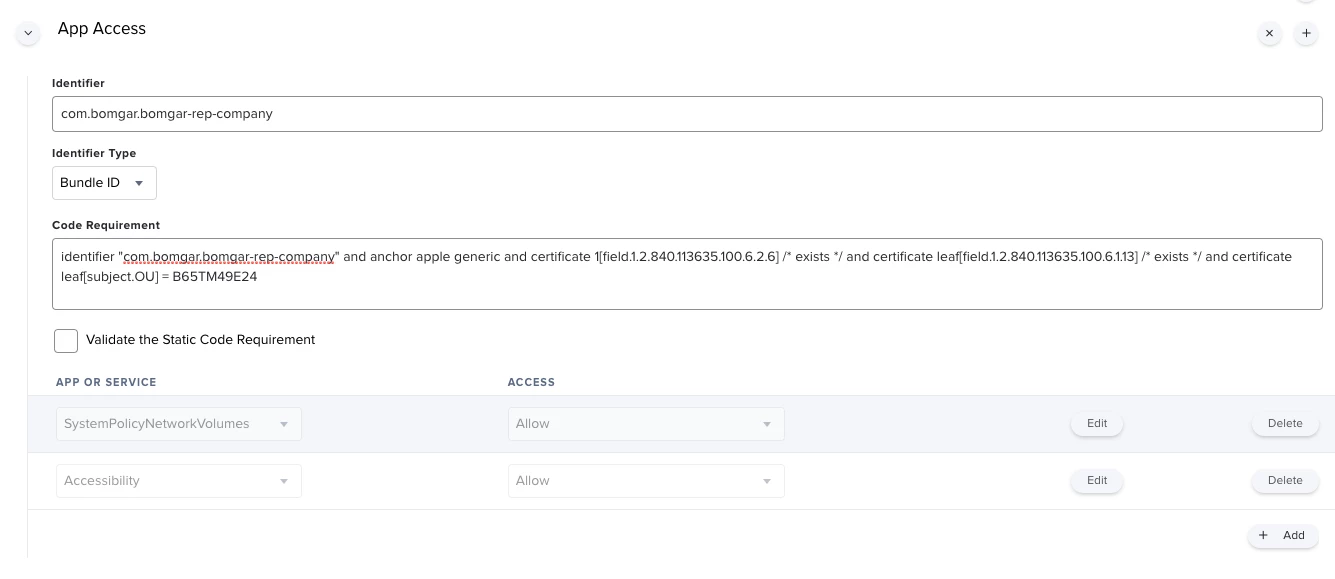
You can use the PPPC payload in a Config Profile to approve the Network Volume Access and Accessibility, but the users will always be required to approve the Screen Recording.  Below you'll find one we use for Bomgar (BeyondTrust) 

7 replies

DBrowning
Forum|alt.badge.img+24
  • Esteemed Contributor
  • 668 replies
  • Answer
  • August 4, 2021

You can use the PPPC payload in a Config Profile to approve the Network Volume Access and Accessibility, but the users will always be required to approve the Screen Recording.  Below you'll find one we use for Bomgar (BeyondTrust) 


bwoods
Forum|alt.badge.img+14
  • Honored Contributor
  • 473 replies
  • August 4, 2021

Welcome to the world of Apple my friend...where everything requires user consent. ( Even if you have a profile in place)


Samstar777
Forum|alt.badge.img+11
  • Valued Contributor
  • 134 replies
  • August 4, 2021

Unfortunately Screen Recording permission as per Apple is User's Privacy and hence we cannot allow it from backend but Yes, PPPC utility can help you with Network Volume Access and Accessiblity.


Forum|alt.badge.img+4
  • Author
  • Contributor
  • 24 replies
  • August 5, 2021

Welcome to the world of Apple my friend...where everything requires user consent. ( Even if you have a profile in place)


That's what I was afraid of 😞 


Forum|alt.badge.img+4
  • Author
  • Contributor
  • 24 replies
  • August 5, 2021

You can use the PPPC payload in a Config Profile to approve the Network Volume Access and Accessibility, but the users will always be required to approve the Screen Recording.  Below you'll find one we use for Bomgar (BeyondTrust) 


Stupid question probably, but where can I find the identifier for an app?

And the code requirement for that matter... I'm new to all this 😕😕


DBrowning
Forum|alt.badge.img+24
  • Esteemed Contributor
  • 668 replies
  • August 5, 2021

Stupid question probably, but where can I find the identifier for an app?

And the code requirement for that matter... I'm new to all this 😕😕


This page will help you best understand what needs to be done.  It also gives you terminal commands to find the code requirement.   This page will give you a couple methods to find the bundle ID.  


Forum|alt.badge.img+4
  • Author
  • Contributor
  • 24 replies
  • August 9, 2021

This page will help you best understand what needs to be done.  It also gives you terminal commands to find the code requirement.   This page will give you a couple methods to find the bundle ID.  


Thanks!