Question

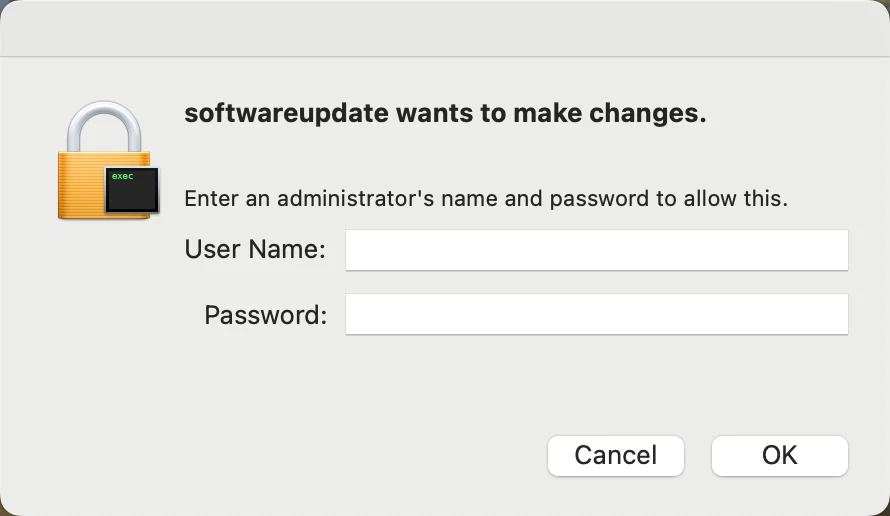
has anyone seen this prompt popping up lately?

  • April 2, 2024
  • 2 replies
  • 18 views

danlaw777
Forum|alt.badge.img+17

We are MacOS 14.x and these started popping up. I feel like i am missing something here as I thought Apple had removed the need for admin elevation to update MacOS


2 replies

jamf-42
Forum|alt.badge.img+17
  • Esteemed Contributor
  • April 2, 2024

thats showing a shell script in the icon.. the macOS update dialog does not look like that.. are you running a script to update, rather that using the OS? authentication is not required as long as it all correctly configured.. 


ajanicke
Forum|alt.badge.img+6
  • Contributor
  • April 3, 2024

Could be a secure token issue? Not sure how you're updating since @jamf-42 is correct that it's a script icon and is not the default update GUI.

If the user does not have a secure token and is a volume owner they will not be able to update the machine unless they have admin credentials entered. You can check by going into Jamf Pro > The device > Users > FileVault Enabled - Yes, means they have the token. No, means they do not have a token and will not be able to update. It does say file vault but that's just a GUI issue in Jamf Pro.